Glassential (Forge)
Various types of glass to aid in your building.
Screenshots
Über diese Mod
Logo by Wouter, old textures by GentlemanGnu.

Several mods, such as Extra Utilities, add a bunch of cool glasses to your game. Like glass that you can see through but blocks light or glass that emits light.
Have you ever wanted to get that cool stuff, but without all the overhead of putting a major content mod in your modpack? Well look no further than Glassential.
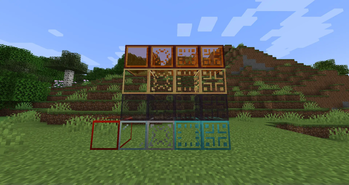
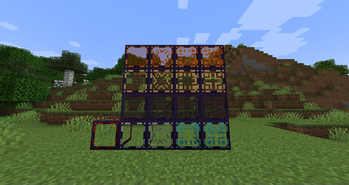
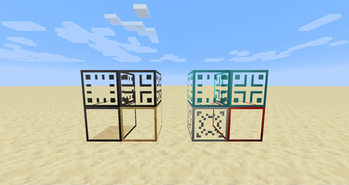
It adds the following glasses, for a total of 32 with the combinations:
- Luminous Glass: emits light, just like Glowstone.
- Redstone Glass: emits a strong redstone signal, just like a Block of Redstone.
- Magmatic Glass: hurts when you walk on it or are inside it, like Magma Blocks.
- Ghostly Glass: non-solid to all entities of any kind. Also comes in Tinted, Luminous, and Magmatic variants.
- Ethereal Glass: non-solid to players. Also comes in Tinted, Luminous, and Magmatic variants.
- Reverse Ethereal Glass: only solid to players (and fluids). Also comes in Tinted, Luminous, and Magmatic variants.
- Blastproof Glass: resists explosions, like Obsidian. Comes in Tinted variant and for every single other type of glass added by the mod (including combinations like Luminous Ethereal).
Before version 2.0.0 (in Minecraft 1.20.1), there only was Luminous, Redstone, Ghostly, Ethereal, Reverse Ethereal, Tinted Ethereal, and Tinted Reverse Ethereal.
In Minecraft 1.16.5 and below, there is also Dark Glass, which is like modern vanilla Tinted Glass.
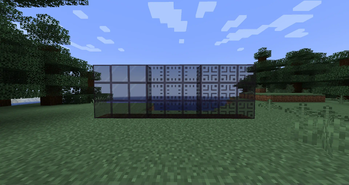
Glasses are also all fully compatible with ConnectedTexturesMod (which I highly recommend).
Verfügbare Versionen
Glassential (Forge) auf dem Server installieren
Server bestellen
Bestelle einen Minecraft Java Server mit mindestens 3 GB RAM (4 GB empfohlen).
forge Loader setzen
Wähle im Panel unter "Egg" den forge-Loader und die passende Minecraft-Version (1.20.1).
Mod installieren
Öffne den Mod-Browser im Dashboard und suche nach "Glassential (Forge)". Klicke "Installieren" – fertig! Alternativ: Lade die .jar via SFTP in den /mods Ordner.
Kompatibilität
Mod-Loader
Minecraft-Versionen
1.20.1, 1.19.2, 1.19.1 (+8 weitere)
Server-seitig
✓ ErforderlichEmpfohlener RAM
4 GB(min. 3 GB)Häufige Fragen
Glassential (Forge) Server crasht beim Start – was tun?
Häufigste Ursache: falsche forge-Version oder zu wenig RAM. Prüfe im Server-Log (latest.log), ob ein "OutOfMemoryError" oder "Mixin"-Fehler auftritt. Bei Mado Hosting: Stelle sicher, dass mindestens 3 GB RAM zugewiesen sind und der Loader zur Mod-Version passt (1.20.1). Über das Panel kannst du den Loader mit einem Klick wechseln.
Ist Glassential (Forge) mit forge und neoforge kompatibel?
Glassential (Forge) unterstützt offiziell forge, neoforge für Minecraft 1.20.1, 1.19.2, 1.19.1. Im Mado Dashboard werden inkompatible Loader-Kombinationen automatisch erkannt.
Server laggt mit Glassential (Forge) – wie optimiere ich die Performance?
Empfohlener RAM: 4 GB (+1 GB pro 8 Spieler). Prüfe mit /spark profiler, ob Glassential (Forge) den meisten Tick-Time verbraucht. Häufige Fixes: Server-View-Distance auf 8-10 reduzieren, bei Forge "performant" oder "starlight" als Zusatz-Mod installieren. Bei Mado Hosting läuft dein Server auf NVMe-SSDs mit dedizierten CPU-Kernen für minimale Latenz.
Ähnliche Mods

![[ETF] Entity Texture Features](https://cdn.modrinth.com/data/BVzZfTc1/af683d206d50b05258d865b0d6e4aa2f2cee12f2_96.webp)
![[EMF] Entity Model Features](https://cdn.modrinth.com/data/4I1XuqiY/6e5bbd0d06b1741bfdab6c0cfab6de8fdaf0064c_96.webp)



Modded Server mieten
Installiere Glassential (Forge) mit nur einem Klick auf deinem Server.