
GuidedMod
A mod for modpack creators to guide players through mode selection and physically toggle mods on/off.
Screenshots
Über diese Mod
GuidedMod
A customizable Minecraft client-side guide mod
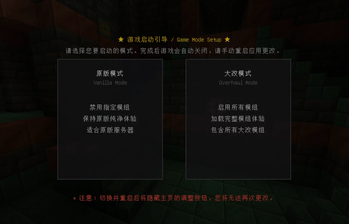
GuidedMod intercepts players on the first game startup, prompting them to choose between "Vanilla Mode" and "Overhaul Mode". The mod physically controls mod loading states by renaming .jar files (appending or removing the .disabled suffix).
Features
- 3D Rotating Panorama: Beautiful Trial Chamber panorama background with clean rendering.
- Dual Cards Selector: Offers card selectors with hover highlights, outer glows, and custom click sounds.
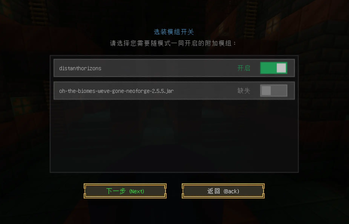
- Optional Mods Screen: Upgrades standard buttons to sleek iOS/Material-style slider switches linked to ON/OFF states.
- Missing Mod Detection: Automatically renders disabled missing mods as gray and displays
Missing. - Hover Tooltips: Shows the exact JAR filename being controlled when hovering over the mod item.
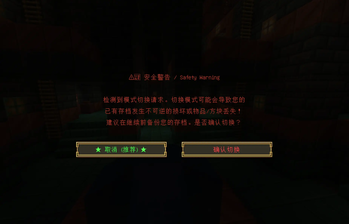
- Anti-Accidental-Click: Cancel button on the left (selected by default) and red warning text on the right.
- One-Time Interception Lock: Hide menu entry and bypass subsequent startup screens once configured.
- Defensive Matching: Strips common version brackets and version prefixes before doing a prefix starts-with check. Rejects keywords < 3 characters to prevent mass-renaming bugs.
Configuration
Generates configuration files in config/:
1. config/guidedmod-mods.txt
# Mods controlled by primary modes (Vanilla/Overhaul)
# Example:
# appleskin

[optional]
# Optional mods controlled individually by sliders
# Example:
# justenoughitems
Verfügbare Versionen
GuidedMod auf deinem Client installieren
Mod-Loader lokal installieren
Installiere neoforge für deine lokale Minecraft-Version.
Passende Datei herunterladen
Wähle die GuidedMod-Datei für neoforge und Minecraft 1.21.1.
Mod installieren
Lege die .jar-Datei in deinem lokalen .minecraft/mods-Ordner ab und starte Minecraft neu. Eine Installation auf dem Server ist nicht nötig.
Kompatibilität
Mod-Loader
Minecraft-Versionen
1.21.1
Server-seitig
✗ Nicht unterstütztEmpfohlener RAM
4 GB(min. 3 GB)Häufige Fragen
Muss GuidedMod auf dem Minecraft Server installiert werden?
Nein. Modrinth kennzeichnet GuidedMod serverseitig als nicht unterstützt. Installiere die Mod nur im lokalen Minecraft-Mods-Ordner. Dein Server kann unverändert bleiben, sofern die Mod-Seite keine zusätzliche Abhängigkeit nennt.
Welche Version und welchen Loader braucht GuidedMod?
Nutze eine Datei für neoforge und exakt deine Minecraft-Version. Unterstützte Versionen sind unter anderem 1.21.1. Loader-Dateien sind nicht untereinander austauschbar.
GuidedMod funktioniert nicht – was kann ich prüfen?
Prüfe zuerst Minecraft-Version, Loader-Version und erforderliche Abhängigkeiten. Lege die .jar-Datei im lokalen .minecraft/mods-Ordner ab und entferne ältere Duplikate. Da die Mod clientseitig ist, löst mehr Server-RAM dieses Problem nicht.
Ähnliche Mods






Minecraft Server für deine Gruppe
GuidedMod bleibt auf deinem Client. Hoste dazu eine kompatible Welt für deine Mitspieler.