
Inventory Sorting
Quick, simple, and lightweight inventory sorting
Über diese Mod
Inventory Sorter 
Inventory Sorter is a lightweight mod that keeps your inventory clean with minimal effort.
It’s used by millions of players across Modrinth and CurseForge.
Designed to run server-side, it works out of the box, even with vanilla clients, making it perfect
for modpacks, multiplayer servers, and anyone who wants frictionless sorting without needing client-side mods.
It also works perfectly in single-player, since Minecraft runs an integrated server behind the scenes.
Features
Inventory Sorter supports several ways to trigger a sort:
- Click the sort button (client mod required)
- Use the keybind (client mod required)
- Double-click an empty slot (works with vanilla client)
- Use
/invsort sortor/invsort sortmein chat (works with vanilla client)
The mod is designed to run server-side.
Sorting actions like middle-click, double-click, and commands work even if the client has no mods installed.
If you're using the optional client mod, you'll also get visual buttons, keybind support, and in-game configuration menus.
Compatibility and Configuration
Inventory Sorter supports all inventories, including those from other mods.
You can control where sorting is enabled, customize how it behaves, and hide UI elements for specific containers.
All configuration options are documented at:
https://inventorysorter.meza.gg
Before and After
Before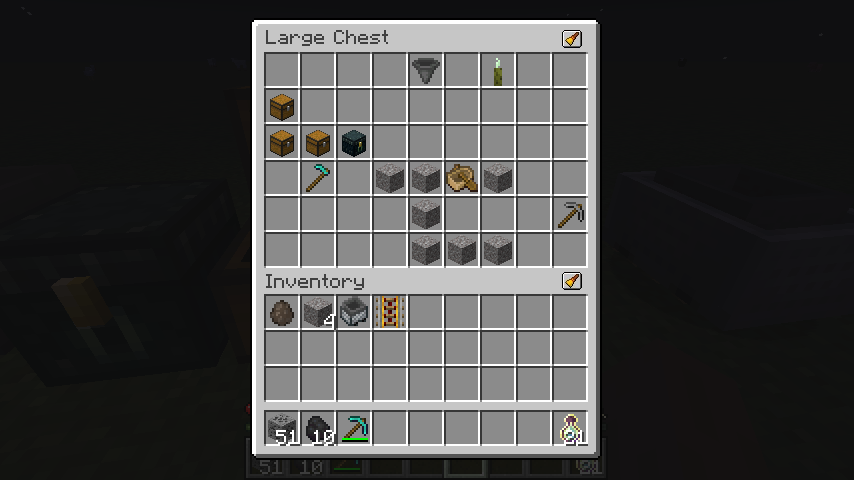
After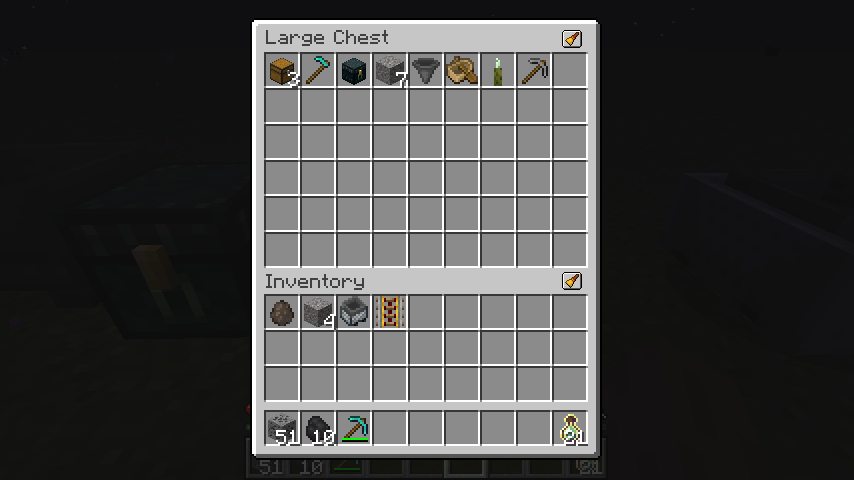
Dependencies
For client-side configuration and UI features, you’ll need:
- Cloth Config (required)
- Mod Menu (optional, for easier access to config)
The mod functions server-side without any client dependencies.
Translations
Inventory Sorter is available in multiple languages.
If you want to help translate the mod into your language, please check out the translation guide.
Project Status
Inventory Sorter is actively maintained and safe to use in modpacks and multiplayer environments.
Compatibility issues with certain modded inventories can be resolved using the built-in configuration system,
described in the documentation.
Verfügbare Versionen
Inventory Sorting auf dem Server installieren
Server bestellen
Bestelle einen Minecraft Java Server mit mindestens 3 GB RAM (4 GB empfohlen).
fabric Loader setzen
Wähle im Panel unter "Egg" den fabric-Loader und die passende Minecraft-Version (26.3).
Mod installieren
Öffne den Mod-Browser im Dashboard und suche nach "Inventory Sorting". Klicke "Installieren" – fertig! Alternativ: Lade die .jar via SFTP in den /mods Ordner.
Kompatibilität
Mod-Loader
Minecraft-Versionen
26.3, 26.2, 26.1.2 (+24 weitere)
Server-seitig
✓ ErforderlichEmpfohlener RAM
4 GB(min. 3 GB)Häufige Fragen
Inventory Sorting Server crasht beim Start – was tun?
Häufigste Ursache: falsche fabric-Version oder zu wenig RAM. Prüfe im Server-Log (latest.log), ob ein "OutOfMemoryError" oder "Mixin"-Fehler auftritt. Bei Mado Hosting: Stelle sicher, dass mindestens 3 GB RAM zugewiesen sind und der Loader zur Mod-Version passt (26.3). Über das Panel kannst du den Loader mit einem Klick wechseln.
Ist Inventory Sorting mit fabric und neoforge kompatibel?
Inventory Sorting unterstützt offiziell fabric, neoforge für Minecraft 26.3, 26.2, 26.1.2. Im Mado Dashboard werden inkompatible Loader-Kombinationen automatisch erkannt.
Server laggt mit Inventory Sorting – wie optimiere ich die Performance?
Empfohlener RAM: 4 GB (+1 GB pro 8 Spieler). Prüfe mit /spark profiler, ob Inventory Sorting den meisten Tick-Time verbraucht. Häufige Fixes: Server-View-Distance auf 8-10 reduzieren, bei Forge "performant" oder "starlight" als Zusatz-Mod installieren. Bei Mado Hosting läuft dein Server auf NVMe-SSDs mit dedizierten CPU-Kernen für minimale Latenz.
Ähnliche Mods


Modded Server mieten
Installiere Inventory Sorting mit nur einem Klick auf deinem Server.