
Item Obliterator
Modpack utility mod that allows to disable items and/or its interactions. Also removes them from creative tabs, recipes, trades, and JEI/REI/EMI.
Screenshots
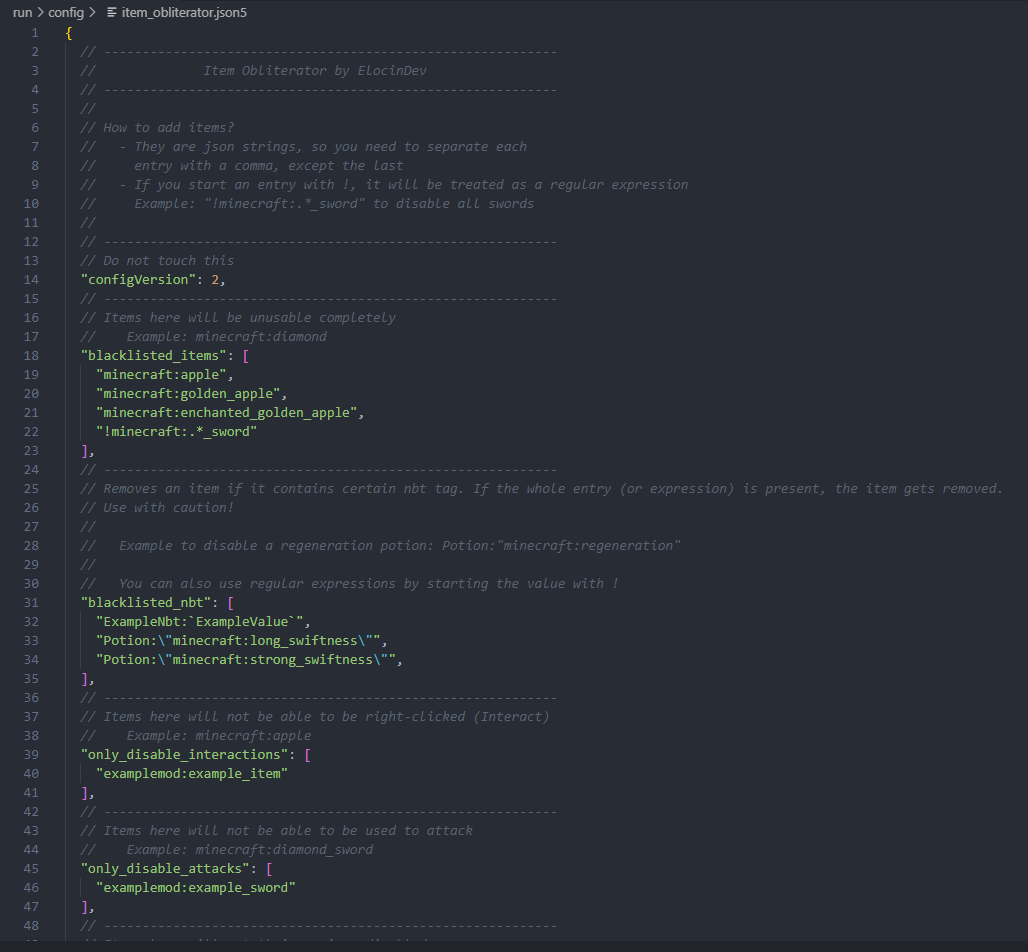
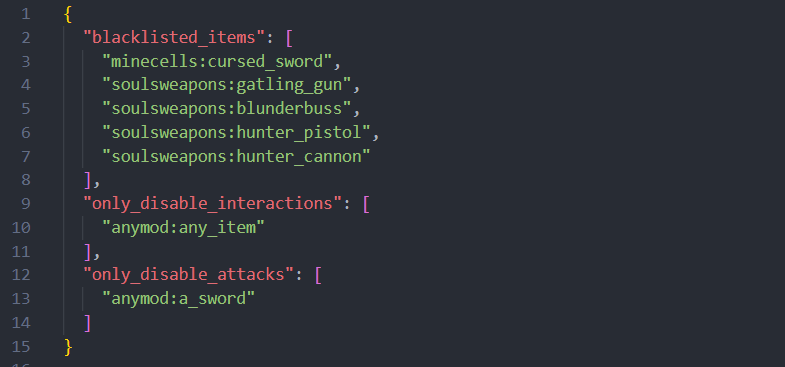
Über diese Mod
Disable unwanted items from existing using JSON configuration.
Supports Fabric/Quilt 1.19.2 - 1.20.X, 1.21
Supports Forge 1.19.2 - 1.20.1
Supports NeoForge 1.20.1
Features
- Inventory Removal. The Item won't be held or dropped anymore, it will be removed if exists.
- Creative Tab Removal. The Item won't appear in the respective creative tab it was.
- Trade Removal. All trades involving the item will be removed from villagers.
- Recipe Removal. Removes all recipes (Crafting, furnaces, and custom mod recipes).
- NBT Removal. Remove specific potions, enchanted books, or anything!
- REI Integration. Banned items won't appear in REI.
- EMI Integration. Banned items won't appear in EMI.
- JEI Integration. Banned items won't appear in JEI.
- Regex Support. Save yourself time by using regular expressions.
- Optimized. Item Obliterator will never cause lag! And can be used as an optimization tool if certain items cause lag.
Specific Configs
- Disable Items Completely. You can blacklist items to be removed with all features above.
- Disable Only Specific NBT in Items. You can blackliist items that have specific NBT tags. Works with regex too!
- Disable Only Item Attacks. You can blacklist items to only disable its attacks.
- Disable Only Item Interaction. You can blacklist items to only disable interactions (Right-Click).
- Disable Only Recipes. You can blacklist recipes only if they contain the item.
FAQ
- Can I use this in my modpack?
Of course! It was designed for modpack creators to remove undesired items that may unbalance the game or create issues.
- Client or server?
The mod is needed on both client and server. As it has some client features, but also server ones.
Can work server-side only, but JEI/REI/EMI and creative tab removals won't work.
- What if I mispell an item ID in the config file?
Nothing will happen. Adding invalid ID's won't cause issues, but obviously the item won't be blacklisted as it technically doesn't exist. Same thing would happen if the mod isn't present, but it will be if it's added later and the ID is valid.
Example Configuration:
Configuration is as simple as adding JSON entries for each item you want to obliterate.
Items can be from vanilla or any mod, you just have to add the id with the proper namespace, like minecraft:golden_apple
It's located inside the config folder, with the file "item_obliterator.json5" (>=2.0.0) or "item_obliterator.json" (< 2.0.0)

Verfügbare Versionen
Item Obliterator auf dem Server installieren
Server bestellen
Bestelle einen Minecraft Java Server mit mindestens 3 GB RAM (4 GB empfohlen).
fabric Loader setzen
Wähle im Panel unter "Egg" den fabric-Loader und die passende Minecraft-Version (1.21.1).
Mod installieren
Öffne den Mod-Browser im Dashboard und suche nach "Item Obliterator". Klicke "Installieren" – fertig! Alternativ: Lade die .jar via SFTP in den /mods Ordner.
Kompatibilität
Mod-Loader
Minecraft-Versionen
1.21.1, 1.21, 1.20.2 (+7 weitere)
Server-seitig
✓ ErforderlichEmpfohlener RAM
4 GB(min. 3 GB)Häufige Fragen
Item Obliterator Server crasht beim Start – was tun?
Häufigste Ursache: falsche fabric-Version oder zu wenig RAM. Prüfe im Server-Log (latest.log), ob ein "OutOfMemoryError" oder "Mixin"-Fehler auftritt. Bei Mado Hosting: Stelle sicher, dass mindestens 3 GB RAM zugewiesen sind und der Loader zur Mod-Version passt (1.21.1). Über das Panel kannst du den Loader mit einem Klick wechseln.
Ist Item Obliterator mit fabric und forge und neoforge und quilt kompatibel?
Item Obliterator unterstützt offiziell fabric, forge, neoforge, quilt für Minecraft 1.21.1, 1.21, 1.20.2. Achtung: Forge- und Fabric-Mods sind NICHT untereinander kompatibel – wähle einen Loader und bleibe dabei. Im Mado Dashboard werden inkompatible Loader-Kombinationen automatisch erkannt.
Server laggt mit Item Obliterator – wie optimiere ich die Performance?
Empfohlener RAM: 4 GB (+1 GB pro 8 Spieler). Prüfe mit /spark profiler, ob Item Obliterator den meisten Tick-Time verbraucht. Häufige Fixes: Server-View-Distance auf 8-10 reduzieren, bei Forge "performant" oder "starlight" als Zusatz-Mod installieren. Bei Mado Hosting läuft dein Server auf NVMe-SSDs mit dedizierten CPU-Kernen für minimale Latenz.
Ähnliche Mods






Modded Server mieten
Installiere Item Obliterator mit nur einem Klick auf deinem Server.