
ItemCleaner
Custom drop cleaning tool, supporting scheduled cleaning and range configuration
Screenshots
Über diese Mod
ItemCleaner - Minecraft Item Cleanup Mod
ItemCleaner is a Fabric-based Minecraft mod designed to provide flexible and configurable item entity cleanup. It features scheduled automatic cleanup, customizable cleanup ranges, item whitelist management, and intuitive chat feedback. Suitable for both servers and single-player worlds.
Features
Core Cleanup Features
- ✅ Scheduled Auto Cleanup: Configurable cleanup intervals (default: 20 minutes) to automatically remove specified items
- ✅ Real-time Threshold Detection: Displays a warning when item entities reach a configured threshold, allowing players to decide whether to clean
- ✅ Player-Centric Range Cleanup: Cleans up item entities around each online player within a configurable radius
- ✅ Manual Cleanup Command: Execute cleanup instantly via commands for on-demand operations
- ✅ Admin Tool: Admins can obtain the Cleanup Hoe from the creative inventory or by using the command
/give @s itemcleaner:cleanup_hoe. Hold it in hand and right-click to instantly remove all item drops listed in the cleanup configuration - ✅ Single-Player Support: Fully functional in single-player worlds
Flexible Configuration System
- ✅ Precise Configuration: Fine-tune settings like cleanup toggle, interval, range, item threshold, and language
- ✅ Custom Cleanup Radius: Set horizontal cleanup radius (default: 48 blocks, i.e., 3 chunks) and vertical range (default: Y=-64 to Y=320)
- ✅ Item Whitelist Management: Precisely specify which items to clean (supports item IDs)
- ✅ Multiple List Management: Create and manage multiple cleanup lists; add or remove items via commands
- ✅ Customizable Messages: Customize cleanup countdown text and colors (supports Minecraft color codes
§) - ✅ Multi-Language Support: Includes English and Chinese; supports custom language packs
Clear User Feedback
- ✅ Chat Notifications: Countdown warnings before cleanup (1 minute, 30 seconds, 5 seconds)
- ✅ Detailed Cleanup Stats: After cleanup, shows total items removed and breakdown by item name, ID, and quantity
Installation
Place the downloaded mod JAR file into your mods folder.
Installation Steps
- Download the mod JAR file for your Minecraft version
- Place the JAR file into the
modsfolder:- Client: Place in the client's
modsfolder; supports single-player - Server: Place in the server's
modsfolder; all players share the same cleanup rules
- Client: Place in the client's
- Launch the game/server; the mod will generate a default config file automatically
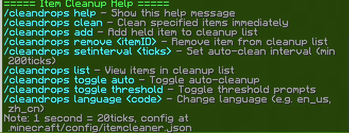
Commands
- /cleandrops: Shows command overview
- /cleandrops help: Displays detailed help
- /cleandrops clean: Instantly cleans up item entities (based on the active cleanup list)
- /cleandrops add: Adds the currently held item to the cleanup list
- /cleandrops remove
: Removes an item by its full ID from the cleanup list - /cleandrops list: Shows all items in the current cleanup list
- /cleandrops toggle auto: Toggles automatic scheduled cleanup on/off
- /cleandrops toggle threshold: Toggles the item threshold warning feature on/off
- /cleandrops setinterval
: Sets the auto-cleanup interval (1 second = 20 ticks) - /cleandrops language
: Changes the mod's display language (e.g., en_usfor English,zh_cnfor Chinese) - /cleandrops listmanager create
: Creates a new cleanup list - /cleandrops listmanager switch
: Switches to the specified list - /cleandrops listmanager delete
: Deletes a list (must keep at least one list) - /cleandrops listmanager current: Shows the currently active list
- /cleandrops listmanager all: Lists all available cleanup lists
- /cleandrops listmanager list: Shows all lists and their contents
Configuration
Config file path: ./config/itemcleaner.json (generated automatically on first launch)
Core Configuration Parameters
{
  "enableAutoCleanup": true, // Enable automatic cleanup (true = on, false = off)
  "enableThresholdCheck": true, // Enable item count threshold check (true = on, false = off)
  "cleanupInterval": 12000, // Auto-cleanup interval (in ticks)
  "thresholdCheckInterval": 100, // Item threshold check interval (in ticks)
  "warningCooldown": 1200, // Cooldown for pre-cleanup warnings (in ticks)
  "cleanRadius": 48, // Horizontal cleanup radius (in blocks)
  "yMin": -64, // Minimum Y-level for cleanup
  "yMax": 320, // Maximum Y-level for cleanup
  "itemThreshold": 100, // Item count threshold to trigger cleanup warnings
  "language": "en_us", // Display language (e.g., "en_us" for English)
  "currentCleanupList": "default", // Currently active cleanup list
  "cleanupLists": { // Stores multiple independent cleanup lists (key = list name, value = array of item IDs)
    "NowClean": [
      "minecraft:gravel",
      "minecraft:sand"
    ],
    "default": [
      "minecraft:cobblestone",
      "minecraft:dirt",
      "minecraft:bone",
      "minecraft:rotten_flesh",
      "minecraft:spider_eye",
      "minecraft:string",
      "minecraft:feather",
      "minecraft:gunpowder",
      "minecraft:flint",
      "minecraft:gravel",
      "minecraft:sand",
      "minecraft:clay_ball",
      "minecraft:snowball",
      "minecraft:egg",
      "minecraft:cod",
      "minecraft:salmon",
      "minecraft:pufferfish",
      "minecraft:tropical_fish",
      "minecraft:beef",
      "minecraft:porkchop",
      "minecraft:chicken",
      "minecraft:rabbit",
      "minecraft:mutton",
      "minecraft:leather",
      "minecraft:wool",
      "minecraft:stick",
      "minecraft:stone",
      "minecraft:cobblestone",
      "minecraft:grass_block",
      "minecraft:dead_bush",
      "minecraft:brown_mushroom",
      "minecraft:red_mushroom",
      "minecraft:lily_pad",
      "minecraft:seagrass",
      "minecraft:kelp"
    ]
  }
}
Verfügbare Versionen
ItemCleaner auf dem Server installieren
Server bestellen
Bestelle einen Minecraft Java Server mit mindestens 3 GB RAM (4 GB empfohlen).
fabric Loader setzen
Wähle im Panel unter "Egg" den fabric-Loader und die passende Minecraft-Version (1.21.1).
Mod installieren
Öffne den Mod-Browser im Dashboard und suche nach "ItemCleaner". Klicke "Installieren" – fertig! Alternativ: Lade die .jar via SFTP in den /mods Ordner.
Kompatibilität
Mod-Loader
Minecraft-Versionen
1.21.1, 1.20.1
Server-seitig
✓ ErforderlichEmpfohlener RAM
4 GB(min. 3 GB)Häufige Fragen
ItemCleaner Server crasht beim Start – was tun?
Häufigste Ursache: falsche fabric-Version oder zu wenig RAM. Prüfe im Server-Log (latest.log), ob ein "OutOfMemoryError" oder "Mixin"-Fehler auftritt. Bei Mado Hosting: Stelle sicher, dass mindestens 3 GB RAM zugewiesen sind und der Loader zur Mod-Version passt (1.21.1). Über das Panel kannst du den Loader mit einem Klick wechseln.
Ist ItemCleaner mit fabric kompatibel?
ItemCleaner unterstützt offiziell fabric für Minecraft 1.21.1, 1.20.1. Im Mado Dashboard werden inkompatible Loader-Kombinationen automatisch erkannt.
Server laggt mit ItemCleaner – wie optimiere ich die Performance?
Empfohlener RAM: 4 GB (+1 GB pro 8 Spieler). Prüfe mit /spark profiler, ob ItemCleaner den meisten Tick-Time verbraucht. Häufige Fixes: Server-View-Distance auf 8-10 reduzieren, bei Forge "performant" oder "starlight" als Zusatz-Mod installieren. Bei Mado Hosting läuft dein Server auf NVMe-SSDs mit dedizierten CPU-Kernen für minimale Latenz.
Ähnliche Mods






Modded Server mieten
Installiere ItemCleaner mit nur einem Klick auf deinem Server.