![[Let's Do] HerbalBrews](https://cdn.modrinth.com/data/Eh11TaTm/cea48ad39e9323e9e0f5354ee1d4c160f46b50be_96.webp)
[Let's Do] HerbalBrews
It's Tea Time! Brew Tea, Coffee and Flasks.
Screenshots
Über diese Mod

Calming Teas & Energizing Coffees
The relaxed side of the Let's Do collection.
"Take some time off, relax."
Herbal Brews adds an intricate way of drying and brewing various types of tea and a few types of coffee. You collect the tea leaves, the sun dries the tea leaves, and the kettle brews the best blend you've ever had.
Kick back, enjoy, and relish in the moment.
Herbal Brews is a fun addition to your vanilla experience and serves to add the ability to brew teas and coffees without breaking the vanilla immersion.
Venture the Land
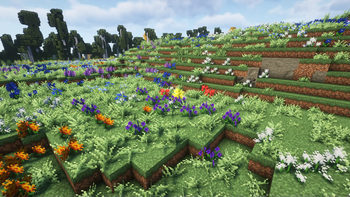
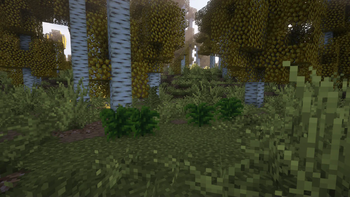
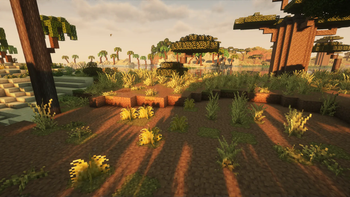
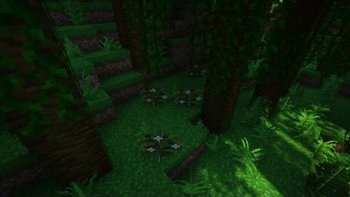
- Various tea plants that grow in different biomes
- New mechanic to dry tea leaves
Sit down, watch tea leaves dry.
Brewing Relaxation
- Brew tea in either the Tea Kettle or Copper Tea Kettle
- Concoct various combinations of potions using the Brewing Cauldron
- Brew delicious teas and coffees with beneficial effects to all players in a radius
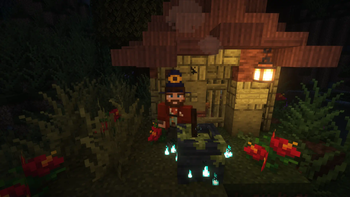
Who knew witches could brew more than potions?
Decorative Elements
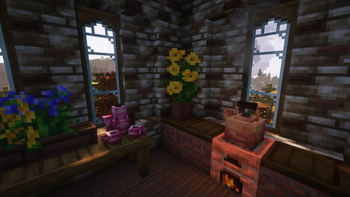
- Use Hibiscus and Lavender not only in your tea, but also your flower pots
- Decorate your kitchen with a jug that can contain up to three different teas and functions as a one-time weapon
- Place down the teas you've brewed and show off your collection of blends that way
- Dress up like a true gentleman or a wicked witch using the Top Hat and Witch Hat respectively. They also reduce damage from magic while worn
Venture the world.
Brew a blessed blend.
Relax.
Dedicated to MissLilitu
The Let’s Do Collection

Support & Community
Let’s Do grows through its community.
Verfügbare Versionen
[Let's Do] HerbalBrews auf dem Server installieren
Server bestellen
Bestelle einen Minecraft Java Server mit mindestens 3 GB RAM (4 GB empfohlen).
fabric Loader setzen
Wähle im Panel unter "Egg" den fabric-Loader und die passende Minecraft-Version (1.21.1).
Mod installieren
Öffne den Mod-Browser im Dashboard und suche nach "[Let's Do] HerbalBrews". Klicke "Installieren" – fertig! Alternativ: Lade die .jar via SFTP in den /mods Ordner.
Kompatibilität
Mod-Loader
Minecraft-Versionen
1.21.1, 1.20.1
Server-seitig
✓ ErforderlichEmpfohlener RAM
4 GB(min. 3 GB)Häufige Fragen
[Let's Do] HerbalBrews Server crasht beim Start – was tun?
Häufigste Ursache: falsche fabric-Version oder zu wenig RAM. Prüfe im Server-Log (latest.log), ob ein "OutOfMemoryError" oder "Mixin"-Fehler auftritt. Bei Mado Hosting: Stelle sicher, dass mindestens 3 GB RAM zugewiesen sind und der Loader zur Mod-Version passt (1.21.1). Über das Panel kannst du den Loader mit einem Klick wechseln.
Ist [Let's Do] HerbalBrews mit fabric und forge und neoforge und quilt kompatibel?
[Let's Do] HerbalBrews unterstützt offiziell fabric, forge, neoforge, quilt für Minecraft 1.21.1, 1.20.1. Achtung: Forge- und Fabric-Mods sind NICHT untereinander kompatibel – wähle einen Loader und bleibe dabei. Im Mado Dashboard werden inkompatible Loader-Kombinationen automatisch erkannt.
Server laggt mit [Let's Do] HerbalBrews – wie optimiere ich die Performance?
Empfohlener RAM: 4 GB (+1 GB pro 8 Spieler). Prüfe mit /spark profiler, ob [Let's Do] HerbalBrews den meisten Tick-Time verbraucht. Häufige Fixes: Server-View-Distance auf 8-10 reduzieren, bei Forge "performant" oder "starlight" als Zusatz-Mod installieren. Bei Mado Hosting läuft dein Server auf NVMe-SSDs mit dedizierten CPU-Kernen für minimale Latenz.
Ähnliche Mods

![[ETF] Entity Texture Features](https://cdn.modrinth.com/data/BVzZfTc1/af683d206d50b05258d865b0d6e4aa2f2cee12f2_96.webp)
![[EMF] Entity Model Features](https://cdn.modrinth.com/data/4I1XuqiY/6e5bbd0d06b1741bfdab6c0cfab6de8fdaf0064c_96.webp)



Modded Server mieten
Installiere [Let's Do] HerbalBrews mit nur einem Klick auf deinem Server.