
MinerTrack Anti XRay
The Powerful antixray, help you auto catch X-rayers and punish them according to your configuration.
Screenshots




Über diese Mod

MinerTrack Anti-XRay












MinerTrack is a plugin that will really help you catch those naughty players using Xray on your server in a different way from other Anti-Xray plugins. This plugin doesn't hide ores, as hiding ores requires a lot of resources.
So how does it work?
To catch Xray, MinerTrack uses an advanced algorithm that combines several factors like ore scarcity, the amount of ores mined in a certain period, the player’s path to ores, and many other aspects.
But can't people still use Xray?
Yes and no. Indeed, a player using Xray has two options:
- Keep using Xray but behave like a normal player to avoid being caught. They can't get more ores than a normal player or they’ll be caught by MinerTrack.
- Uninstall their Xray or be caught.
Why choose MinerTrack over other AntiXray options?
Compared to Paper Anti-XRay and Orebfuscator:
- MinerTrack is lightweight.
- MinerTrack's engine is innovative.
- MinerTrack detects Xray users, leaving it to you to decide on sanctions.
Compared to other AntiXray solutions:
- MinerTrack supports the latest Minecraft version.
- MinerTrack has been tested on servers with about 20 simultaneous players, with very few false positives (default config).
- MinerTrack is free.
Look what users have to say:
Assessments



- Detect XRayer
- Automatically handle cases when a player's X-Ray violation level reaches a threshold
- Automatically reduce the violation level when the player's behavior normalizes
- When the player is mining in a cave, they will not be detected incorrectly
- Highly configurable profiles

/mtrack notify <message>- Send alerts to staff/mtrack verbose- Enable Detailed Mode and notify staff with it enabled whenever a player’s violation level increases/mtrack check <player>- Check a player’s violation history/mtrack reset <player>- Reset a player's violation record/mtrack help- Get plugin help/mtrack kick <player> <reason>- Kick a player with a specific reason/mtrack reload- Reload the plugin’s configuration/mtrack update- Check for plugin updates/mtrack logs <log name.log>- View a MinerTrack log file

minertrack.bypass- Bypass X-Ray detectionminertrack.notify- Receive notifications and verbose informationminertrack.checkupdate- Receive update information and use/mtrack updateminertrack.use- Access the root command/mtrackminertrack.check- Use/mtrack checkminertrack.kick- Use/mtrack kickminertrack.logs- Use/mtrack logsminertrack.help- Use/mtrack helpminertrack.reset- Use/mtrack resetminertrack.sendnotify- Use/mtrack notifyminertrack.verbose- Use/mtrack verboseminertrack.reload- Use/mtrack reload

- Download the latest version of MinerTrack from Modrinth.
- Place the .jar file into the plugins or mods folder.
- Restart the server to generate the configuration and necessary files.

As plugin:
- Java 17 or higher
- Paper, Purpur, Folia or compatible forks (1.18 or newer) Not Spigot!
As Fabric mod:
- Java 17 or higher
- Fabric 1.18 or newer
- Fabric API
- LuckPerms 5.0.0+ (If you need permission node function)
As Forge mod:
- Java 17 or higher
- Forge 1.18 or newer
As NeoForge mod:
- Java 17 or higher
- NeoForge 1.20.1 or newer

If you encounter any issues or have suggestions for new features, feel free to reach out via Discord or open an issue on the plugin’s GitHub repository.
View Source: https://github.com/At87668/MinerTrack
Report Issue: https://github.com/At87668/MinerTrack/issues
Pull Requset: https://github.com/At87668/MinerTrack/pulls
Visit Wiki: https://minertrack.pages.dev/wiki/
Join Discord: https://discord.gg/MzTea2W9cb
Support Project: https://patreon.com/Author87668/join
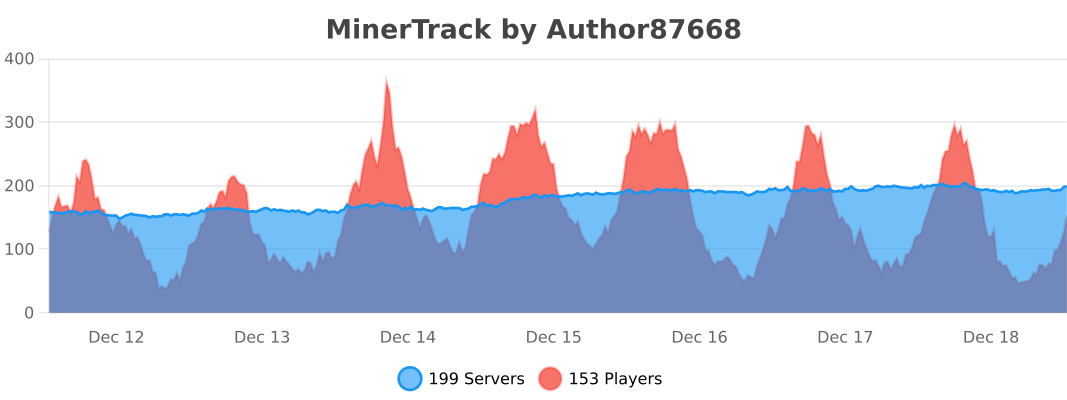
Plugin Usage
Mod Usage
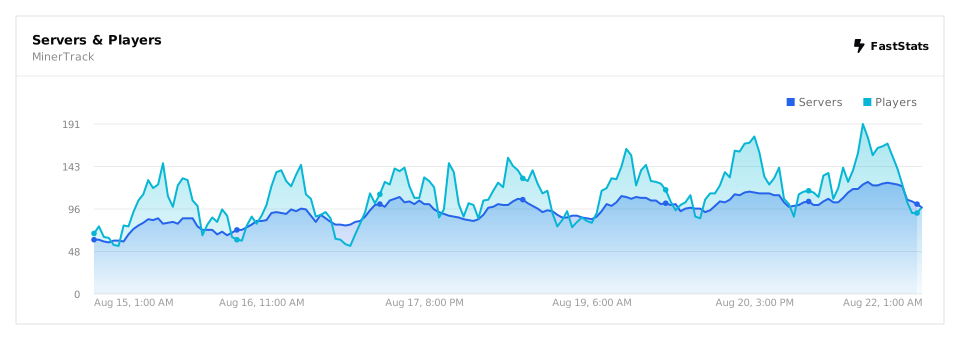
Verfügbare Versionen
MinerTrack Anti XRay auf dem Server installieren
Server bestellen
Bestelle einen Minecraft Java Server mit mindestens 3 GB RAM (4 GB empfohlen).
bukkit Loader setzen
Wähle im Panel unter "Egg" den bukkit-Loader und die passende Minecraft-Version (26.3).
Mod installieren
Öffne den Mod-Browser im Dashboard und suche nach "MinerTrack Anti XRay". Klicke "Installieren" – fertig! Alternativ: Lade die .jar via SFTP in den /mods Ordner.
Kompatibilität
Mod-Loader
Minecraft-Versionen
26.3, 26.2, 26.1.2 (+29 weitere)
Server-seitig
✗ Nicht unterstütztEmpfohlener RAM
4 GB(min. 3 GB)Häufige Fragen
MinerTrack Anti XRay Server crasht beim Start – was tun?
Häufigste Ursache: falsche bukkit-Version oder zu wenig RAM. Prüfe im Server-Log (latest.log), ob ein "OutOfMemoryError" oder "Mixin"-Fehler auftritt. Bei Mado Hosting: Stelle sicher, dass mindestens 3 GB RAM zugewiesen sind und der Loader zur Mod-Version passt (26.3). Über das Panel kannst du den Loader mit einem Klick wechseln.
Ist MinerTrack Anti XRay mit bukkit und fabric und folia und forge und neoforge und paper und purpur und spigot kompatibel?
MinerTrack Anti XRay unterstützt offiziell bukkit, fabric, folia, forge, neoforge, paper, purpur, spigot für Minecraft 26.3, 26.2, 26.1.2. Achtung: Forge- und Fabric-Mods sind NICHT untereinander kompatibel – wähle einen Loader und bleibe dabei. Im Mado Dashboard werden inkompatible Loader-Kombinationen automatisch erkannt.
Server laggt mit MinerTrack Anti XRay – wie optimiere ich die Performance?
Empfohlener RAM: 4 GB (+1 GB pro 8 Spieler). Prüfe mit /spark profiler, ob MinerTrack Anti XRay den meisten Tick-Time verbraucht. Häufige Fixes: Server-View-Distance auf 8-10 reduzieren, bei Forge "performant" oder "starlight" als Zusatz-Mod installieren. Bei Mado Hosting läuft dein Server auf NVMe-SSDs mit dedizierten CPU-Kernen für minimale Latenz.
Ähnliche Mods






Modded Server mieten
Installiere MinerTrack Anti XRay mit nur einem Klick auf deinem Server.
Details
- Lizenz
- GNU General Public License v3.0 or later
- Server-seitig
- Nicht unterstützt