
MoreCosmetics
MoreCosmetics adds cosmetics to Minecraft, such as hats, wings, shields and cloaks. Everything free and fully customizable!
Screenshots
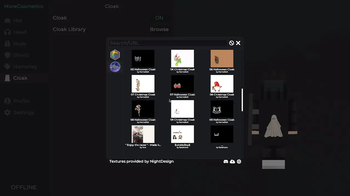
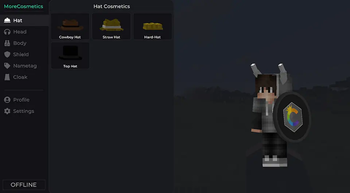
Über diese Mod
MORECOSMETICS
MoreCosmetics adds cosmetics to Minecraft, such as hats, wings, shields and cloaks.
Everything free and fully customizable!
Navigate to Skin Customization or press M to open the MoreCosmetics UI.
You can change the key in the settings.
TRAILER
FEATURES
- Free cloaks
- Upload your own texture
- visible to all MoreCosmetics users
- Free cosmetics
- Fully customizable with color settings and much more
- Create your own cosmetics
- Using Blockbench and our MoreCosmetics Plugin (morecosmetics.org/cosmetics)
- Integrated texture library
- Over 1000 designs directly integrated
- Nametag feature
- Choose from different styles and fonts
- Multi client support
- MoreCosmetics also supports vanilla clients via the Installer
TUTORIAL
Get more information at morecosmetics.org.
Verfügbare Versionen
MoreCosmetics auf deinem Client installieren
Mod-Loader lokal installieren
Installiere fabric für deine lokale Minecraft-Version.
Passende Datei herunterladen
Wähle die MoreCosmetics-Datei für fabric und Minecraft 26.3.
Mod installieren
Lege die .jar-Datei in deinem lokalen .minecraft/mods-Ordner ab und starte Minecraft neu. Eine Installation auf dem Server ist nicht nötig.
Kompatibilität
Mod-Loader
Minecraft-Versionen
26.3, 26.2, 26.1.2 (+32 weitere)
Server-seitig
✗ Nicht unterstütztEmpfohlener RAM
4 GB(min. 3 GB)Häufige Fragen
Muss MoreCosmetics auf dem Minecraft Server installiert werden?
Nein. Modrinth kennzeichnet MoreCosmetics serverseitig als nicht unterstützt. Installiere die Mod nur im lokalen Minecraft-Mods-Ordner. Dein Server kann unverändert bleiben, sofern die Mod-Seite keine zusätzliche Abhängigkeit nennt.
Welche Version und welchen Loader braucht MoreCosmetics?
Nutze eine Datei für fabric, forge und exakt deine Minecraft-Version. Unterstützte Versionen sind unter anderem 26.3, 26.2, 26.1.2. Loader-Dateien sind nicht untereinander austauschbar.
MoreCosmetics funktioniert nicht – was kann ich prüfen?
Prüfe zuerst Minecraft-Version, Loader-Version und erforderliche Abhängigkeiten. Lege die .jar-Datei im lokalen .minecraft/mods-Ordner ab und entferne ältere Duplikate. Da die Mod clientseitig ist, löst mehr Server-RAM dieses Problem nicht.
Ähnliche Mods

![[ETF] Entity Texture Features](https://cdn.modrinth.com/data/BVzZfTc1/af683d206d50b05258d865b0d6e4aa2f2cee12f2_96.webp)
![[EMF] Entity Model Features](https://cdn.modrinth.com/data/4I1XuqiY/6e5bbd0d06b1741bfdab6c0cfab6de8fdaf0064c_96.webp)



Minecraft Server für deine Gruppe
MoreCosmetics bleibt auf deinem Client. Hoste dazu eine kompatible Welt für deine Mitspieler.