
Nearby Crafting
Allows crafting to access nearby chests or other containers, because that's how it should be!
Screenshots


Über diese Mod
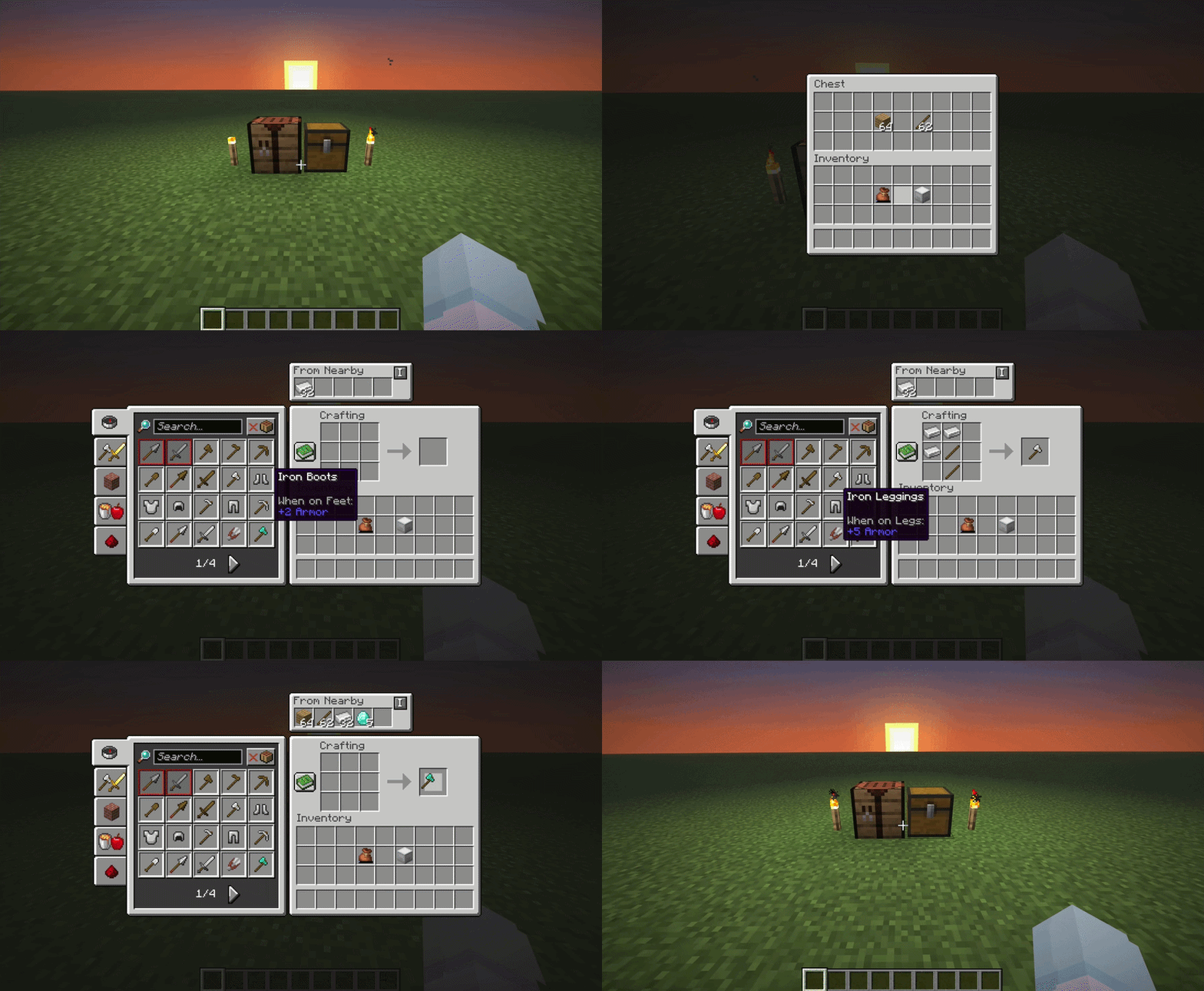
Nearby crafting is a simple mod for Fabric and NeoForge which enables crafting from nearby container blocks (such as barrels and chests) and from containers you're carrying (like shulker boxes and bundles).
A massive timesaver, and absolute essential for your survival world or server modpacks.
Features
Crafting from nearby containers
No more rummaging through chests endlessly, this works for both crafting tables and crafting within the player's inventory
Crafting from carried containers
Craft from shulker boxes in your inventory without having to place them, and from bundles without having to empty them
A live "From Nearby" panel
See what's available from nearby containers at a glance, from inside the recipe book's page. Toggle it on/off and reposition it from the config screen.
Two crafting modes
- Default: Lets the crafter access a cube around itself, with a radius can you change.
- Connected: Only lets the crafter access containers physically connected to the crafting table, directly or through other connected containers, up to a depth you can change.
Completley Customisable
Nearby Crafting supports customising the reach radius (or depth, in Connected mode), toggling the reach functionality altogether, and enabling/disabling individual container block types (useful if, let's say, it crafting from hoppers messes up your machine or sorting system!).
By default, the reach functionality is enabled and the radius is 8 blocks (or depth is 10) for all crafting scenarios.
These can be changed using ModMenu, or commands.
Use commands for changing configuration on a server.
FAQs
Q: I think I found an issue...
A: Feel free to create an issue on Github or reach out directly by email[email protected].Q: Will you release support for x ?
A: Whenever I have time and feel like it, I make sure this mod comes to support the latest versions, but sometimes I get busy! Again, feel free to reach out with reqeusts to support certain versions or other mods.
Commands Guide
Use the /nearbycrafting command to customize server-wide behavior for Nearby Crafting. You must be a server operator to change the server's Nearby Crafting configuration.
The command follows a simple, modular format:
/nearbycrafting <target> <action> [value]
Command Structure
<target>
This defines which crafting scenario you're configuring:
mode- Switches between Default and Connected crafting modes.craftingTable- Affects vanilla crafting tables.playerInventoryCrafting- Affects the player's inventory crafting (2x2 crafting grid).CONTAINERS- Enables or disables individual container block types.
<action>
Defines the type of action you want to perform. Available actions depend on the target:
enable/disable- Turns the functionality ON or OFF.setReach <number>/getReach- Sets or displays the radius (in blocks) from which inventories are accessible.setDepth <number>/getDepth- Sets or displays how many containers deep Connected mode will access from the crafting table.default/connected/get– Sets or displays the current crafting mode.get <block>/list– Displays whether a specific container block is enabled, or lists all of them.
Examples
Enable crafting table inventory access:
/nearbycrafting craftingTable enable
Disable player inventory crafting access:
/nearbycrafting playerInventoryCrafting disable
Set reach radius to 10 blocks for crafting tables:
/nearbycrafting craftingTable setReach 10
Switch to Connected mode:
/nearbycrafting mode connected
Disable a specific container:
/nearbycrafting CONTAINERS disable minecraft:barrel
Note: These commands require operator permissions on the server.
Verfügbare Versionen
Nearby Crafting auf dem Server installieren
Server bestellen
Bestelle einen Minecraft Java Server mit mindestens 3 GB RAM (4 GB empfohlen).
fabric Loader setzen
Wähle im Panel unter "Egg" den fabric-Loader und die passende Minecraft-Version (26.2).
Mod installieren
Öffne den Mod-Browser im Dashboard und suche nach "Nearby Crafting". Klicke "Installieren" – fertig! Alternativ: Lade die .jar via SFTP in den /mods Ordner.
Kompatibilität
Mod-Loader
Minecraft-Versionen
26.2, 26.1.2, 26.1.1 (+14 weitere)
Server-seitig
✓ ErforderlichEmpfohlener RAM
4 GB(min. 3 GB)Häufige Fragen
Nearby Crafting Server crasht beim Start – was tun?
Häufigste Ursache: falsche fabric-Version oder zu wenig RAM. Prüfe im Server-Log (latest.log), ob ein "OutOfMemoryError" oder "Mixin"-Fehler auftritt. Bei Mado Hosting: Stelle sicher, dass mindestens 3 GB RAM zugewiesen sind und der Loader zur Mod-Version passt (26.2). Über das Panel kannst du den Loader mit einem Klick wechseln.
Ist Nearby Crafting mit fabric und neoforge kompatibel?
Nearby Crafting unterstützt offiziell fabric, neoforge für Minecraft 26.2, 26.1.2, 26.1.1. Im Mado Dashboard werden inkompatible Loader-Kombinationen automatisch erkannt.
Server laggt mit Nearby Crafting – wie optimiere ich die Performance?
Empfohlener RAM: 4 GB (+1 GB pro 8 Spieler). Prüfe mit /spark profiler, ob Nearby Crafting den meisten Tick-Time verbraucht. Häufige Fixes: Server-View-Distance auf 8-10 reduzieren, bei Forge "performant" oder "starlight" als Zusatz-Mod installieren. Bei Mado Hosting läuft dein Server auf NVMe-SSDs mit dedizierten CPU-Kernen für minimale Latenz.
Ähnliche Mods






Modded Server mieten
Installiere Nearby Crafting mit nur einem Klick auf deinem Server.