
OfflineLAN
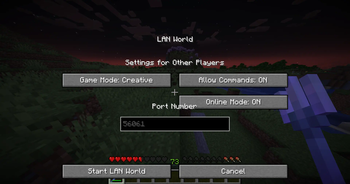
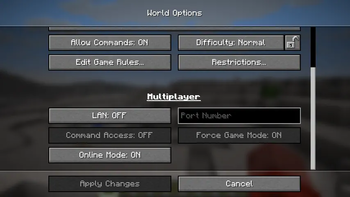
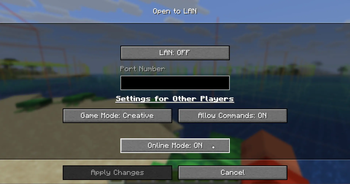
A mod that adds a toggle in the "Open To Lan" / "Multiplayer" menu to disable online-mode on the integrated server
Screenshots

Über diese Mod
OfflineLAN: a Fabric mod that brings the online-mode server config into the client via in-game GUI
This mod depends on the library mod Fabric API!
OfflineLAN is a Fabric mod that gives you the power to manage your online-mode configuration directly that is usually accessed from server.properties to your client where it was previously inaccessible.
Online-mode is a sever-side config that dictates whether players need to authenticate with Mojang's servers before joining. When online mode is enabled, players must verify their Minecraft accounts, ensuring they have logged in and can access their profile. If online mode is disabled, the authentication process is skipped entirely, useful if you want a second minecraft instance to join your world that is ran with "offline mode" in MultiMC.
This mod works with vanilla clients!, you would only need the mod if you're hosting the world.
This mod DOES NOT need any other dependencies!, its completely standalone and i will keep it updated for older versions just like SyncedAdvancements, version 1.18 and prior is coming someday.
2.0.0 Requires FabricAPI as a hard dependency, Version 1.18 and prior is finally available thanks to Stonecutter!
How to use:
- Just.. Open To Lan and it'll show you the options, and make sure you read the Caveats below!
Additional Infos/Caveats:
- The toggle for the Online-mode DEFAULTS TO ON (just like in server.properties), So you have to deliberately turn it OFF for the mod to take effect.
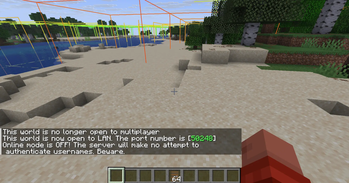
- This mod takes effect ONLY when you Open To Lan, it wouldn't make your world insecure just by having it installed.
- This works exactly like it would work on dedicated servers (if port-forwarded, or using e4mc/e4mcbiat)
- BE wary that Online-mode is a dangerous option to toggle, i am not responsible if your world gets griefed by malicious actors. Always have a backup of your world and have a security layer ready.
- if Online-mode is toggled OFF, External playersdatas will be identified with a locally generated UUID, which means a player who was playing with Online-mode toggled ON, might lose their entire progress on the world if Online-mode was suddenly toggled OFF. to mitigate this, you can migrate the old playerdata to the new UUID (yes this is possible, my friend who wasn't as tech savvy could figure it out, it doesnt need rocket science). This does not affect the host, as playerdata of the host is stored in level.dat, and that playerdata is presistent regardless of UUID. Turning Online-mode back ON will make it resolve to their account UUID again, restoring their progress.
Verfügbare Versionen
OfflineLAN auf dem Server installieren
Server bestellen
Bestelle einen Minecraft Java Server mit mindestens 3 GB RAM (4 GB empfohlen).
fabric Loader setzen
Wähle im Panel unter "Egg" den fabric-Loader und die passende Minecraft-Version (26.3).
Mod installieren
Öffne den Mod-Browser im Dashboard und suche nach "OfflineLAN". Klicke "Installieren" – fertig! Alternativ: Lade die .jar via SFTP in den /mods Ordner.
Kompatibilität
Mod-Loader
Minecraft-Versionen
26.3, 26.2, 26.1.2 (+45 weitere)
Server-seitig
✓ ErforderlichEmpfohlener RAM
4 GB(min. 3 GB)Häufige Fragen
OfflineLAN Server crasht beim Start – was tun?
Häufigste Ursache: falsche fabric-Version oder zu wenig RAM. Prüfe im Server-Log (latest.log), ob ein "OutOfMemoryError" oder "Mixin"-Fehler auftritt. Bei Mado Hosting: Stelle sicher, dass mindestens 3 GB RAM zugewiesen sind und der Loader zur Mod-Version passt (26.3). Über das Panel kannst du den Loader mit einem Klick wechseln.
Ist OfflineLAN mit fabric kompatibel?
OfflineLAN unterstützt offiziell fabric für Minecraft 26.3, 26.2, 26.1.2. Im Mado Dashboard werden inkompatible Loader-Kombinationen automatisch erkannt.
Server laggt mit OfflineLAN – wie optimiere ich die Performance?
Empfohlener RAM: 4 GB (+1 GB pro 8 Spieler). Prüfe mit /spark profiler, ob OfflineLAN den meisten Tick-Time verbraucht. Häufige Fixes: Server-View-Distance auf 8-10 reduzieren, bei Forge "performant" oder "starlight" als Zusatz-Mod installieren. Bei Mado Hosting läuft dein Server auf NVMe-SSDs mit dedizierten CPU-Kernen für minimale Latenz.
Ähnliche Mods






Modded Server mieten
Installiere OfflineLAN mit nur einem Klick auf deinem Server.