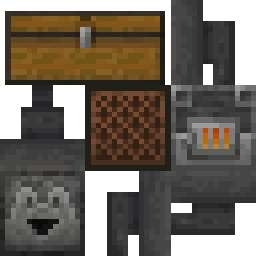
Omni-Hopper
Break free from the constraints of normal hoppers. Experience true item transportation freedom.
Screenshots
Über diese Mod
Omni-Hopper
Have you ever thought about why hoppers can only suck from above?
You could say it makes sense from a realism perspective,
or mention it encourages creativity through limitations.These are all valid arguments of course.
But who cares about reason when you have to get an item
from one machine to another in some awkward configuration,
and you have to decipher some obscure pipe mod to insert it from below,
or spend ages working your way up a tech tree to craft some other kind of transport method?Don't you wish the humble 5 iron ingot hopper would help you out in these situations?
But alas, it was not meant to be.
It seemed we would be forever shackled in chains laid upon us by lord Jeb himself.Until one day, the young Omni-Hopper was born.
With a small offering of one copper ingot,
one everyday hopper can be freed from its constraints,
and be placed in any possible orientation!
Surely this will change the fate of Modded Minecraftia forevermore,
no longer shall players have to suffer under the rule of realism.
Freedom is within our grasp!Add Omni-Hopper to your modpack today and free your hoppers!
Features
Omni-Hoppers
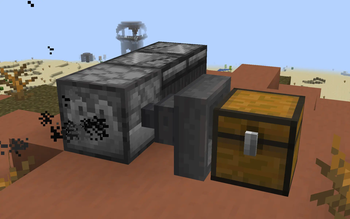
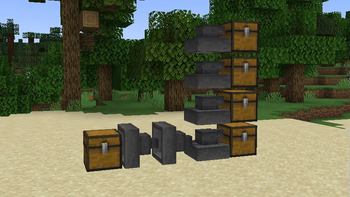
This is a variant of vanilla hoppers that can be placed in any orientation, sucking from and inserting into any side.
It can be crafted by combining a regular hopper with a copper ingot.
Placing an omni-hopper can be confusing at first, but it's actually quite simple.
The "sucky bit" (input) will always face towards the player that placed it,
meanwhile the "pointy bit" (output) will face into the block the player placed it on.
Think of it like the input following the same placement logic as a piston,
while the output uses the logic of a log or pillar block.

Floppers
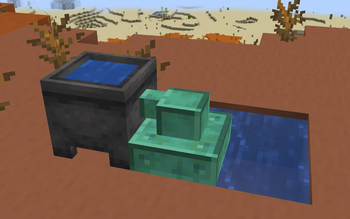
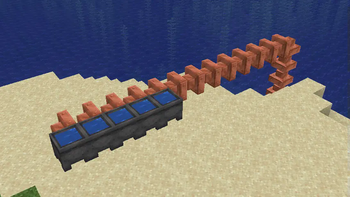
Floppers are another hopper variant that transports fluids instead of items.
Whenever possible they will pick up fluids from the world using their sucky side.
They can be crafted using the same recipe as a regular hopper,
but replacing iron with copper and the chest with a bucket.
Since they're made of copper, they can oxidize and be waxed like any other copper block.

Whoppers
A basic alternative to vanilla hoppers. They operate at half the speed of a regular hopper,
and contain only one inventory slot.
But they're also very cheap to craft, only requiring 5 planks and a chest.
They also don't respond to redstone, which can be a curse or a blessing depending on your needs.

Omni variants for all
All custom hopper types come with their own omnidirectional variant,
again crafted by combining it with a single copper ingot.

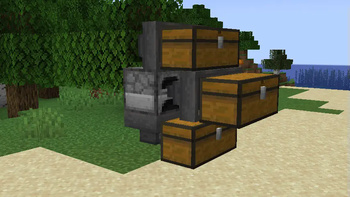
Lidless Chests
These simple blocks will instantly drop any inserted items onto the ground.
They can face in any direction.

Examples
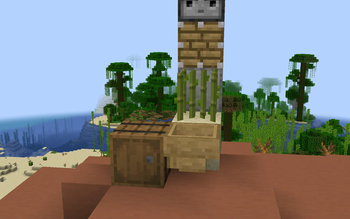
Basic upside-down sorter
An unconventional sorter that uses Omni-Whoppers to pull items out of a water stream from above.
The items are dropped into the stream using a Lidless Chest.

Verfügbare Versionen
Omni-Hopper auf dem Server installieren
Server bestellen
Bestelle einen Minecraft Java Server mit mindestens 3 GB RAM (4 GB empfohlen).
fabric Loader setzen
Wähle im Panel unter "Egg" den fabric-Loader und die passende Minecraft-Version (26.1.2).
Mod installieren
Öffne den Mod-Browser im Dashboard und suche nach "Omni-Hopper". Klicke "Installieren" – fertig! Alternativ: Lade die .jar via SFTP in den /mods Ordner.
Kompatibilität
Mod-Loader
Minecraft-Versionen
26.1.2, 26.1.1, 26.1 (+15 weitere)
Server-seitig
✓ ErforderlichEmpfohlener RAM
4 GB(min. 3 GB)Häufige Fragen
Omni-Hopper Server crasht beim Start – was tun?
Häufigste Ursache: falsche fabric-Version oder zu wenig RAM. Prüfe im Server-Log (latest.log), ob ein "OutOfMemoryError" oder "Mixin"-Fehler auftritt. Bei Mado Hosting: Stelle sicher, dass mindestens 3 GB RAM zugewiesen sind und der Loader zur Mod-Version passt (26.1.2). Über das Panel kannst du den Loader mit einem Klick wechseln.
Ist Omni-Hopper mit fabric kompatibel?
Omni-Hopper unterstützt offiziell fabric für Minecraft 26.1.2, 26.1.1, 26.1. Im Mado Dashboard werden inkompatible Loader-Kombinationen automatisch erkannt.
Server laggt mit Omni-Hopper – wie optimiere ich die Performance?
Empfohlener RAM: 4 GB (+1 GB pro 8 Spieler). Prüfe mit /spark profiler, ob Omni-Hopper den meisten Tick-Time verbraucht. Häufige Fixes: Server-View-Distance auf 8-10 reduzieren, bei Forge "performant" oder "starlight" als Zusatz-Mod installieren. Bei Mado Hosting läuft dein Server auf NVMe-SSDs mit dedizierten CPU-Kernen für minimale Latenz.
Ähnliche Mods


Modded Server mieten
Installiere Omni-Hopper mit nur einem Klick auf deinem Server.