
Real Filing Reborn
Real Filing Reborn is a modern storage solution for Minecraft, built on NeoForge. Inspired by the classic Real Filing Cabinet by BlueNeenja.
Screenshots
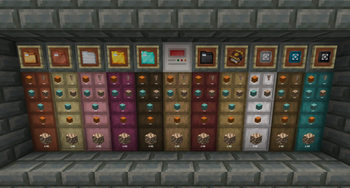
Über diese Mod

Real Filing Reborn is a storage mod built around Filing Folders — items that each hold a massive quantity of a single item type — and Filing Cabinets to house them.
Features
Filing Cabinet
Filing cabinets come in three types:
- Single Cabinet - Holds 1 folder
- Double Cabinet - Holds 2 folders
- Quad Cabinet - Holds 4 folders
- Fully compatible with automation (hoppers, pipes, etc.)
- Right-click to insert items directly into a matching folder
- Right-click with a folder to insert it into an empty slot
- Shift + Right-click to open the cabinet GUI
Filing Index
- Links multiple cabinets into a unified storage network
- Base range of 8 blocks, extendable up to 64 blocks with upgrades
- Right-click with an item to insert it into a matching folder across the network
- Compatible with external storage interfaces (AE2, Refined Storage, etc.) for unified access
- Pipes and hoppers connected to the index route items into matching folders automatically
- Shift + Right-click to open the index GUI
Ledger Tool
- Links and unlinks cabinets to a Filing Index
- Single and multi-selection modes for individual cabinets or entire areas
- Visual wireframes show network topology, range, and connections in real-time
Filing Folders
Folders come in six tiers and store a single item type each.
| Tier | Capacity |
|---|---|
| Base | 4,096 |
| Copper | 32,768 |
| Iron | 262,144 |
| Gold | 2,097,152 |
| Diamond | 16,777,216 |
| Netherite | 134,217,728 |
- Cannot store items with NBT data (enchantments, custom names, damage, etc.)
- Shift + Right-click a folder to open its GUI for assigning, depositing, and extracting items
- Upgrade a folder by placing it in the top-left of a 2x2 crafting grid with three of the next tier's material — stored contents are preserved
- Reset an assigned but empty folder to factory default by placing it alone in a crafting grid
Range Upgrades
| Upgrade | Range |
|---|---|
| Iron | 16 blocks |
| Diamond | 32 blocks |
| Netherite | 64 blocks |
Compatibility
- Applied Energistics 2
- Refined Storage
- Tom's Simple Storage
- Integrated Dynamics
Verfügbare Versionen
Real Filing Reborn auf dem Server installieren
Server bestellen
Bestelle einen Minecraft Java Server mit mindestens 3 GB RAM (4 GB empfohlen).
neoforge Loader setzen
Wähle im Panel unter "Egg" den neoforge-Loader und die passende Minecraft-Version (26.2).
Mod installieren
Öffne den Mod-Browser im Dashboard und suche nach "Real Filing Reborn". Klicke "Installieren" – fertig! Alternativ: Lade die .jar via SFTP in den /mods Ordner.
Kompatibilität
Mod-Loader
Minecraft-Versionen
26.2, 26.1.2, 1.21.1
Server-seitig
✓ ErforderlichEmpfohlener RAM
4 GB(min. 3 GB)Häufige Fragen
Real Filing Reborn Server crasht beim Start – was tun?
Häufigste Ursache: falsche neoforge-Version oder zu wenig RAM. Prüfe im Server-Log (latest.log), ob ein "OutOfMemoryError" oder "Mixin"-Fehler auftritt. Bei Mado Hosting: Stelle sicher, dass mindestens 3 GB RAM zugewiesen sind und der Loader zur Mod-Version passt (26.2). Über das Panel kannst du den Loader mit einem Klick wechseln.
Ist Real Filing Reborn mit neoforge kompatibel?
Real Filing Reborn unterstützt offiziell neoforge für Minecraft 26.2, 26.1.2, 1.21.1. Im Mado Dashboard werden inkompatible Loader-Kombinationen automatisch erkannt.
Server laggt mit Real Filing Reborn – wie optimiere ich die Performance?
Empfohlener RAM: 4 GB (+1 GB pro 8 Spieler). Prüfe mit /spark profiler, ob Real Filing Reborn den meisten Tick-Time verbraucht. Häufige Fixes: Server-View-Distance auf 8-10 reduzieren, bei Forge "performant" oder "starlight" als Zusatz-Mod installieren. Bei Mado Hosting läuft dein Server auf NVMe-SSDs mit dedizierten CPU-Kernen für minimale Latenz.
Ähnliche Mods






Modded Server mieten
Installiere Real Filing Reborn mit nur einem Klick auf deinem Server.