Smoke Suppression
Client mod to suppress campfire smoke when certain blocks are below campfires.
Screenshots
Über diese Mod
Smoke Suppression














Client mod to suppress campfire smoke when certain blocks are below the campfire.
Works client-side and in single player.
Prevents campfires from creating any particles when certain blocks are underneath them.
It affects both standard and soul campfires.
This is to prevent client-side lag and general annoyance when using large numbers of campfires in farms.
Configuration
Supports MidnightLib and
Mod Menu for configuration, but neither is required.
Versions before 1.5.0 support Cloth Config instead of
MidnightLib.
Options will use their default values if MidnightLib is absent.
If MidnightLib is present, options can be configured either through
Mod Menu or by editing config/smoke_suppression.json in your
instance folder (.minecraft/ by default for the vanilla launcher).
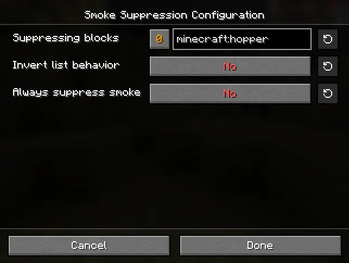
Suppressing blocks list; default:
minecraft:hopper,minecraft:rail,minecraft:activator_rail,minecraft:powered_rail,minecraft:detector_railList of blocks that will suppress the smoke of any campfire placed above them.
Existing campfires must be re-placed or re-loaded to reflect config changesInvert list behavior; default:
falseInstead of suppressing smoke, blocks on the list will enable smoke, and all other blocks will suppress smoke.
Existing campfires must be re-placed or re-loaded to reflect config changesAlways suppress smoke; default:
falseSuppress smoke particles regardless of which block is beneath a campfire.
Existing campfires must be re-placed or re-loaded to reflect config changes
Translations
Install SSS Translate to automatically download new translations.
You can help translate Smoke Suppression on Crowdin.
This mod is only for Fabric (works on Quilt, too!) and I won't be porting it to Forge. The license is MIT, however,
so anyone else is free to port it.
I'd appreciate links back to this page if you port or otherwise modify this project, but links aren't required.
Verfügbare Versionen
Smoke Suppression auf deinem Client installieren
Mod-Loader lokal installieren
Installiere fabric für deine lokale Minecraft-Version.
Passende Datei herunterladen
Wähle die Smoke Suppression-Datei für fabric und Minecraft 26.3.
Mod installieren
Lege die .jar-Datei in deinem lokalen .minecraft/mods-Ordner ab und starte Minecraft neu. Eine Installation auf dem Server ist nicht nötig.
Kompatibilität
Mod-Loader
Minecraft-Versionen
26.3, 26.2, 26.1.2 (+32 weitere)
Server-seitig
✗ Nicht unterstütztEmpfohlener RAM
4 GB(min. 3 GB)Häufige Fragen
Muss Smoke Suppression auf dem Minecraft Server installiert werden?
Nein. Modrinth kennzeichnet Smoke Suppression serverseitig als nicht unterstützt. Installiere die Mod nur im lokalen Minecraft-Mods-Ordner. Dein Server kann unverändert bleiben, sofern die Mod-Seite keine zusätzliche Abhängigkeit nennt.
Welche Version und welchen Loader braucht Smoke Suppression?
Nutze eine Datei für fabric, quilt und exakt deine Minecraft-Version. Unterstützte Versionen sind unter anderem 26.3, 26.2, 26.1.2. Loader-Dateien sind nicht untereinander austauschbar.
Smoke Suppression funktioniert nicht – was kann ich prüfen?
Prüfe zuerst Minecraft-Version, Loader-Version und erforderliche Abhängigkeiten. Lege die .jar-Datei im lokalen .minecraft/mods-Ordner ab und entferne ältere Duplikate. Da die Mod clientseitig ist, löst mehr Server-RAM dieses Problem nicht.
Ähnliche Mods

![[ETF] Entity Texture Features](https://cdn.modrinth.com/data/BVzZfTc1/af683d206d50b05258d865b0d6e4aa2f2cee12f2_96.webp)
![[EMF] Entity Model Features](https://cdn.modrinth.com/data/4I1XuqiY/6e5bbd0d06b1741bfdab6c0cfab6de8fdaf0064c_96.webp)



Minecraft Server für deine Gruppe
Smoke Suppression bleibt auf deinem Client. Hoste dazu eine kompatible Welt für deine Mitspieler.