
Snapper
Screenshots, made simple
Screenshots
Über diese Mod
Snapper
Screenshots, made simple






📖 About
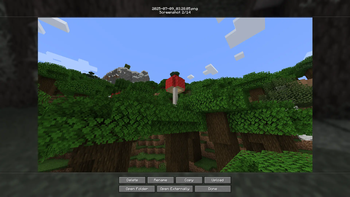
Inspired by existing screenshot mods, Snapper strives to bridge the feature-gap that most screenshot mods have, improving the overall experience.
With Snapper, you can:
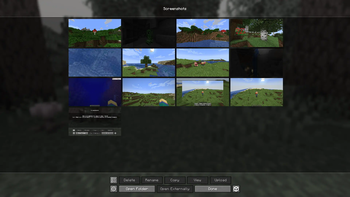
- Access an easy-to-use screenshot management menu from the title screen or in-game
- View your latest screenshot with just a key press
- Rename, delete, copy, and externally open images
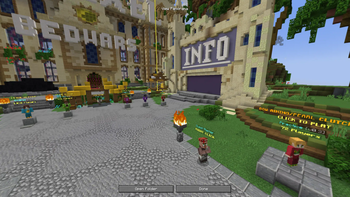
- Create and view panoramic screenshots
- Share your screenshots with anyone via uploading
Not having to install a mod from an EXE
❓ FAQ
Forge?
No. Please do not ask us for a forge port.Do you plan to / Could you add
X?
If you want to suggest something, join the Discord or make a GitHub issue.Can you port/backport to
Xversion?
Probably not. Multi-version projects are hard :<My screenshots aren't copying and my game is logging
Failed to get clipboard.
The official Minecraft launcher doesn't have all of the necessary tools provided by a standard Java runtime. This may cause issues with copying for some users on Windows & Linux. Other launchers are not affected.Question not here? We're happy to help you on our Discord server.
➕ Details
Special thanks to ThinkSeal for helping with Snapper QA.
Snapper's image uploading is powered by the wonderful (and open-source) AxolotlClient and governed by their terms of use. Agreement is opt-in and you may revoke it at any time.
Verfügbare Versionen
Snapper auf deinem Client installieren
Mod-Loader lokal installieren
Installiere fabric für deine lokale Minecraft-Version.
Passende Datei herunterladen
Wähle die Snapper-Datei für fabric und Minecraft 26.2.
Mod installieren
Lege die .jar-Datei in deinem lokalen .minecraft/mods-Ordner ab und starte Minecraft neu. Eine Installation auf dem Server ist nicht nötig.
Kompatibilität
Mod-Loader
Minecraft-Versionen
26.2, 26.1.2, 1.21.10 (+5 weitere)
Server-seitig
✗ Nicht unterstütztEmpfohlener RAM
4 GB(min. 3 GB)Häufige Fragen
Muss Snapper auf dem Minecraft Server installiert werden?
Nein. Modrinth kennzeichnet Snapper serverseitig als nicht unterstützt. Installiere die Mod nur im lokalen Minecraft-Mods-Ordner. Dein Server kann unverändert bleiben, sofern die Mod-Seite keine zusätzliche Abhängigkeit nennt.
Welche Version und welchen Loader braucht Snapper?
Nutze eine Datei für fabric und exakt deine Minecraft-Version. Unterstützte Versionen sind unter anderem 26.2, 26.1.2, 1.21.10. Loader-Dateien sind nicht untereinander austauschbar.
Snapper funktioniert nicht – was kann ich prüfen?
Prüfe zuerst Minecraft-Version, Loader-Version und erforderliche Abhängigkeiten. Lege die .jar-Datei im lokalen .minecraft/mods-Ordner ab und entferne ältere Duplikate. Da die Mod clientseitig ist, löst mehr Server-RAM dieses Problem nicht.
Ähnliche Mods






Minecraft Server für deine Gruppe
Snapper bleibt auf deinem Client. Hoste dazu eine kompatible Welt für deine Mitspieler.