
Tinker's Planner Reborn
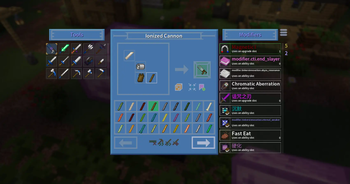
Tinkers' Blueprint is a client-side add-on for Tinkers' Construct 3 that allows players to preview assembled tools in a blueprint interface and view their stats.
Screenshots
Über diese Mod
Tinker's Planner
A client-side blueprint planner for Tinkers' Construct 3: see exactly what a
tool, armor piece or bow will end up like before you forge it.







Overview
Tinker's Planner is a purely client-side mod. Once installed, a planner icon
appears in the Tinker Station and Tinker's Anvil GUIs; click it to open the
planner.
Inside the planner you can freely combine any parts — even ones you do not
have on hand — and preview the finished item's full stats, so you never again
gather materials for a tool that turns out to be a disappointment.
Features
- Tools and armor modes: switch between Tools and Armors to plan tools,
armor and bows. - Live stat preview: durability, mining speed, attack damage, armor,
accuracy, draw speed and more update as you swap parts. - Sorting and search: sort parts by a chosen attribute, such as mining
speed or durability, or search materials directly. - Bookmarks and stars: save designs you like and come back to compare
them later. - Modifier simulation: edit the modifier stack, add or remove levels and
simulate creative slots. - Import and move parts: import an existing tool from the station into
the planner, or move planned parts back to the station. - Randomize: roll random material combinations for fun or inspiration.
- Translations: English, Simplified Chinese, Japanese, Russian.
License
This project is derived from tiffit's tconplanner, which is released under
the MIT license. Different parts of this repository carry different licenses:
| Part | License | File |
|---|---|---|
Code (src/main/java) |
LGPL-3.0-or-later | LICENSE |
| Textures and artwork | CC BY-NC-SA 4.0 | LICENSE.md |
| Upstream code | MIT, © 2021 tiffit | LICENSE.txt |
Notes:
- MIT permits redistributing a derivative work under a different license as
long as the original copyright notice is retained;LICENSE.txtis that
notice and must ship with any distribution. - Code added or modified in this repository is licensed under
LGPL-3.0-or-later. Distributing a derivative build requires publishing the
corresponding source changes under the same license. - Textures, icons and other artwork
(src/main/resources/assets/tconplanner/texturesandsrc/main/resources/logo.png) are licensed under CC BY-NC-SA 4.0:
attribution, non-commercial, share-alike. Original files inherited from the
upstream MIT release remain usable under MIT. - CC BY-NC-SA 4.0 carries a non-commercial clause. Modpack inclusion,
reuploads and derivative artwork must stay non-commercial and credit the
source. For a commercial license, get in touch through Issues.
Credits
- tiffit — author of the original Tinker's Planner (MIT).
- SpikyStars, xinian — development and maintenance of this fork.
- ssakura49 — feature work and Simplified Chinese translation.
- Twister — Japanese translation.
- Slime Knights — Tinkers' Construct and Mantle.
See also
- [Tinkers' Construct][tconstruct]
- Minecraft Forge
- Creative Commons BY-NC-SA 4.0
- GNU LGPL 3.0
Verfügbare Versionen
Tinker's Planner Reborn auf deinem Client installieren
Mod-Loader lokal installieren
Installiere forge für deine lokale Minecraft-Version.
Passende Datei herunterladen
Wähle die Tinker's Planner Reborn-Datei für forge und Minecraft 1.20.1.
Mod installieren
Lege die .jar-Datei in deinem lokalen .minecraft/mods-Ordner ab und starte Minecraft neu. Eine Installation auf dem Server ist nicht nötig.
Kompatibilität
Mod-Loader
Minecraft-Versionen
1.20.1, 1.19.2
Server-seitig
✗ Nicht unterstütztEmpfohlener RAM
4 GB(min. 3 GB)Häufige Fragen
Muss Tinker's Planner Reborn auf dem Minecraft Server installiert werden?
Nein. Modrinth kennzeichnet Tinker's Planner Reborn serverseitig als nicht unterstützt. Installiere die Mod nur im lokalen Minecraft-Mods-Ordner. Dein Server kann unverändert bleiben, sofern die Mod-Seite keine zusätzliche Abhängigkeit nennt.
Welche Version und welchen Loader braucht Tinker's Planner Reborn?
Nutze eine Datei für forge, neoforge und exakt deine Minecraft-Version. Unterstützte Versionen sind unter anderem 1.20.1, 1.19.2. Loader-Dateien sind nicht untereinander austauschbar.
Tinker's Planner Reborn funktioniert nicht – was kann ich prüfen?
Prüfe zuerst Minecraft-Version, Loader-Version und erforderliche Abhängigkeiten. Lege die .jar-Datei im lokalen .minecraft/mods-Ordner ab und entferne ältere Duplikate. Da die Mod clientseitig ist, löst mehr Server-RAM dieses Problem nicht.
Ähnliche Mods






Minecraft Server für deine Gruppe
Tinker's Planner Reborn bleibt auf deinem Client. Hoste dazu eine kompatible Welt für deine Mitspieler.
Details
- Lizenz
- Creative Commons Attribution Non Commercial Share Alike 4.0 International
- Server-seitig
- Nicht unterstützt