
Too Many Entities
Hide extra entities in order to reduce lag, especially with mob farms. The mobs still exist in the world, they are just not visible.
Über diese Mod
Description
This mod allows you to hide extra entities in order to reduce lag, especially with mob farms. The mobs still exist in the world, they are just not visible. In order to use the mod, you first have to configure a maximum entity limit (which can either be set per entity type, or globally). By default, this is set to 64. If the entity limit is set to 64 and it is applied globally, then the mod will prevent rendering more than 64 of one entity type at a time. You can also specify a limit for each entity type, for example a limit of 5 cows, meaning that at all times there will be no more than 5 cows rendered on screen. This is particularly useful for mob farms, where you can have up to hundreds of entities that aren't necessarily important to see, and hiding them can give a big increase in FPS depending on how many entities there were.
This mod requires Cloth Config to run, as well as Architectury API for versions of the mod past v1.0.1. For Fabric, this mod requires the Fabric API, and it is strongly recommended to install Mod Menu. This will allow you to modify the mod's configuration without having to restart the game. If Entity Culling is installed, there is an option you can toggle that will make the mod work with Entity Culling, for an extra boost in performance
If the mod isn't doing anything, make sure you have it configured properly. By default, the mod doesn't hide extra entities in order to avoid unexpected/confusion behavior. You can enable this by toggling the "Apply Max Entity Count Globally" setting, or tweaking the individual maximum entity counts in the "Entity" tab of the settings menu.
Performance
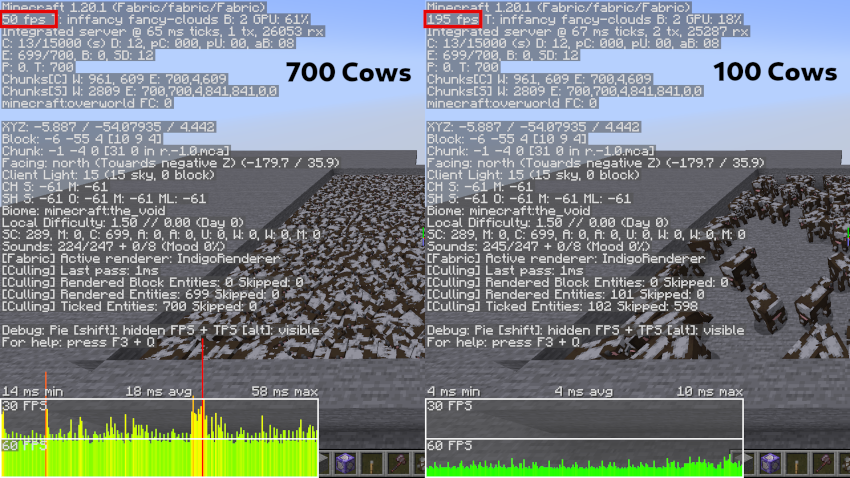
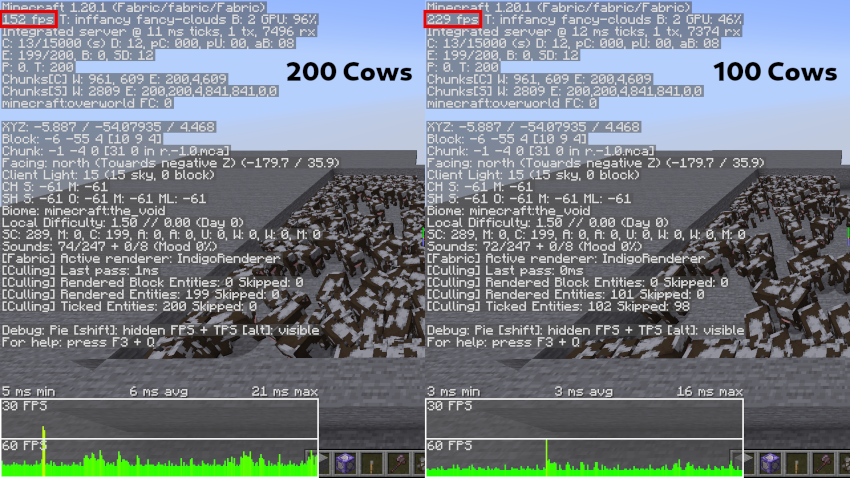
In order to test the efficiency of this mod, I summoned many cows and compared the FPS when using the mod to cap the number of cows to 100, and when the mod is disabled. On the left is when the mod is disabled, and on the right is when the number of cows is capped.
Verfügbare Versionen
Too Many Entities auf deinem Client installieren
Mod-Loader lokal installieren
Installiere fabric für deine lokale Minecraft-Version.
Passende Datei herunterladen
Wähle die Too Many Entities-Datei für fabric und Minecraft 26.2.
Mod installieren
Lege die .jar-Datei in deinem lokalen .minecraft/mods-Ordner ab und starte Minecraft neu. Eine Installation auf dem Server ist nicht nötig.
Kompatibilität
Mod-Loader
Minecraft-Versionen
26.2, 26.1.2, 26.1.1 (+17 weitere)
Server-seitig
✗ Nicht unterstütztEmpfohlener RAM
4 GB(min. 3 GB)Häufige Fragen
Muss Too Many Entities auf dem Minecraft Server installiert werden?
Nein. Modrinth kennzeichnet Too Many Entities serverseitig als nicht unterstützt. Installiere die Mod nur im lokalen Minecraft-Mods-Ordner. Dein Server kann unverändert bleiben, sofern die Mod-Seite keine zusätzliche Abhängigkeit nennt.
Welche Version und welchen Loader braucht Too Many Entities?
Nutze eine Datei für fabric, forge, neoforge und exakt deine Minecraft-Version. Unterstützte Versionen sind unter anderem 26.2, 26.1.2, 26.1.1. Loader-Dateien sind nicht untereinander austauschbar.
Too Many Entities funktioniert nicht – was kann ich prüfen?
Prüfe zuerst Minecraft-Version, Loader-Version und erforderliche Abhängigkeiten. Lege die .jar-Datei im lokalen .minecraft/mods-Ordner ab und entferne ältere Duplikate. Da die Mod clientseitig ist, löst mehr Server-RAM dieses Problem nicht.
Ähnliche Mods


Minecraft Server für deine Gruppe
Too Many Entities bleibt auf deinem Client. Hoste dazu eine kompatible Welt für deine Mitspieler.