
Too Many Entities
Hide extra entities in order to reduce lag, especially with mob farms. The mobs still exist in the world, they are just not visible.
About this Mod
Description
This mod allows you to hide extra entities in order to reduce lag, especially with mob farms. The mobs still exist in the world, they are just not visible. In order to use the mod, you first have to configure a maximum entity limit (which can either be set per entity type, or globally). By default, this is set to 64. If the entity limit is set to 64 and it is applied globally, then the mod will prevent rendering more than 64 of one entity type at a time. You can also specify a limit for each entity type, for example a limit of 5 cows, meaning that at all times there will be no more than 5 cows rendered on screen. This is particularly useful for mob farms, where you can have up to hundreds of entities that aren't necessarily important to see, and hiding them can give a big increase in FPS depending on how many entities there were.
This mod requires Cloth Config to run, as well as Architectury API for versions of the mod past v1.0.1. For Fabric, this mod requires the Fabric API, and it is strongly recommended to install Mod Menu. This will allow you to modify the mod's configuration without having to restart the game. If Entity Culling is installed, there is an option you can toggle that will make the mod work with Entity Culling, for an extra boost in performance
If the mod isn't doing anything, make sure you have it configured properly. By default, the mod doesn't hide extra entities in order to avoid unexpected/confusion behavior. You can enable this by toggling the "Apply Max Entity Count Globally" setting, or tweaking the individual maximum entity counts in the "Entity" tab of the settings menu.
Performance
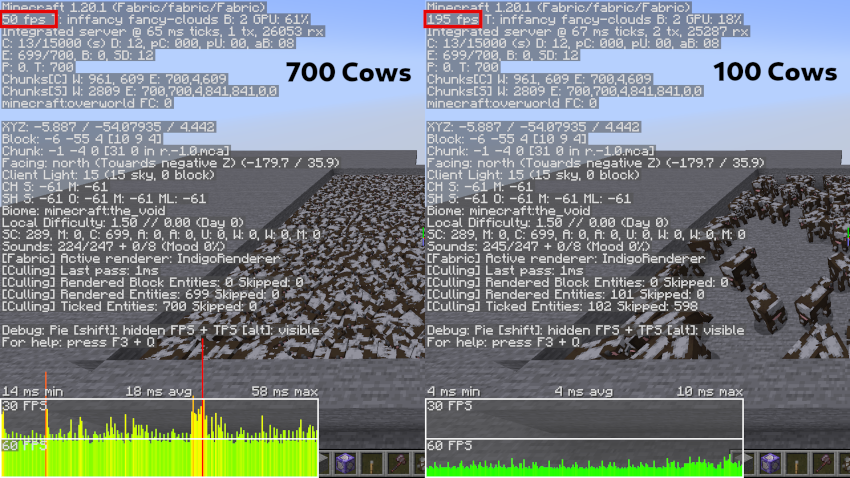
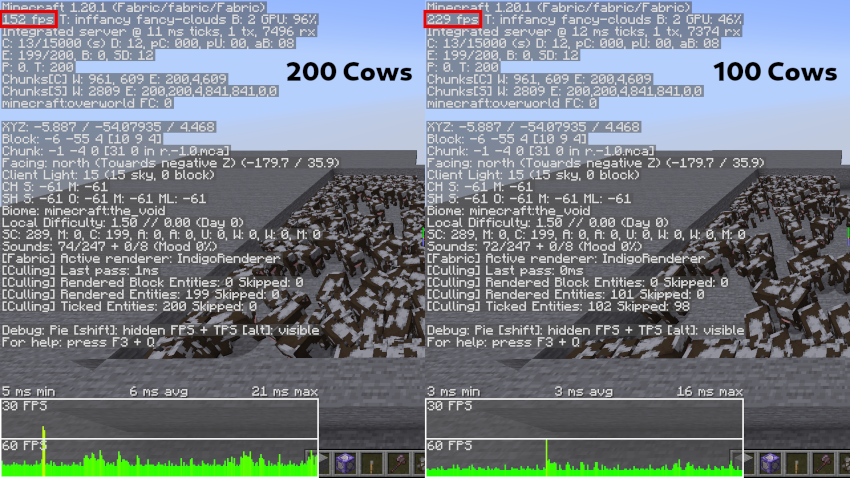
In order to test the efficiency of this mod, I summoned many cows and compared the FPS when using the mod to cap the number of cows to 100, and when the mod is disabled. On the left is when the mod is disabled, and on the right is when the number of cows is capped.
Available Versions
How to Install Too Many Entities on Your Client
Install the Mod Loader Locally
Install fabric for your local Minecraft version.
Download the Matching File
Choose the Too Many Entities file for fabric and Minecraft 26.2.
Install Mod
Place the .jar file in your local .minecraft/mods folder and restart Minecraft. No server-side installation is required.
Compatibility
Mod Loaders
Minecraft Versions
26.2, 26.1.2, 26.1.1 (+17 more)
Server-side
✗ UnsupportedRecommended RAM
4 GB(min. 3 GB)Frequently Asked Questions
Does Too Many Entities need to be installed on the Minecraft server?
No. Modrinth marks Too Many Entities as unsupported on the server side. Install it only in your local Minecraft mods folder. Your server can remain unchanged unless the mod page lists an additional dependency.
Which version and loader does Too Many Entities require?
Use a file for fabric, forge, neoforge and your exact Minecraft version. Supported versions include 26.2, 26.1.2, 26.1.1. Files for different loaders are not interchangeable.
Too Many Entities is not working – what should I check?
First check the Minecraft version, loader version and required dependencies. Put the .jar file in your local .minecraft/mods folder and remove older duplicates. Because this mod is client-side, adding server RAM will not fix it.
Similar Mods


Minecraft Server for Your Group
Too Many Entities stays on your client. Host a compatible world for your group.