Totem Resize
The Totem Resizer is a client-side mod that lets you change the size of the "Totem of Undying" in your hand and on your screen. It’s perfect for clearing up your view during combat or just personalizing your game.
Screenshots
Über diese Mod
TotemScale is a sleek, lightweight, client-side utility designed to solve one of Minecraft’s oldest visual nuisances: the bulky "Totem of Undying" model. Whether you are a PVPer who needs a clear field of view or a casual player who wants a more minimalist aesthetic, TotemScale gives you total control over how the totem appears on your screen.
Built for the 1.21.x era, this mod integrates directly into the modern Minecraft engine, ensuring high performance and a "native" feel.
Key Features
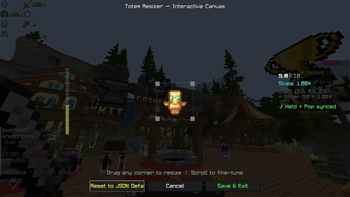
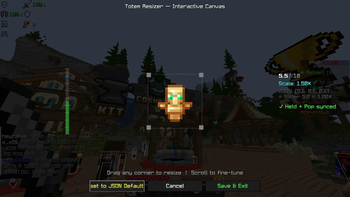
Precision Scaling (0.1x – 2.5x): Use an intuitive in-game slider to shrink the totem into a tiny charm or grow it into a massive icon.
Total Visual Coverage: The scaling logic applies to every state of the totem:
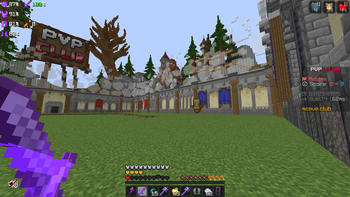
Main Hand: Keeps your right-side vision clear.
Off-Hand: Prevents the totem from blocking your peripheral view.
The "Pop" Animation: Shrinks the large on-screen animation that triggers when you cheat death, so you can keep fighting without a giant golden face in your way.
Fully Rebindable Controls: No more digging through config files. Access the customization menu with a single keypress (Default: 'J'). The keybinding is fully integrated into the standard Minecraft Options > Controls menu.
Vanilla & Server Compatible: Since the mod only changes how you see the totem, it is 100% Client-Side. You can use it on any vanilla server, SMP, or competitive network (like Hypixel) without any risk or extra server-side setup.
Technical Excellence
Modern Compatibility: Optimized for Java 21 and the 1.21.1 through 1.21.11 update cycle.
Data Component Ready: Uses the latest 1.21 item handling system, ensuring it works perfectly with custom resource packs and modded totems.
Seamless UI: Powered by a clean, modern interface that matches the updated 1.21 "Tricky Trials" and "Mounts of Mayhem" menu styles.
Zero Impact: Lightweight code ensures your FPS remains stable, even during intense combat or "totem popping" scenarios.
Verfügbare Versionen
Totem Resize auf deinem Client installieren
Mod-Loader lokal installieren
Installiere fabric für deine lokale Minecraft-Version.
Passende Datei herunterladen
Wähle die Totem Resize-Datei für fabric und Minecraft 1.21.11.
Mod installieren
Lege die .jar-Datei in deinem lokalen .minecraft/mods-Ordner ab und starte Minecraft neu. Eine Installation auf dem Server ist nicht nötig.
Kompatibilität
Mod-Loader
Minecraft-Versionen
1.21.11, 1.21.10, 1.21.9 (+9 weitere)
Server-seitig
✗ Nicht unterstütztEmpfohlener RAM
4 GB(min. 3 GB)Häufige Fragen
Muss Totem Resize auf dem Minecraft Server installiert werden?
Nein. Modrinth kennzeichnet Totem Resize serverseitig als nicht unterstützt. Installiere die Mod nur im lokalen Minecraft-Mods-Ordner. Dein Server kann unverändert bleiben, sofern die Mod-Seite keine zusätzliche Abhängigkeit nennt.
Welche Version und welchen Loader braucht Totem Resize?
Nutze eine Datei für fabric und exakt deine Minecraft-Version. Unterstützte Versionen sind unter anderem 1.21.11, 1.21.10, 1.21.9. Loader-Dateien sind nicht untereinander austauschbar.
Totem Resize funktioniert nicht – was kann ich prüfen?
Prüfe zuerst Minecraft-Version, Loader-Version und erforderliche Abhängigkeiten. Lege die .jar-Datei im lokalen .minecraft/mods-Ordner ab und entferne ältere Duplikate. Da die Mod clientseitig ist, löst mehr Server-RAM dieses Problem nicht.
Ähnliche Mods






Minecraft Server für deine Gruppe
Totem Resize bleibt auf deinem Client. Hoste dazu eine kompatible Welt für deine Mitspieler.