Transparent
Allows resource packs to make certain entities support transparency.
Screenshots
Über diese Mod
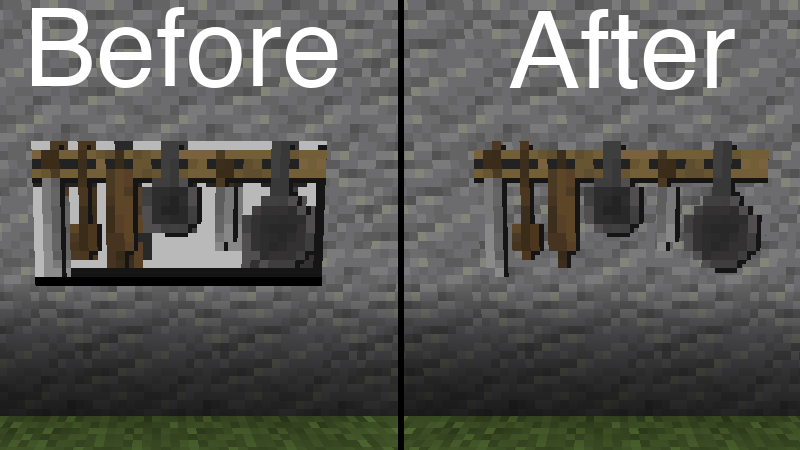
Transparent allows resource packs to give certain entities textures with transparent (or translucent) pixels. To use, simply install the mod and use or create a resource pack that gives one of the supported entities a transparent texture.
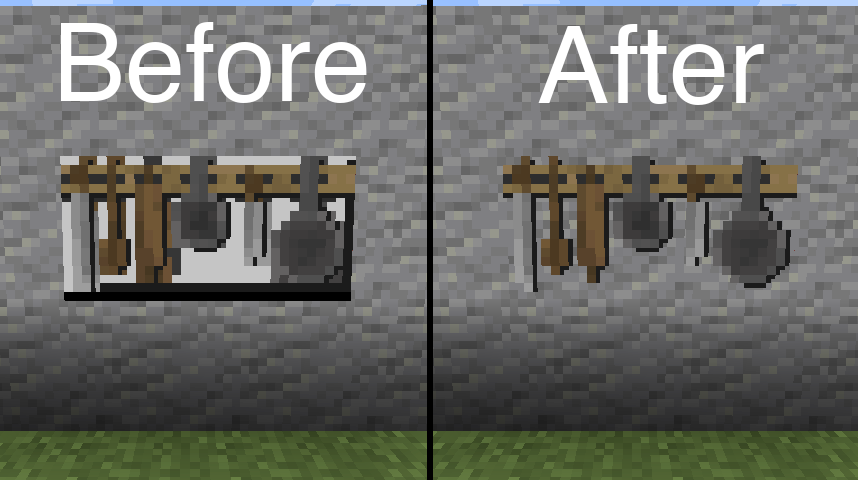
Resource pack used in the above image: BwW Texturepack.
Officially supports Paintings++ Mod!
Supported Entities
| Entity | Enabled By Default | Reason | Versions |
|---|---|---|---|
| Armor Stand | true | 1.19.4+ | |
| End Crystal | true | ||
| End Crystal Beam | true | 1.21+ | |
| Item Frame | true | ||
| Painting | true | ||
| Player Cape | true | 1.21+ | |
| Player Armor | true | 1.21+ | |
| Beacon Beam | false | Enabling transparency causes render layer bugs. |
If you want another entity to be supported by this mod, please let me know on Discord or GitHub Issues.
Configuration
In order to change the default configuration, paste the following json file content into a file in your resource pack located at /assets/transparent/transparent.json.
{
    "armor_stand": true,
    "beacon_beam": false,
    "end_crystal": true,
    "end_crystal_beam": true,
    "item_frame": true,
    "painting": true,
    "player_cape": true,
    "player_armor": true
}
Report any issues on GitHub. Chat on Discord in the #transparent channel.
Support the development of my mods on Ko-fi.

Verfügbare Versionen
Transparent auf deinem Client installieren
Mod-Loader lokal installieren
Installiere fabric für deine lokale Minecraft-Version.
Passende Datei herunterladen
Wähle die Transparent-Datei für fabric und Minecraft 1.21.5.
Mod installieren
Lege die .jar-Datei in deinem lokalen .minecraft/mods-Ordner ab und starte Minecraft neu. Eine Installation auf dem Server ist nicht nötig.
Kompatibilität
Mod-Loader
Minecraft-Versionen
1.21.5, 1.21.4, 1.21.3 (+16 weitere)
Server-seitig
✗ Nicht unterstütztEmpfohlener RAM
4 GB(min. 3 GB)Häufige Fragen
Muss Transparent auf dem Minecraft Server installiert werden?
Nein. Modrinth kennzeichnet Transparent serverseitig als nicht unterstützt. Installiere die Mod nur im lokalen Minecraft-Mods-Ordner. Dein Server kann unverändert bleiben, sofern die Mod-Seite keine zusätzliche Abhängigkeit nennt.
Welche Version und welchen Loader braucht Transparent?
Nutze eine Datei für fabric, forge, neoforge, quilt und exakt deine Minecraft-Version. Unterstützte Versionen sind unter anderem 1.21.5, 1.21.4, 1.21.3. Loader-Dateien sind nicht untereinander austauschbar.
Transparent funktioniert nicht – was kann ich prüfen?
Prüfe zuerst Minecraft-Version, Loader-Version und erforderliche Abhängigkeiten. Lege die .jar-Datei im lokalen .minecraft/mods-Ordner ab und entferne ältere Duplikate. Da die Mod clientseitig ist, löst mehr Server-RAM dieses Problem nicht.
Ähnliche Mods

![[ETF] Entity Texture Features](https://cdn.modrinth.com/data/BVzZfTc1/af683d206d50b05258d865b0d6e4aa2f2cee12f2_96.webp)
![[EMF] Entity Model Features](https://cdn.modrinth.com/data/4I1XuqiY/6e5bbd0d06b1741bfdab6c0cfab6de8fdaf0064c_96.webp)



Minecraft Server für deine Gruppe
Transparent bleibt auf deinem Client. Hoste dazu eine kompatible Welt für deine Mitspieler.
Details
- Lizenz
- GNU Lesser General Public License v3.0 only
- Server-seitig
- Nicht unterstützt