
Video Player
This mod allows the playback of videos in the user interface (GUI), you can play videos for all connected users.
Screenshots
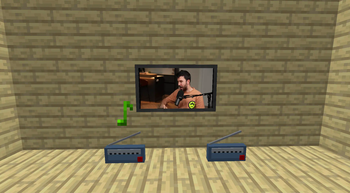
Über diese Mod
🎬 Video Player Mod
✨ Revolutionize Your Minecraft Experience! ✨
The Video Player Mod lets you play videos, music, and international radio directly within the Minecraft GUI. Whether you're hosting a server or playing solo, this mod brings your favorite content straight to your game!
🔊 Key Features
- 🎵 Music & International Radio: Tune in to your favorite stations or play music directly via URLs.
- 📺 TV in Minecraft: Place TV models and enjoy video playback within the game world.
- 🖥️ Fullscreen Video Playback: Immerse yourself with videos in fullscreen, perfect for sharing content across all connected players.
- 🎶 Background music Immerse yourself with custom sounds or music that can be shared across all connected players.
🛠️ Customizable Commands
/playvideo: Simple and effective. Play videos with basic options like volume and control locks.
/playgovideo: Advanced command with customizable screen modes, positions, and fade effects.
/playmusic: Play music or radio streams with customizable volume and control options.
/stopvideo: Stop the actual videos of the players that you want.
/stopmusic: Stop the actual musics of the players that you want.
📜 How to Use Commands
1. /playvideo <TARGETS/PLAYER> <VOLUME> <URL> [<control_blocked>] [<can_skip>]
This command allows you to play a video for the specified players with customizable options:
- 🎯 TARGETS/PLAYER: Specify the player(s) who will see the video. Example: @a for all players.
- 🔊 VOLUME: Set the volume level (0-100).
- 🌐 URL: The video URL to be played (e.g., YouTube link).
- 🚫 control_blocked: (Optional) Block fast forward/rewind controls. Default is false.
- ⏭️ can_skip: (Optional) Disable SHIFT + ESCAPE to prevent skipping. Default is true.
Example: /playvideo @a 100 https://www.youtube.com/watch?v=C0DPdy98e4c
Plays the video for all players at maximum volume.
2. /playgovideo <TARGETS/PLAYER> <VOLUME> <URL> <MODE> [<control_blocked>] [<can_skip>] [ONLY IN MODE 1 -> <position>] [<option_mode _in option_secs_in option_mode_out option_secs_out>]
This advanced command offers more customization:
- 🎯 TARGETS/PLAYER: Specify the player(s) who will see the video.
- 🔊 VOLUME: Set the volume level (0-100).
- 🌐 URL: The video URL to be played.
- 🖥️ MODE: Choose 0 for fullscreen or 1 for partial screen (under development).
- 🚫 control_blocked: (Optional) Block fast forward/rewind controls.
- ⏭️ can_skip: (Optional) Disable SHIFT + ESCAPE.
- 📍 position: (Mode 1 only) Customize the video position (under development).
- 💨 option_mode & option_secs: Define fade-in and fade-out effects with specified durations.
Example: /playgovideo @a 100 https://www.youtube.com/watch?v=C0DPdy98e4c 0 false true 0 5 1 3
Plays the video in fullscreen with a 5-second fade-in and a 3-second fade-out for all players.
🎮 Intuitive Controls
- 🚪 Close Video: SHIFT + ESCAPE
- ⏩ Forward/Rewind: SHIFT + RIGHT/LEFT ARROW
- ⏯️ Pause: SHIFT + SPACE
- 🔊 Adjust Volume: UP/DOWN ARROW
- 🔇 Mute: M
🎥 Demo & Support
Found a bug? Report it on GitHub or join the discussion on Discord!
👥 Credits & Contributions
You are free to use this mod in modpacks. Special thanks to SrRapero720 for development support, and anarkh_angel for the TV models.
</a>
💰 Support & Donations
If you love this mod, consider supporting via PayPal. Every contribution helps!
©️ Copyright
VideoPlayer Mod © Goedix. All rights reserved.
Verfügbare Versionen
Video Player auf dem Server installieren
Server bestellen
Bestelle einen Minecraft Java Server mit mindestens 3 GB RAM (4 GB empfohlen).
fabric Loader setzen
Wähle im Panel unter "Egg" den fabric-Loader und die passende Minecraft-Version (1.20.6).
Mod installieren
Öffne den Mod-Browser im Dashboard und suche nach "Video Player". Klicke "Installieren" – fertig! Alternativ: Lade die .jar via SFTP in den /mods Ordner.
Kompatibilität
Mod-Loader
Minecraft-Versionen
1.20.6, 1.20.5, 1.20.4 (+14 weitere)
Server-seitig
✓ ErforderlichEmpfohlener RAM
4 GB(min. 3 GB)Häufige Fragen
Video Player Server crasht beim Start – was tun?
Häufigste Ursache: falsche fabric-Version oder zu wenig RAM. Prüfe im Server-Log (latest.log), ob ein "OutOfMemoryError" oder "Mixin"-Fehler auftritt. Bei Mado Hosting: Stelle sicher, dass mindestens 3 GB RAM zugewiesen sind und der Loader zur Mod-Version passt (1.20.6). Über das Panel kannst du den Loader mit einem Klick wechseln.
Ist Video Player mit fabric und forge kompatibel?
Video Player unterstützt offiziell fabric, forge für Minecraft 1.20.6, 1.20.5, 1.20.4. Achtung: Forge- und Fabric-Mods sind NICHT untereinander kompatibel – wähle einen Loader und bleibe dabei. Im Mado Dashboard werden inkompatible Loader-Kombinationen automatisch erkannt.
Server laggt mit Video Player – wie optimiere ich die Performance?
Empfohlener RAM: 4 GB (+1 GB pro 8 Spieler). Prüfe mit /spark profiler, ob Video Player den meisten Tick-Time verbraucht. Häufige Fixes: Server-View-Distance auf 8-10 reduzieren, bei Forge "performant" oder "starlight" als Zusatz-Mod installieren. Bei Mado Hosting läuft dein Server auf NVMe-SSDs mit dedizierten CPU-Kernen für minimale Latenz.
Ähnliche Mods

![[ETF] Entity Texture Features](https://cdn.modrinth.com/data/BVzZfTc1/af683d206d50b05258d865b0d6e4aa2f2cee12f2_96.webp)
![[EMF] Entity Model Features](https://cdn.modrinth.com/data/4I1XuqiY/6e5bbd0d06b1741bfdab6c0cfab6de8fdaf0064c_96.webp)



Modded Server mieten
Installiere Video Player mit nur einem Klick auf deinem Server.