
VulkanMod
Vulkan renderer mod for Minecraft.
Screenshots
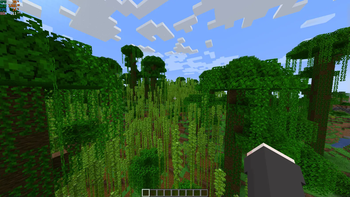
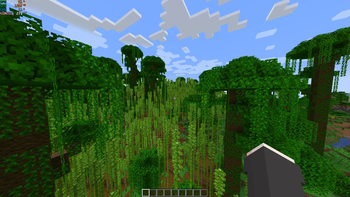
Über diese Mod
This is a mod that introduces a brand new Vulkan based rendering engine to Minecraft in order to bring performance and graphical improvements, but even new features that are only possible thanks to the new graphics APIs.
Developing this mod requires huge amounts of time and effort. If you want to help me continue developing this project, consider buying me a coffee.

Installation

Requirements
- A device (GPU) that supports Vulkan (1.2 or higher)
- Fabric mod loader
Steps
- Move
VulkanMod.jartomodsfolder of your Minecraft Instance.
What about shaders?
If you want to use shaders with VulkanMod, then check out Beryl

Community
If you need help or want to chat feel free to join our Discord server.

Issues
Before asking for help, if your instance is crashing check if your system supports Vulkan and if any of the mods listed in the link below is present in your instance.
Please before reporting any new issue check if it already exists.
Compatibility
Mod compatibility is not guaranteed. When VulkanMod is loaded, mods that make direct calls to OpenGL might crash the game.
Check Incompatible mods list to make sure you are not using one of them.
Verfügbare Versionen
VulkanMod auf deinem Client installieren
Mod-Loader lokal installieren
Installiere fabric für deine lokale Minecraft-Version.
Passende Datei herunterladen
Wähle die VulkanMod-Datei für fabric und Minecraft 26.1.2.
Mod installieren
Lege die .jar-Datei in deinem lokalen .minecraft/mods-Ordner ab und starte Minecraft neu. Eine Installation auf dem Server ist nicht nötig.
Kompatibilität
Mod-Loader
Minecraft-Versionen
26.1.2, 26.1.1, 26.1 (+20 weitere)
Server-seitig
✗ Nicht unterstütztEmpfohlener RAM
4 GB(min. 3 GB)Häufige Fragen
Muss VulkanMod auf dem Minecraft Server installiert werden?
Nein. Modrinth kennzeichnet VulkanMod serverseitig als nicht unterstützt. Installiere die Mod nur im lokalen Minecraft-Mods-Ordner. Dein Server kann unverändert bleiben, sofern die Mod-Seite keine zusätzliche Abhängigkeit nennt.
Welche Version und welchen Loader braucht VulkanMod?
Nutze eine Datei für fabric, quilt und exakt deine Minecraft-Version. Unterstützte Versionen sind unter anderem 26.1.2, 26.1.1, 26.1. Loader-Dateien sind nicht untereinander austauschbar.
VulkanMod funktioniert nicht – was kann ich prüfen?
Prüfe zuerst Minecraft-Version, Loader-Version und erforderliche Abhängigkeiten. Lege die .jar-Datei im lokalen .minecraft/mods-Ordner ab und entferne ältere Duplikate. Da die Mod clientseitig ist, löst mehr Server-RAM dieses Problem nicht.
Ähnliche Mods


Minecraft Server für deine Gruppe
VulkanMod bleibt auf deinem Client. Hoste dazu eine kompatible Welt für deine Mitspieler.
Details
- Lizenz
- GNU Lesser General Public License v3.0 only
- Server-seitig
- Nicht unterstützt