
VulkanMod
Vulkan renderer mod for Minecraft.
Screenshots
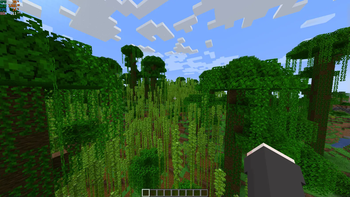
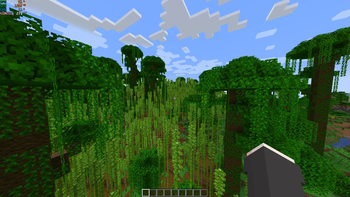
About this Mod
This is a mod that introduces a brand new Vulkan based rendering engine to Minecraft in order to bring performance and graphical improvements, but even new features that are only possible thanks to the new graphics APIs.
Developing this mod requires huge amounts of time and effort. If you want to help me continue developing this project, consider buying me a coffee.

Installation

Requirements
- A device (GPU) that supports Vulkan (1.2 or higher)
- Fabric mod loader
Steps
- Move
VulkanMod.jartomodsfolder of your Minecraft Instance.
What about shaders?
If you want to use shaders with VulkanMod, then check out Beryl

Community
If you need help or want to chat feel free to join our Discord server.

Issues
Before asking for help, if your instance is crashing check if your system supports Vulkan and if any of the mods listed in the link below is present in your instance.
Please before reporting any new issue check if it already exists.
Compatibility
Mod compatibility is not guaranteed. When VulkanMod is loaded, mods that make direct calls to OpenGL might crash the game.
Check Incompatible mods list to make sure you are not using one of them.
Available Versions
How to Install VulkanMod on Your Client
Install the Mod Loader Locally
Install fabric for your local Minecraft version.
Download the Matching File
Choose the VulkanMod file for fabric and Minecraft 26.1.2.
Install Mod
Place the .jar file in your local .minecraft/mods folder and restart Minecraft. No server-side installation is required.
Compatibility
Mod Loaders
Minecraft Versions
26.1.2, 26.1.1, 26.1 (+20 more)
Server-side
✗ UnsupportedRecommended RAM
4 GB(min. 3 GB)Frequently Asked Questions
Does VulkanMod need to be installed on the Minecraft server?
No. Modrinth marks VulkanMod as unsupported on the server side. Install it only in your local Minecraft mods folder. Your server can remain unchanged unless the mod page lists an additional dependency.
Which version and loader does VulkanMod require?
Use a file for fabric, quilt and your exact Minecraft version. Supported versions include 26.1.2, 26.1.1, 26.1. Files for different loaders are not interchangeable.
VulkanMod is not working – what should I check?
First check the Minecraft version, loader version and required dependencies. Put the .jar file in your local .minecraft/mods folder and remove older duplicates. Because this mod is client-side, adding server RAM will not fix it.
Similar Mods


Minecraft Server for Your Group
VulkanMod stays on your client. Host a compatible world for your group.