
WhatsMyLag
Find out exactly what’s lagging your world - with mod, entity, and tick info.
Screenshots

Über diese Mod
🌀 Lag Detector — Find What’s Slowing You Down
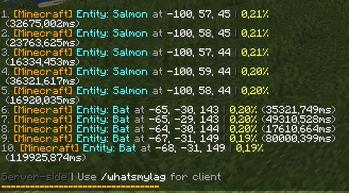
See exactly which mods, entities, or blocks cause lag — on both client and server!
A lightweight and powerful tool to track performance issues directly in-game.
💻 Client-Side Lag Analysis
Command: /whatsmylag
- Shows FPS, entity count, and top 10 nearby lag sources
- Displays mod name, entity type, distance, and lag impact (%)
- Ideal for spotting laggy builds, farms, or particles
🧠 Note: If the mod is only installed on the client, only this command will be available.
🌐 Server-Side Lag Analysis
Command: /whatsthisserverlag
- Shows server tick usage for the top 10 entities or blocks
- Displays coordinates, mod name, and performance percentage
- Perfect for diagnosing lag farms or overloaded chunks
🧠 Note: If the mod is only installed on the server, only this command will be available.
📊 Features
- ✅ Detects lag sources from any mod (Create, Minecraft, etc.)
- ✅ Clear, color-coded in-chat display
- ✅ Works in singleplayer and multiplayer
- ✅ Client and server commands work independently
- ✅ No setup — just install and type the command
🧩 Compatibility
- Supports Fabric / Quilt 1.20+
- Works alongside optimization mods like Sodium, Lithium, and FerriteCore
🧠 Perfect For
- Players who want smooth gameplay
- Server admins hunting lag farms
- Modpack developers testing performance
Verfügbare Versionen
WhatsMyLag auf dem Server installieren
Server bestellen
Bestelle einen Minecraft Java Server mit mindestens 3 GB RAM (4 GB empfohlen).
fabric Loader setzen
Wähle im Panel unter "Egg" den fabric-Loader und die passende Minecraft-Version (1.20.6).
Mod installieren
Öffne den Mod-Browser im Dashboard und suche nach "WhatsMyLag". Klicke "Installieren" – fertig! Alternativ: Lade die .jar via SFTP in den /mods Ordner.
Kompatibilität
Mod-Loader
Minecraft-Versionen
1.20.6, 1.20.5, 1.20.4 (+4 weitere)
Server-seitig
~ OptionalEmpfohlener RAM
4 GB(min. 3 GB)Häufige Fragen
WhatsMyLag Server crasht beim Start – was tun?
Häufigste Ursache: falsche fabric-Version oder zu wenig RAM. Prüfe im Server-Log (latest.log), ob ein "OutOfMemoryError" oder "Mixin"-Fehler auftritt. Bei Mado Hosting: Stelle sicher, dass mindestens 3 GB RAM zugewiesen sind und der Loader zur Mod-Version passt (1.20.6). Über das Panel kannst du den Loader mit einem Klick wechseln.
Ist WhatsMyLag mit fabric und quilt kompatibel?
WhatsMyLag unterstützt offiziell fabric, quilt für Minecraft 1.20.6, 1.20.5, 1.20.4. Im Mado Dashboard werden inkompatible Loader-Kombinationen automatisch erkannt.
Server laggt mit WhatsMyLag – wie optimiere ich die Performance?
Empfohlener RAM: 4 GB (+1 GB pro 8 Spieler). Prüfe mit /spark profiler, ob WhatsMyLag den meisten Tick-Time verbraucht. Häufige Fixes: Server-View-Distance auf 8-10 reduzieren, bei Forge "performant" oder "starlight" als Zusatz-Mod installieren. Bei Mado Hosting läuft dein Server auf NVMe-SSDs mit dedizierten CPU-Kernen für minimale Latenz.
Ähnliche Mods






Modded Server mieten
Installiere WhatsMyLag mit nur einem Klick auf deinem Server.