
Zombies Can't Gather
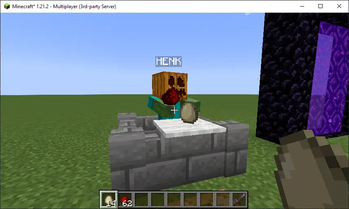
Prevent Zombies from picking up certain items!
Screenshots
Über diese Mod
Zombies Can't Gather


A Minecraft mod that prevents Zombies from picking up any item you choose!
Since 1.17.1 there's a check in the game to prevent zombies from gathering glow ink sacs.
Zombies Can't Gather changes that line to check against a blacklist, loaded from the config.
Zombies are not able to pick up blacklisted items, which prevents them from becoming persistent.
Now with a fancy tracker!
By default, the mod only prevents Zombies from gathering
minecraft:glow_ink_sac, just like vanilla Minecraft.
Blacklists
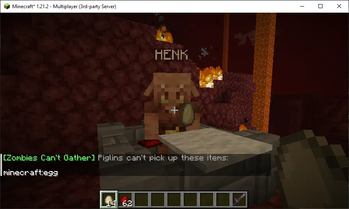
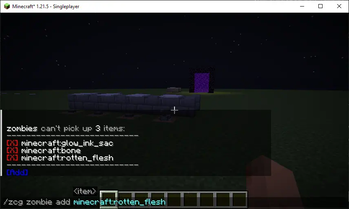
Zombies Can't Gather provides blacklists of items that prevent Zombies or Piglins from picking them up. These
blacklists are available through the command /zombiescantgather zombie and /zombiescantgather piglin. From here,
you can add or remove items:

When an item is on the blacklist, the corresponding mob can not pick it up.
To reset the lists, use the following commands:
/zombiescantgather zombie reset
/zombiescantgather piglin reset
Tracker
Do you have an existing world where mobs are already holding items you added to the blacklist? Turn on the tracker
and sniff them out. To turn on the tracker, use set enableTracker to true in the config, or if you use are in
single player, use Mod Menu. The tracker is turned off by default.
/zombiescantgather config enableTracker true
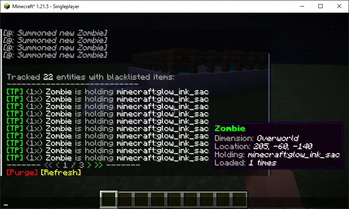
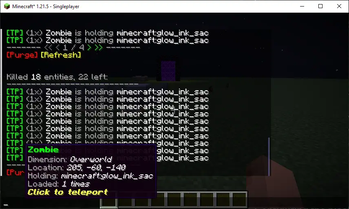
The tracker in Zombies Can't Gather logs of every time a mob holding a blacklisted item is loaded so you can
use a command to see where all those persistent mobs are. When turned on, running the command/zombiescantgather tracker will show information about those mobs, like the item they are holding and
the amount of times the mob has been loaded.

At the bottom of the tracker is the Purge button. This button will kill any entities on the list, provided that
they are currently loaded. After running a purge, the tracker will refresh, leaving only the mobs that couldn't
be found due to them being in unloaded chunks. Here's where the TP button comes in handy. This teleport works
with mobs in unloaded chunks, so you can just teleport to the next remaining mob and run purge again when you arrive.

Running /zombiescantgather tracker reset will clear the list, so you can start fresh.
Permissions
By default, everything in Zombies Can't Gather is locked under Permission Level 4 (configurable), but for more
control on permissions Luckperms support is available. The following permissions can be configured:
| Permission | Grants/revokes |
|---|---|
zombiescantgather |
Everything |
zombiescantgather.* |
All commands under /zombiescantgather |
zombiescantgather.blacklist |
Access to blacklists |
zombiescantgather.blacklist.add |
Adding blacklist items |
zombiescantgather.blacklist.remove |
Removing blacklist items |
zombiescantgather.blacklist.reset |
Resetting blacklists |
zombiescantgather.tracker |
Access to tracker |
zombiescantgather.tracker.log |
Receive updates on tracked mobs in chat |
zombiescantgather.tracker.reset |
Clearing the tracker |
zombiescantgather.tracker.teleport |
Teleporting to tracked mobs |
zombiescantgather.tracker.purge |
Purging tracked mobs |
zombiescantgather.configure |
Changing configuration |
Configuration
Configuration options to use the mod in single player are available through Mod Menu. Configuration options
are also available through the command /zcg config <option> <value> or in config/zombiescantgather.json:
{
  "zombiesBlacklist": [
    "minecraft:glow_ink_sac"
  ],
  "piglinsBlacklist": [],
  "permissionLevel": 4,
  "enableTracker": false,
  "trackCustomNamedMobs": false,
  "showTrackerLogs": false,
  "broadcastTrackedMobs": false
}
Verfügbare Versionen
Zombies Can't Gather auf dem Server installieren
Server bestellen
Bestelle einen Minecraft Java Server mit mindestens 3 GB RAM (4 GB empfohlen).
fabric Loader setzen
Wähle im Panel unter "Egg" den fabric-Loader und die passende Minecraft-Version (1.21.11).
Mod installieren
Öffne den Mod-Browser im Dashboard und suche nach "Zombies Can't Gather". Klicke "Installieren" – fertig! Alternativ: Lade die .jar via SFTP in den /mods Ordner.
Kompatibilität
Mod-Loader
Minecraft-Versionen
1.21.11, 1.21.10, 1.21.9 (+9 weitere)
Server-seitig
~ OptionalEmpfohlener RAM
4 GB(min. 3 GB)Häufige Fragen
Zombies Can't Gather Server crasht beim Start – was tun?
Häufigste Ursache: falsche fabric-Version oder zu wenig RAM. Prüfe im Server-Log (latest.log), ob ein "OutOfMemoryError" oder "Mixin"-Fehler auftritt. Bei Mado Hosting: Stelle sicher, dass mindestens 3 GB RAM zugewiesen sind und der Loader zur Mod-Version passt (1.21.11). Über das Panel kannst du den Loader mit einem Klick wechseln.
Ist Zombies Can't Gather mit fabric kompatibel?
Zombies Can't Gather unterstützt offiziell fabric für Minecraft 1.21.11, 1.21.10, 1.21.9. Im Mado Dashboard werden inkompatible Loader-Kombinationen automatisch erkannt.
Server laggt mit Zombies Can't Gather – wie optimiere ich die Performance?
Empfohlener RAM: 4 GB (+1 GB pro 8 Spieler). Prüfe mit /spark profiler, ob Zombies Can't Gather den meisten Tick-Time verbraucht. Häufige Fixes: Server-View-Distance auf 8-10 reduzieren, bei Forge "performant" oder "starlight" als Zusatz-Mod installieren. Bei Mado Hosting läuft dein Server auf NVMe-SSDs mit dedizierten CPU-Kernen für minimale Latenz.
Ähnliche Mods






Modded Server mieten
Installiere Zombies Can't Gather mit nur einem Klick auf deinem Server.