
Cobblemon PokeFactory
PokeFactory is the ultimate modpack centered Cobblemon & Create - PokeBall factories, Pokemon Homesteads, and much more!
Screenshots



About this Modpack
Cobblemon PokeFactory - the best of Pokemon, Minecraft, and mods

The Ultimate Cobblemon Modpack - combining technology, magic, and adventure seamlessly with Pokemon & Minecraft
PokeFactory was originally release on Forge 1.16 /w Pixelmon. Cobblemon & Fabric are allowing us to do so much more with larger mods, a more modern version, and a more stable player experience.
Jump into singleplayer, or play with others on our NOP2W, player based economy server for PokeFactory.
What mods are included?
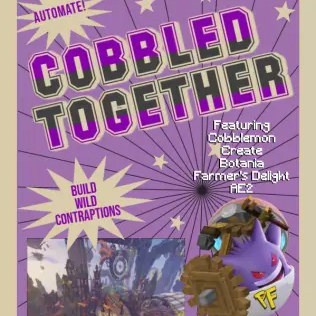
- Cobblemon - the perfect Pokemon mod for Minecraft, PokeFactory is designed for and around Cobblemon
- Create - the partner to Cobblemon, Create is the basis for the majority of the other mods, automate everything, rival Silph Co, and never have to mine anything again
- Applied Energistics 2 - sick of rotation? Turn it into energy, AE2 complements Create in every way and provides the main storage methods for PokeFactory
- Farmer's Delight - PokeFactory isn't just for players who want to build huge factories, with Farmer's Delights we offer the peaceful Pokemon Homestead of your dreams
- Botania - if you're avoiding a steampunk, pipe-y mess, Botania gives you the power benefits of Create while fitting your aesthetic aims
What's Performance like?
PokeFactory includes 90+ mods, but this isn't a kitchen sink pack - everything has been tested extensively and each mod was added for a reason.
PokeFactory includes the best of Fabric optimisation by default so you don't have to mess around with client side mods that may conflict with each other.
We recommend running at least 4GB of memory, PokeFactory has been tested on laptops & lower end PCs and is completely playable. If you can play Cobblemon fine, you can play PokeFactory fine.
On top of that, more load will be taken off your PC by playing on our server, which handles the major logic for you!
Mods Credits
Xaerox's Minimap - https://www.curseforge.com/minecraft/mc-mods/xaeros-minimap
Xaerox's World Map - https://www.curseforge.com/minecraft/mc-mods/xaeros-world-map
When Dungeons Arise - https://www.curseforge.com/minecraft/mc-mods/when-dungeons-arise-fabric
Available Versions
How to Set Up a Cobblemon PokeFactory Server
Order Server
Choose at least 6 GB RAM (8 GB recommended for Cobblemon PokeFactory). Based on player count: per 5 players.
Install Modpack in Dashboard
Open the modpack browser in the dashboard, search for "Cobblemon PokeFactory" and click "Install". The fabric loader and Minecraft 1.19.2 are configured automatically.
Start Server & Play
Start the server – all mods are loaded automatically. Share the server IP with friends and play together!
Frequently Asked Questions
Cobblemon PokeFactory server crashes or won't start – what to do?
Most common causes: insufficient RAM or wrong fabric loader. Check latest.log for "OutOfMemoryError" → increase RAM to at least 8 GB. For "Mixin" or "ClassNotFoundException" errors: modpack version and loader don't match. With Mado Hosting, loader and Minecraft version are auto-configured on modpack install – preventing most startup issues.
How much RAM does a Cobblemon PokeFactory server really need?
Minimum 6 GB, recommended 8 GB for stable performance. per 5 players. Important: Minecraft modpacks need more RAM than vanilla – plan extra per additional player. With Mado Hosting, you can scale RAM up live at any time without data loss (from €7.800000000000001/month).
Can I add custom mods to Cobblemon PokeFactory without conflicts?
Yes, but check compatibility: only use mods for the same loader (fabric) and same Minecraft version (1.19.2). Common issues: ID conflicts with recipe mods and incompatible coremod versions. The Mado dashboard mod browser only shows compatible mods and warns about known conflicts.
Cobblemon PokeFactory server lagging – performance tips
1) Increase RAM to 8 GB+. 2) Reduce server view-distance to 8 (server.properties). 3) Pre-generate chunks with the "Chunky" plugin. 4) Use /spark profiler to check which mods consume the most tick time. With Mado Hosting, all servers run on NVMe SSDs with dedicated CPU cores – eliminating hardware as a bottleneck.
Similar Modpacks
![Cobblemon Official Modpack [Fabric]](https://cdn.modrinth.com/data/5FFgwNNP/e7f9ee2e9d361623847853fe2ddce42f519ee64f.png)
![COBBLEVERSE - Pokemon Adventure [Cobblemon]](https://cdn.modrinth.com/data/Jkb29YJU/581ecf54530972afb18a04660afd820f2f24f6c7.png)
![Better MC [FABRIC] - BMC2](https://cdn.modrinth.com/data/shFhR8Vx/a19c2bcb51d38f32f138d3607e91cb2b7b8e387f_96.webp)


![Better MC [FORGE] - BMC4](https://cdn.modrinth.com/data/4BV47HRn/7f5ef7cc61b2593609aabef3ed07a866a4f11b73_96.webp)
Rent Cobblemon PokeFactory Server
Start your own server with automatic modpack installation.
Supported Versions
Start your Cobblemon PokeFactory Server now
From €7.80/month; 8 GB RAM is recommended for best performance.
Configure Server →