
Cornetto
A modpack that optimizes the game without sacrificing the graphics
About this Modpack


⚠️ Since as of 1.21.6, Mojang has been drastically improving the performance of the game, especially since 26.3, some mods like Sodium feels less and less necessary. It's definitely worth trying out the game without Sodium enabled, as it might even run better on your device (or only slightly worse, but allows you to use vanilla shaders without any issues as well>:P)
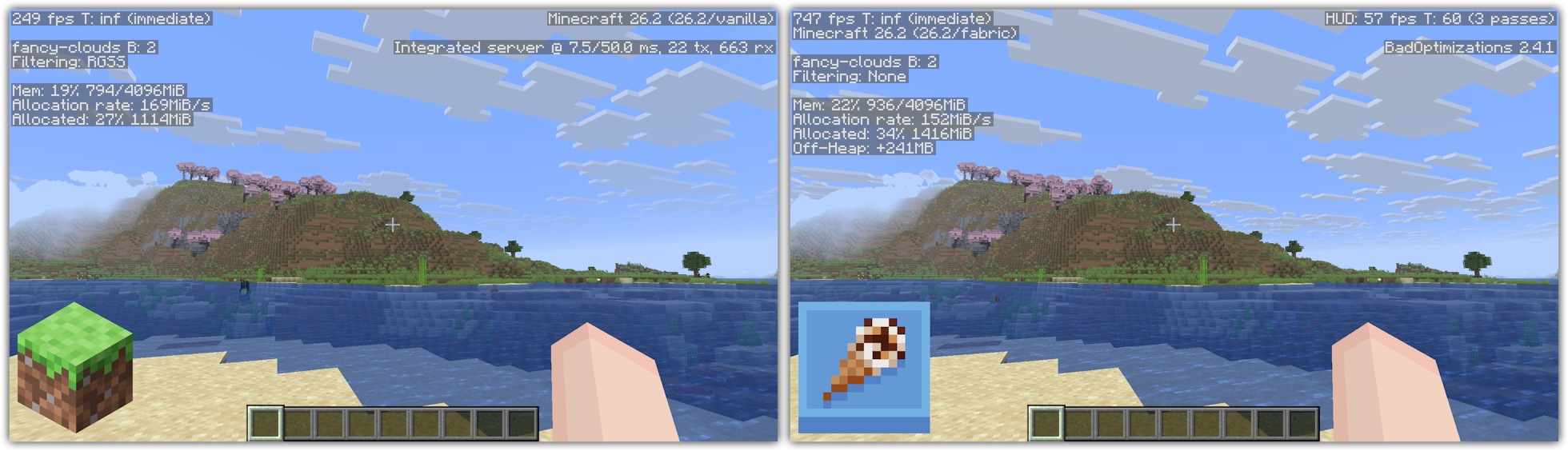
Cornetto (Italian: [kor' netto]; 'little horn') is a small modpack that strives to optimizes your game, with no extra knick-knacks attached to it, meaning you can just add any of your favourite mods on top of this modpack!
This client side modpack (meaning you can join any server with it!) is meant for anyone who likes to keep things basic, or for the people who want to add other mods without having to deal with the optimization part. This pack doesn't add new features to it, like a zoom or no chat report function. (Though very unlikely, some servers don't allow login and chat packets to be altered.)
Please keep in mind that this modpack may or may not work better than other modpacks on your system. This varies between systems as not every computer uses the exact same hardware. But since this modpack only uses a whopping 27 mods, it'll most likely work perfectly on your system too.
What does Cornetto stand for?
OpenJDK Corretto > Cornetto - funny ice cream, hah, get it? Yeah, me neither.
What mods are included?
Cornetto exists out of the following mods;
- Async Logger - Makes logging operations asynchronous
- AsyncParticles - Offloads particles to the GPU
- Audition - Lowers CPU overhead from the sound engine
- BadOptimizations - A collection of micro optimisations
- Better Block Entities - Optimizes how block entities are rendered
- Dynamic FPS - Reduces resource usage while Minecraft is in the background
- Enchanted's Sodium Options - Makes the Sodium video settings screen look more like vanilla's. While purely cosmetical, this does not affect performance.
- Entity Culling - Stops rendering entities that aren't on the screen
- FerriteCore - Reduces memory usage
- Gnetum - Distributes HUD updates over multiple frames
- ImmediatelyFast - Optimizes mode rendering
- Ixeris - Optimises event polling
- Jasione - Reduces GC pressure
- kennytvs-epic-force-close-loading-screen-mod-for-fabric - disables the world loading screen
- MixinTrace - Makes crash logs easier to read
- ModernFix - Fixes a lot of bugs and reduces memory usage
- Moonrise - Optimises the integrated and dedicated server
- More Culling - Introduces multiple culling methods to the game
- Particle Core - Stops rendering particles you can't see
- Quick Pack - Optimises pack loading times
- Server Pinger Fixer - Improves how servers are pinged
- Sodium - Improves how the game is rendered
- StackDeobfuscator - Makes unreadable crash reports more readable
If you have encounter any bugs or issues, feel free to join my Discord to report them!
Available Versions
How to Set Up a Cornetto Server
Order Server
Choose at least 6 GB RAM (8 GB recommended for Cornetto). Based on player count: per 5 players.
Install Modpack in Dashboard
Open the modpack browser in the dashboard, search for "Cornetto" and click "Install". The fabric loader and Minecraft 26.3 are configured automatically.
Start Server & Play
Start the server – all mods are loaded automatically. Share the server IP with friends and play together!
Frequently Asked Questions
Cornetto server crashes or won't start – what to do?
Most common causes: insufficient RAM or wrong fabric loader. Check latest.log for "OutOfMemoryError" → increase RAM to at least 8 GB. For "Mixin" or "ClassNotFoundException" errors: modpack version and loader don't match. With Mado Hosting, loader and Minecraft version are auto-configured on modpack install – preventing most startup issues.
How much RAM does a Cornetto server really need?
Minimum 6 GB, recommended 8 GB for stable performance. per 5 players. Important: Minecraft modpacks need more RAM than vanilla – plan extra per additional player. With Mado Hosting, you can scale RAM up live at any time without data loss (from €7.800000000000001/month).
Can I add custom mods to Cornetto without conflicts?
Yes, but check compatibility: only use mods for the same loader (fabric) and same Minecraft version (26.3). Common issues: ID conflicts with recipe mods and incompatible coremod versions. The Mado dashboard mod browser only shows compatible mods and warns about known conflicts.
Cornetto server lagging – performance tips
1) Increase RAM to 8 GB+. 2) Reduce server view-distance to 8 (server.properties). 3) Pre-generate chunks with the "Chunky" plugin. 4) Use /spark profiler to check which mods consume the most tick time. With Mado Hosting, all servers run on NVMe SSDs with dedicated CPU cores – eliminating hardware as a bottleneck.
Similar Modpacks

![Cobblemon Official Modpack [Fabric]](https://cdn.modrinth.com/data/5FFgwNNP/e7f9ee2e9d361623847853fe2ddce42f519ee64f.png)
![COBBLEVERSE - Pokemon Adventure [Cobblemon]](https://cdn.modrinth.com/data/Jkb29YJU/581ecf54530972afb18a04660afd820f2f24f6c7.png)
![Better MC [FABRIC] - BMC2](https://cdn.modrinth.com/data/shFhR8Vx/a19c2bcb51d38f32f138d3607e91cb2b7b8e387f_96.webp)


Rent Cornetto Server
Start your own server with automatic modpack installation.
Details
- License
- LicenseRef-All-Rights-Reserved
- Server-side
- Unsupported
- Client-side
- Required
Supported Versions
Start your Cornetto Server now
From €7.80/month; 8 GB RAM is recommended for best performance.
Configure Server →