
MaxOptimize
optimization Bioelectricity Redstone Beautify
Screenshots
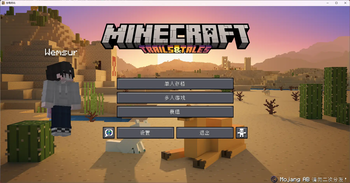
About this Modpack
这是一个针对红石和生电进行了大量优化的整合包。
如果您下载请优先下载更新的版本,不需要担心版本兼容问题,viafabricplus可以保证您加入任何版本的服务器。
包含界面美化、信息模块、性能优化、支持模块,
包含红石、生存、生物电玩家所需的大部分模块,
轻量、加载更快、世界加载更快
现在向世界开放!不仅限于中国
由于mojang在之后的版本中更改了过多生电特性使得很多生电机器无法正常使用,这个整合包可能会停留在1.21与1.21.1
现版本:1.21.1
This is a pack with a lot of optimisations for redstone and raw power.
If you download please try to download the newer version, viafabricplus can guarantee that you join any version of the server, please do not worry
Includes interface beautification, information modules, performance optimisation and support modules.
It contains most of the modules needed by Redstone, Survival and Bioelectric players.
Lightweight, faster loading, faster world loading
Now open to the world!Not just China
Since mojang has changed so many features in later releases that many machines will not work properly, the integration package will likely stay at 1.21 and 1.21.1
Translation may not be accurate. translate by DeepL
Now is 1.21.1
by Wemsur
bilibili of Wemsur
Available Versions
How to Set Up a MaxOptimize Server
Order Server
Choose at least 4 GB RAM (6 GB recommended for MaxOptimize). Based on player count: per 8 players.
Install Modpack in Dashboard
Open the modpack browser in the dashboard, search for "MaxOptimize" and click "Install". The fabric loader and Minecraft 1.21.1 are configured automatically.
Start Server & Play
Start the server – all mods are loaded automatically. Share the server IP with friends and play together!
Frequently Asked Questions
MaxOptimize server crashes or won't start – what to do?
Most common causes: insufficient RAM or wrong fabric loader. Check latest.log for "OutOfMemoryError" → increase RAM to at least 6 GB. For "Mixin" or "ClassNotFoundException" errors: modpack version and loader don't match. With Mado Hosting, loader and Minecraft version are auto-configured on modpack install – preventing most startup issues.
How much RAM does a MaxOptimize server really need?
Minimum 4 GB, recommended 6 GB for stable performance. per 8 players. Important: Minecraft modpacks need more RAM than vanilla – plan extra per additional player. With Mado Hosting, you can scale RAM up live at any time without data loss (from €5.2/month).
Can I add custom mods to MaxOptimize without conflicts?
Yes, but check compatibility: only use mods for the same loader (fabric) and same Minecraft version (1.21.1). Common issues: ID conflicts with recipe mods and incompatible coremod versions. The Mado dashboard mod browser only shows compatible mods and warns about known conflicts.
MaxOptimize server lagging – performance tips
1) Increase RAM to 6 GB+. 2) Reduce server view-distance to 8 (server.properties). 3) Pre-generate chunks with the "Chunky" plugin. 4) Use /spark profiler to check which mods consume the most tick time. With Mado Hosting, all servers run on NVMe SSDs with dedicated CPU cores – eliminating hardware as a bottleneck.
Similar Modpacks

![Cobblemon Official Modpack [Fabric]](https://cdn.modrinth.com/data/5FFgwNNP/e7f9ee2e9d361623847853fe2ddce42f519ee64f.png)
![COBBLEVERSE - Pokemon Adventure [Cobblemon]](https://cdn.modrinth.com/data/Jkb29YJU/581ecf54530972afb18a04660afd820f2f24f6c7.png)
![Better MC [FABRIC] - BMC2](https://cdn.modrinth.com/data/shFhR8Vx/a19c2bcb51d38f32f138d3607e91cb2b7b8e387f_96.webp)


Rent MaxOptimize Server
Start your own server with automatic modpack installation.
Supported Versions
Start your MaxOptimize Server now
From €5.20/month; 6 GB RAM is recommended for best performance.
Configure Server →