
All Simple Voice Chat Connections!
🎤|See all All Simple Voice Chat Connections!
Screenshots

About this Modpack
all simple voice chat connections!
everything you could want for simple voice chat.



voice chat · discord · tts · soundboards · recording · qol
a complete collection of addons, integrations, and quality-of-life mods built around simple voice chat.
no hunting for addons.
no figuring out what works together.
just install the pack and start talking.

what is this?
simple voice chat connections is a modpack built around simple voice chat and everything that can be connected to it.
it brings together voice communication, discord integration, audio tools, text-to-speech, recording, and a collection of smaller quality-of-life addons into one ready-to-use package.
one modpack. one voice stack.
what's included?





voice & communication
everything you need to make minecraft's voice system more useful:
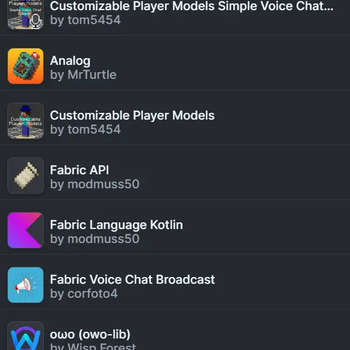
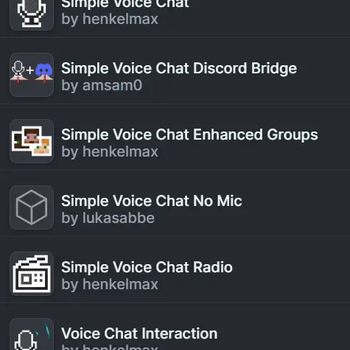
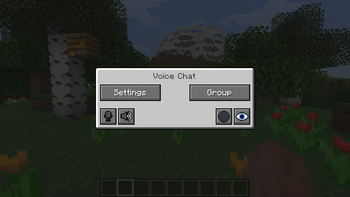
- simple voice chat — proximity voice chat
- replay voice chat — records voice chat alongside replay mod
- voice chat discord — bridges in-game voice to discord
- voice messages — send recorded voice messages through chat
- talkingheads — makes player heads react while speaking
- svc player names — displays player names while they talk
- voicechat names — alternative player name display
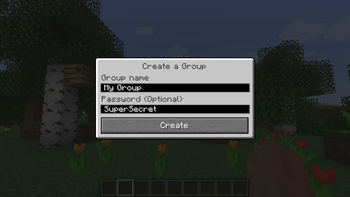
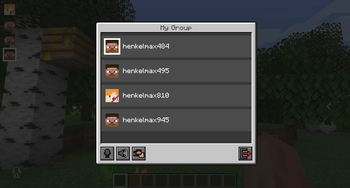
- enhanced groups — improved voice chat group management
- global spectator vc — voice chat support while spectating
- wiretap — record and monitor voice chat sessions
audio & soundboards
turn voice chat into an actual audio system:
- audio player — play custom audio files in-game
- open soundboard — open-source soundboard integration
- simple soundboard — lightweight soundboard addon
- soundboard — additional soundboard functionality
tts & voice effects
because normal voices are apparently not enough:
- ttvoice — twitch chat tts integration
- svc tts — text-to-speech for simple voice chat
- pitch shifter — change your voice pitch in real time
recording
- replay mod — record and replay entire sessions
- replay voice chat — keep voice chat alongside your recordings
performance
the voice stack doesn't need to come at the cost of your fps.
- sodium — optimized rendering
- lithium — optimized game logic
- ferritecore — reduced memory usage
- entity culling — skips rendering things you can't see
- iris — shader support
the whole stack
| category | mods |
|---|---|
| voice chat | simple voice chat, replay voice chat, voice chat discord |
| communication | voice messages, enhanced groups, global spectator vc |
| player presence | talkingheads, svc player names, voicechat names |
| audio | audio player, open soundboard, simple soundboard, soundboard |
| tts | ttvoice, svc tts |
| voice effects | pitch shifter |
| recording | replay mod, replay voice chat |
| performance | sodium, lithium, ferritecore, entity culling, iris |
| interface | mod menu |
| libraries | fabric api, fabric language kotlin, cloth config, owo lib, cristel lib, placeholder api |
compatibility
| minecraft | 1.21.11 |
| loader | fabric 0.18.6 |
| java | java 21 |
| ram | 3 gb allocated recommended |
download
we're currently available on modrinth.

made by edonme studios
lead dev: slibjpg
this modpack exists to make the entire simple voice chat ecosystem easier to use.
instead of searching for every addon individually, everything important is collected here.
Available Versions
How to Set Up a All Simple Voice Chat Connections! Server
Order Server
Choose at least 6 GB RAM (8 GB recommended for All Simple Voice Chat Connections!). Based on player count: per 5 players.
Install Modpack in Dashboard
Open the modpack browser in the dashboard, search for "All Simple Voice Chat Connections!" and click "Install". The fabric loader and Minecraft 1.21.11 are configured automatically.
Start Server & Play
Start the server – all mods are loaded automatically. Share the server IP with friends and play together!
Frequently Asked Questions
All Simple Voice Chat Connections! server crashes or won't start – what to do?
Most common causes: insufficient RAM or wrong fabric loader. Check latest.log for "OutOfMemoryError" → increase RAM to at least 8 GB. For "Mixin" or "ClassNotFoundException" errors: modpack version and loader don't match. With Mado Hosting, loader and Minecraft version are auto-configured on modpack install – preventing most startup issues.
How much RAM does a All Simple Voice Chat Connections! server really need?
Minimum 6 GB, recommended 8 GB for stable performance. per 5 players. Important: Minecraft modpacks need more RAM than vanilla – plan extra per additional player. With Mado Hosting, you can scale RAM up live at any time without data loss (from €7.800000000000001/month).
Can I add custom mods to All Simple Voice Chat Connections! without conflicts?
Yes, but check compatibility: only use mods for the same loader (fabric) and same Minecraft version (1.21.11). Common issues: ID conflicts with recipe mods and incompatible coremod versions. The Mado dashboard mod browser only shows compatible mods and warns about known conflicts.
All Simple Voice Chat Connections! server lagging – performance tips
1) Increase RAM to 8 GB+. 2) Reduce server view-distance to 8 (server.properties). 3) Pre-generate chunks with the "Chunky" plugin. 4) Use /spark profiler to check which mods consume the most tick time. With Mado Hosting, all servers run on NVMe SSDs with dedicated CPU cores – eliminating hardware as a bottleneck.
Similar Modpacks


![Cobblemon Official Modpack [Fabric]](https://cdn.modrinth.com/data/5FFgwNNP/e7f9ee2e9d361623847853fe2ddce42f519ee64f.png)
![COBBLEVERSE - Pokemon Adventure [Cobblemon]](https://cdn.modrinth.com/data/Jkb29YJU/581ecf54530972afb18a04660afd820f2f24f6c7.png)

![Better MC [FABRIC] - BMC2](https://cdn.modrinth.com/data/shFhR8Vx/a19c2bcb51d38f32f138d3607e91cb2b7b8e387f_96.webp)
Rent All Simple Voice Chat Connections! Server
Start your own server with automatic modpack installation.
Supported Versions
Start your All Simple Voice Chat Connections! Server now
From €7.80/month; 8 GB RAM is recommended for best performance.
Configure Server →