
Vital Modpack
QoL and Performance modpack with the features of Essential and OptiFine!
Screenshots



About this Modpack



QoL and Performance modpack with the features of Essential and OptiFine!
Explore the wiki
·
Report Bugs
·
Request Features
Vital is a modpack designed as a QoL and performance modpack that dually serves as an alternative to Essential and OptiFine.
It includes the majority of Essential and OptiFine's features, including world hosting, cosmetics, many resource pack features, shaders, and so much more.
⭐ Features
🚀 Major performance improvement
Vital is built on top of the bleeding edge Simply Optimized Forked modpack, which improves the performance of every aspect of the game.
🔷 Essential features
Vital contains quite a few mods to replace Essential's features!
- Free world hosting that's secure and private, and does not require the other players to use it
- Simply click "Open to Friends" in the menu to get an IP address you can send to your friends to play!
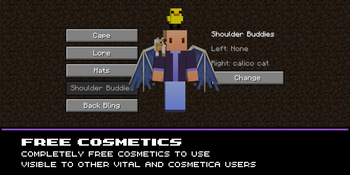
- Completely free cosmetics!
- You can access these in the mod menu or settings menu. You could also visit the Cosmetica website!
- A bunch of neat skin management features
- Accessible through the main menu!
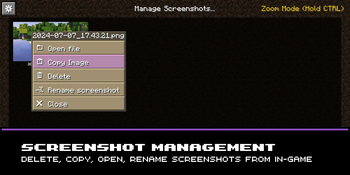
- Screenshot improvements
- When you take a screenshot, it will let you view it easily. You can also manage your screenshots in-game!
- Log into different accounts from ingame.
- Simply go into the main menu and select the account switcher!
- In-game recording
- Via the brilliant Flashback mod!
- Better organized main menu
- Inspired by Essentials layout; intended to be in the style of vanilla!
🔍 OptiFine features
Vital utilizes the core mods needed to bring over all of OptiFine's benefits;
- OptiFine resource pack features
- Built-in shaders support
- Dynamic lighting from held objects
- Better grass and snow
- OptiFine donator capes (and free capes)
- All OptiFine features and more information on the wiki
💡 Quality of Life
Vital also includes some extra features unrelated to OptiFine, although I aim to keep this list of mods minimal. Mods are suitable for the "other features" section if they are lightweight and unobtrusive. This includes things like:
- Small input fixes for MacOS and Linux players
- Borderless fullscreen window setting in the video settings
- All other features and more information on the Additive wiki
✅ Hardware Compatibility
For Hardware Compatibility information, see the corresponding section in Sodium's Modrinth description.
🐛 How to Report Issues
Experiencing bugs, crashes, or other issues? Feel free to open an issue on the issue tracker. Be sure to include necessary information like your hardware/software (e.g. GPU and CPU, modpack version and OS) so that it's easier for us to find issues and resolve them.
Need a server?
Available Versions
How to Set Up a Vital Modpack Server
Order Server
Choose at least 4 GB RAM (6 GB recommended for Vital Modpack). Based on player count: per 8 players.
Install Modpack in Dashboard
Open the modpack browser in the dashboard, search for "Vital Modpack" and click "Install". The fabric loader and Minecraft 26.1.2 are configured automatically.
Start Server & Play
Start the server – all mods are loaded automatically. Share the server IP with friends and play together!
Frequently Asked Questions
Vital Modpack server crashes or won't start – what to do?
Most common causes: insufficient RAM or wrong fabric loader. Check latest.log for "OutOfMemoryError" → increase RAM to at least 6 GB. For "Mixin" or "ClassNotFoundException" errors: modpack version and loader don't match. With Mado Hosting, loader and Minecraft version are auto-configured on modpack install – preventing most startup issues.
How much RAM does a Vital Modpack server really need?
Minimum 4 GB, recommended 6 GB for stable performance. per 8 players. Important: Minecraft modpacks need more RAM than vanilla – plan extra per additional player. With Mado Hosting, you can scale RAM up live at any time without data loss (from €5.2/month).
Can I add custom mods to Vital Modpack without conflicts?
Yes, but check compatibility: only use mods for the same loader (fabric) and same Minecraft version (26.1.2). Common issues: ID conflicts with recipe mods and incompatible coremod versions. The Mado dashboard mod browser only shows compatible mods and warns about known conflicts.
Vital Modpack server lagging – performance tips
1) Increase RAM to 6 GB+. 2) Reduce server view-distance to 8 (server.properties). 3) Pre-generate chunks with the "Chunky" plugin. 4) Use /spark profiler to check which mods consume the most tick time. With Mado Hosting, all servers run on NVMe SSDs with dedicated CPU cores – eliminating hardware as a bottleneck.
Similar Modpacks

![Cobblemon Official Modpack [Fabric]](https://cdn.modrinth.com/data/5FFgwNNP/e7f9ee2e9d361623847853fe2ddce42f519ee64f.png)
![COBBLEVERSE - Pokemon Adventure [Cobblemon]](https://cdn.modrinth.com/data/Jkb29YJU/581ecf54530972afb18a04660afd820f2f24f6c7.png)
![Better MC [FABRIC] - BMC2](https://cdn.modrinth.com/data/shFhR8Vx/a19c2bcb51d38f32f138d3607e91cb2b7b8e387f_96.webp)


Rent Vital Modpack Server
Start your own server with automatic modpack installation.
Supported Versions
Start your Vital Modpack Server now
From €5.20/month; 6 GB RAM is recommended for best performance.
Configure Server →