
AFK Utilitys
Advanced AFK management mod for Minecraft Fabric with anti-kick protection, auto-reconnect, safety disconnect, and hunger management
Screenshots

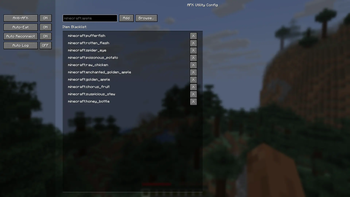


About this Mod
AFK Utilitys

An advanced utility mod for Minecraft Fabric that manages AFK (Away From Keyboard) states with intelligent automation and safety features.
Settings Keybind:
K
Use Cases
- Server AFK Protection: Prevent kicks from AFK timeout systems
- Safety Management: Auto-disconnect when health drops or taking damage
- Automatic Reconnection: Never lose your spot during server restarts
- Hunger Management: Keep your hunger bar full while away
- Farm Automation: Maintain activity for passive mob farms and auto-clickers

Features
Anti-AFK System
Simulates natural player activity to prevent server kicks:
- Auto-Jump: Randomized jumping intervals for natural appearance
- Auto-Swing: Periodic hand swinging with Use (right-click) interaction. Perfect for flipping levers or interacting with buttons automatically.
- Auto-Sneak: Configurable crouch timing and intervals
- Strafe Mode: Automatic left-right movement to avoid coordinate-based detection
- Spin Mode:
- Client Mode: Rotates your camera view visually
- Server Mode: Sends rotation packets while keeping your screen static
- Chat Messages: Send periodic messages with custom text
- Interval range: 0.1 to 30 minutes
- Custom message support
Auto Reconnect
Smart reconnection system for uninterrupted gameplay:
- Server Retention: Automatically remembers last connected server
- Countdown Timer: Visual countdown on disconnect screen
- Quick Toggle: Enable/disable directly from disconnect screen
- Configurable Delay: Set custom wait time before reconnection attempt
Auto Log (Safety Disconnect)
Protect your character while away:
- HP Threshold: Disconnect when health drops below configured value
- Instant Damage Mode: Disconnect immediately upon taking any damage
- Safety Lock: Optional Auto Reconnect disable after Auto Log trigger
- Death Prevention: Keeps you safe in dangerous situations
Auto Eat
Intelligent hunger management:
- Smart Timing: Only eats when hunger restoration won't be wasted
- Blacklist Support: Exclude specific items (e.g., Rotten Flesh, Spider Eyes)
- Efficient Consumption: Calculates optimal eating times based on food value
Installation
Requirements
- Minecraft 1.21+
- Fabric Loader 0.16.0+
- FabricAPI
Download
Download the mod from Modrinth and place the .jar file into your .minecraft/mods folder.
Configuration
The mod features a sidebar-based configuration UI with four main categories:
- Anti-AFK: Configure all anti-kick features and intervals
- Auto-Eat: Set hunger thresholds and manage food blacklist
- Reconnect: Adjust reconnection delay and toggle auto-reconnect
- Auto-Log: Configure health thresholds and safety settings
Configuration File
Settings are saved to:
.minecraft/config/afkutility.json
Example configuration:
{
  "antiAfk": {
    "autoJump": true,
    "autoSwing": true,
    "autoSneak": false,
    "sneakTime": 2.0,
    "strafeMode": false,
    "spinMode": "OFF",
    "chatMessages": false,
    "messageInterval": 5.0,
    "customMessage": "I am not AFK"
  },
  "autoReconnect": {
    "enabled": true,
    "delay": 5
  },
  "autoLog": {
    "enabled": true,
    "healthThreshold": 4.0,
    "onDamage": false,
    "disableReconnect": true
  },
  "autoEat": {
    "enabled": true,
    "blacklist": ["minecraft:rotten_flesh", "minecraft:spider_eye"]
  }
}
For Developers
Building
./gradlew build
Output: build/libs/afk-utility-1.0.0.jar
Project Structure
src/client/java/dev/afk/utility/
├── AFKUtilityClient.java          # Client entrypoint
├── config/
│   └── ModConfig.java             # Configuration management
├── features/
│   ├── AntiAFK.java               # Anti-AFK implementations
│   ├── AutoReconnect.java         # Reconnection handler
│   ├── AutoLog.java               # Safety disconnect
│   └── AutoEat.java               # Hunger management
├── mixin/client/
│   ├── DisconnectScreenMixin.java # UI integration
│   └── ClientPlayerMixin.java     # Player event hooks
└── screen/
    └── ConfigScreen.java          # Sidebar configuration UI
License
MIT
Credits
- Fabric API Team
- Minecraft Modding Community
Available Versions
How to Install AFK Utilitys on Your Client
Install the Mod Loader Locally
Install fabric for your local Minecraft version.
Download the Matching File
Choose the AFK Utilitys file for fabric and Minecraft 1.21.11.
Install Mod
Place the .jar file in your local .minecraft/mods folder and restart Minecraft. No server-side installation is required.
Compatibility
Mod Loaders
Minecraft Versions
1.21.11, 1.21.10, 1.21.9 (+9 more)
Server-side
✗ UnsupportedRecommended RAM
4 GB(min. 3 GB)Frequently Asked Questions
Does AFK Utilitys need to be installed on the Minecraft server?
No. Modrinth marks AFK Utilitys as unsupported on the server side. Install it only in your local Minecraft mods folder. Your server can remain unchanged unless the mod page lists an additional dependency.
Which version and loader does AFK Utilitys require?
Use a file for fabric and your exact Minecraft version. Supported versions include 1.21.11, 1.21.10, 1.21.9. Files for different loaders are not interchangeable.
AFK Utilitys is not working – what should I check?
First check the Minecraft version, loader version and required dependencies. Put the .jar file in your local .minecraft/mods folder and remove older duplicates. Because this mod is client-side, adding server RAM will not fix it.
Similar Mods






Minecraft Server for Your Group
AFK Utilitys stays on your client. Host a compatible world for your group.