Emoji Type
Type Minecraft emojis and symbols with simple shortcodes.
Screenshots
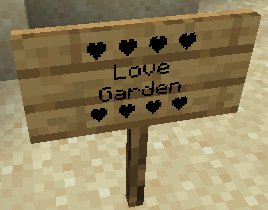
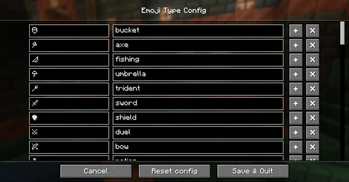

About this Mod
🙂 Emoji Type
Type Minecraft emojis and symbols with simple shortcodes.
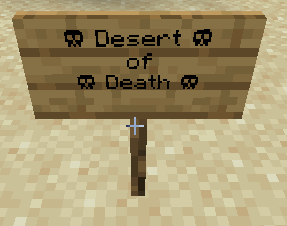
Emoji Type allows you to instantly insert 200+ emojis into your game using intuitive keywords. Type :skull: and get ☠️ instantly. Works in chat, signs, books, anvils - everywhere text appears. No resource packs or texture changes needed.
🚀 Key Features
- Seamless Integration: Works in chat, signs, books, and even anvils.
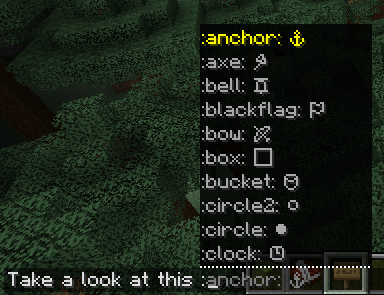
- Smart Autocomplete: Type a colon (
:) in chat to see a real-time list of suggestions. - Vanilla Compatible: Emojis are standard Unicode. Other players can see your emojis even if they don't have the mod installed!
- Emoji Pack: Create, edit your own emoji packs via a built-in visual editor.
Bundled Emoji Packs
| Pack | Description | Examples |
|---|---|---|
| Minecraft Essentials | Tools, weapons, and status icons. | ⚔️ ⛏️ 🏹 ☀️ ❄️ |
| Text Art (Kaomoji) | Classic ASCII and Japanese emoticons. | ¯\_(ツ)_/¯ (╯°□°)╯ |
| Letter Emojis | Stylized circled alphabets. | ⓐ Ⓑ ⓒ Ⓓ |
🛠️ How to Use
- Install: Drop the mod into your
modsfolder (Client-side only!). - Trigger: Press
:in any text field. - Search: Start typing (e.g.,
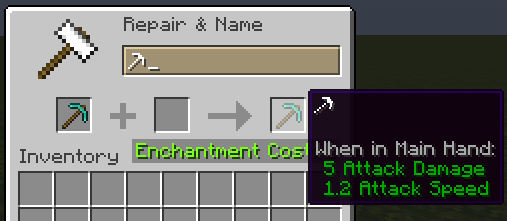
:sw...) and use your arrow keys or mouse to select. - Anywhere Else: On signs or anvils, simply type the full code (e.g.,
:heart:) and watch it transform.
Customizing: Access the config via Mod Menu (Fabric) or the Mods setting (NeoForge) to enable/disable emoji packs or build your own from scratch!
❓ Frequently Asked Questions
Do I need this on my server?
Nope! It’s 100% client-side. It won’t do anything if installed on a server.
Can my friends see the emojis?
Yes! Since these are native Unicode characters, anyone on a modern Minecraft client can see them perfectly.
How do I share my custom packs?
Just send the .yaml file found in config/emojitype/emoji_packs/. Your friends can just drop it in their folder and they're good to go.
Why no autocomplete on signs?
Minecraft’s sign and anvil interfaces are a bit more restrictive than chat. For now, just type the full keyword (like :check:) and it will convert automatically.
🖼️ Gallery
| Chat Suggestions | Config Screen | Emoji Packs |
|---|---|---|
|
 |
 |
Available Versions
How to Install Emoji Type on Your Client
Install the Mod Loader Locally
Install fabric for your local Minecraft version.
Download the Matching File
Choose the Emoji Type file for fabric and Minecraft 26.2.
Install Mod
Place the .jar file in your local .minecraft/mods folder and restart Minecraft. No server-side installation is required.
Compatibility
Mod Loaders
Minecraft Versions
26.2, 26.1.2, 26.1.1 (+29 more)
Server-side
✗ UnsupportedRecommended RAM
4 GB(min. 3 GB)Frequently Asked Questions
Does Emoji Type need to be installed on the Minecraft server?
No. Modrinth marks Emoji Type as unsupported on the server side. Install it only in your local Minecraft mods folder. Your server can remain unchanged unless the mod page lists an additional dependency.
Which version and loader does Emoji Type require?
Use a file for fabric, forge, neoforge, quilt and your exact Minecraft version. Supported versions include 26.2, 26.1.2, 26.1.1. Files for different loaders are not interchangeable.
Emoji Type is not working – what should I check?
First check the Minecraft version, loader version and required dependencies. Put the .jar file in your local .minecraft/mods folder and remove older duplicates. Because this mod is client-side, adding server RAM will not fix it.
Similar Mods






Minecraft Server for Your Group
Emoji Type stays on your client. Host a compatible world for your group.