
Entity Cleaner
Automatically removes unwanted entities like items, arrows, XP orbs, and projectiles to improve performance.
Screenshots
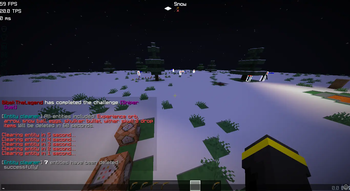
About this Mod

This standalone datapack/mod is a powerful upgrade verison to the original Lag Sweeper, designed to work seamlessly across multiple Minecraft versions. It efficiently clears a wide range of entities, including dropped items, eggs, snow, arrows, shulker bullets, wither skulls, and more, reducing lag and keeping your world running smoothly.


Singleplayer: If you're using the datapack or mod in a singleplayer world, install the Singleplayer Library. It automatically grants you the ec_operator tag, so you don't need to enable cheats. Alternatively, if you have access to commands, you can manually grant yourself operator access with:
/tag @s add ec_operatorMultiplayer: "Do not install the Singleplayer Library". On multiplayer servers, core Entity Cleaner settings should remain restricted to server administrators. To grant a player permission to modify Entity Cleaner settings, use:
/tag <player_name> add ec_operator

- Multi-version compatibility – Works reliably on different Minecraft versions without errors.
- Comprehensive entity cleanup – Removes common lag-causing entities automatically (Every 5min).
- Lightweight and easy to use – Install and run without affecting gameplay performance.
- Optimized for servers and singleplayer – Keeps both worlds and servers smooth, even with high entity counts.
- Easy-to-customize item cleaner config: choose which items to delete, set the cleanup time, and more.

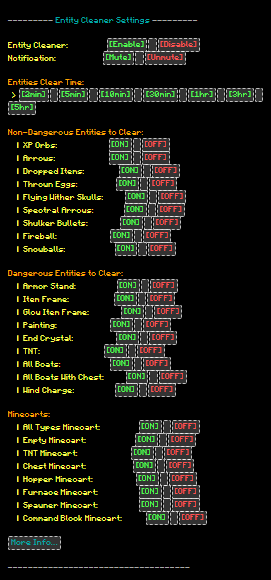
/trigger ec_menu: Opens the Entity Cleaner configuration menu./tag player_name add ec_operator: Gives permission to modify the Entity Cleaner configuration.


What does Entity Cleaner do?
Entity Cleaner helps improve server performance by automatically removing unwanted entities such as dropped items, XP orbs, projectiles, and other selected entities after a configurable amount of time.How to get Operate on entity cleaner?
Run ingame command run command /tag player_name ec_operatorCan I customize what entities get removed?
Yes! Entity Cleaner comes with a fully customizable configuration where you can choose which entities should be removed or kept. You can enable or disable cleaning for items, mobs, projectiles, minecarts, boats, and more (/trigger ec_menu).Can I change the cleanup time?
Yes. You can configure the cleanup interval and choose how often Entity Cleaner checks and removes unwanted entities (/trigger ec_menu).Will it remove important entities?
No. Entity Cleaner allows you to control exactly what gets removed. By default, only selected entities are cleaned, and you can disable any category you want from the config.Can I use this on a multiplayer server?
Yes. Entity Cleaner is designed for servers and can help reduce unnecessary entity buildup, improving performance for players.Does Entity Cleaner delete items instantly?
No. Items are removed based on your configured cleanup timer, giving players enough time to collect dropped items before they are cleared.Can I see when cleanup happens?
Yes. Notification settings can be configured to show cleanup messages when entities are removed.Does Entity Cleaner affect mob farms?
No. Entity Cleaner only removes selected item-related entities and does not remove mobs, so your mob farms will work normally. It is safe to use on servers without affecting mob spawning or farms.

Tired of losing all your items after death? Death Chest keeps your valuable loot safe and gives you a better way to recover your items. Download Now!

Looking for a better, cleaner Minecraft launcher?
Check out Cubi Launcher a modern, feature-rich launcher with a polished UI, and it's completely free to use. Download Now↗

Available Versions
How to Install Entity Cleaner on Your Server
Order Server
Order a Minecraft Java server with at least 3 GB RAM (4 GB recommended).
Set datapack Loader
In the panel under "Egg", select the datapack loader and matching Minecraft version (26.3-snapshot-2).
Install Mod
Open the mod browser in the dashboard and search for "Entity Cleaner". Click "Install" – done! Alternatively, upload the .jar via SFTP to the /mods folder.
Compatibility
Mod Loaders
Minecraft Versions
26.3-snapshot-2, 26.3-snapshot-1, 26.2 (+68 more)
Server-side
✓ RequiredRecommended RAM
4 GB(min. 3 GB)Frequently Asked Questions
Entity Cleaner server crashes on startup – what to do?
Most common cause: wrong datapack version or insufficient RAM. Check the server log (latest.log) for "OutOfMemoryError" or "Mixin" errors. With Mado Hosting: ensure at least 3 GB RAM is allocated and the loader matches the mod version (26.3-snapshot-2). You can switch loaders with one click in the panel.
Is Entity Cleaner compatible with datapack and fabric and forge and neoforge and quilt?
Entity Cleaner officially supports datapack, fabric, forge, neoforge, quilt for Minecraft 26.3-snapshot-2, 26.3-snapshot-1, 26.2. Note: Forge and Fabric mods are NOT cross-compatible – pick one loader and stick with it. The Mado dashboard automatically detects incompatible loader combinations.
Server lagging with Entity Cleaner – how to optimize performance?
Recommended RAM: 4 GB (per 8 players). Use /spark profiler to check if Entity Cleaner consumes the most tick time. Common fixes: reduce server view-distance to 8-10, install "performant" or "starlight" as supplementary mods on Forge. With Mado Hosting, your server runs on NVMe SSDs with dedicated CPU cores for minimal latency.
Similar Mods






Rent Modded Server
Install Entity Cleaner with just one click on your server.