
MineFortress
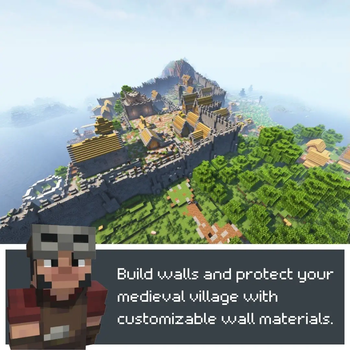
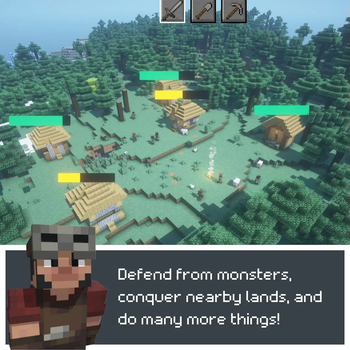
the mod that will turn your Minecraft into real-time strategy like Rimworld or DwarfFortress. Take the role of a village leader, gather resources, build houses, hire professionals to grow and expand your village and even conquer your neighbors!
Screenshots
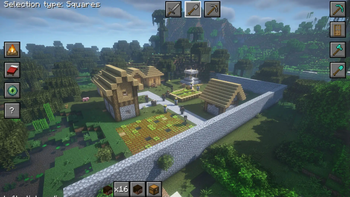
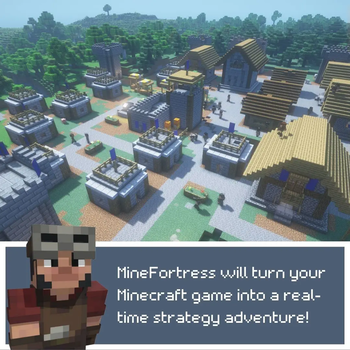
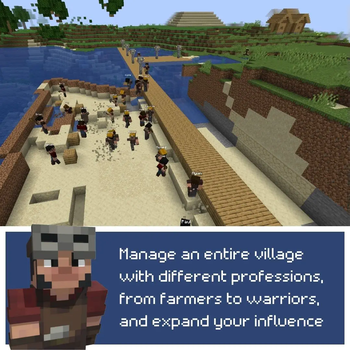
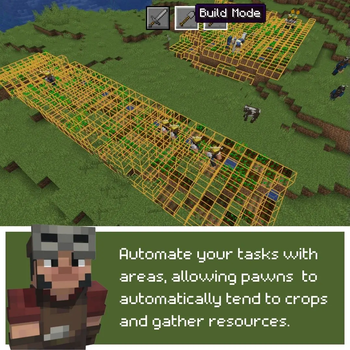
About this Mod





📚 ABOUT THE MOD 📚
The mod turns your Minecraft into RTS. Take the role of a village leader, gather resources, build houses, hire professionals to grow and expand your village and even conquer your neighbors! Forget about the first-person view and control everything with your mouse pointer like in classic RTS games.Features:
- Truly RTS-like view. Control everything with your mouse pointer!
- Resources system. Your pawns will gather resources, and you can spend them to hire more professionals, or to build some houses.
- Blueprints system. Build your custom buildings and add them to your very own village.
- Combat system! Hire warriors and go fight with your neighbors!
- Hunger and mood system. Your pawns have their health stats and in the future will have their mood and character.
- Multiplayer support starting with 1.8.3 beta version
🎥 TAKE A LOOK! 🎥
📚 INSTALLATION 📚


Installation should be pretty straightforward.
- Install Fabric Launcher
- Add Latest Fabric API compatible the mod if it's not installed automatically
- Add the mod
🎮 GETTING STARTED 🎮
The mod adds new Gamemode to the game named "Fortress"Choose gamemode "Fortress" in the World Creation Menu or use "/gamemode fortress" command while playing and you will be switched to Fortress gamemode.
Your main control in the game is you mouse pointer. After starting the world right click to place campfire.
Basic controls:
- left click once - start selecting a task to "dig"/remove something
- left click while selecting - confirm "dig" task
- right click while holding any block in hand - start selecting a task to build something
- right click while selecting - confirm "build" task
- hold sprint button (ctrl by default) and move your mouse - look around
🤑 SUPPORT THE PROJECT 🤑

Available Versions
How to Install MineFortress on Your Server
Order Server
Order a Minecraft Java server with at least 3 GB RAM (4 GB recommended).
Set fabric Loader
In the panel under "Egg", select the fabric loader and matching Minecraft version (1.20.2).
Install Mod
Open the mod browser in the dashboard and search for "MineFortress". Click "Install" – done! Alternatively, upload the .jar via SFTP to the /mods folder.
Compatibility
Mod Loaders
Minecraft Versions
1.20.2, 1.20.1
Server-side
~ OptionalRecommended RAM
4 GB(min. 3 GB)Frequently Asked Questions
MineFortress server crashes on startup – what to do?
Most common cause: wrong fabric version or insufficient RAM. Check the server log (latest.log) for "OutOfMemoryError" or "Mixin" errors. With Mado Hosting: ensure at least 3 GB RAM is allocated and the loader matches the mod version (1.20.2). You can switch loaders with one click in the panel.
Is MineFortress compatible with fabric?
MineFortress officially supports fabric for Minecraft 1.20.2, 1.20.1. The Mado dashboard automatically detects incompatible loader combinations.
Server lagging with MineFortress – how to optimize performance?
Recommended RAM: 4 GB (per 8 players). Use /spark profiler to check if MineFortress consumes the most tick time. Common fixes: reduce server view-distance to 8-10, install "performant" or "starlight" as supplementary mods on Forge. With Mado Hosting, your server runs on NVMe SSDs with dedicated CPU cores for minimal latency.
Similar Mods


![CobbleDollars [Cobblemon Addon]](https://cdn.modrinth.com/data/s7N7AsqL/684040a264fc1d7f9b856ec5d2da39767398c7ad.png)

Rent Modded Server
Install MineFortress with just one click on your server.