
Library Ferret
Shared code for the mod of jtorleon studios
Screenshots

About this Mod
Intro :
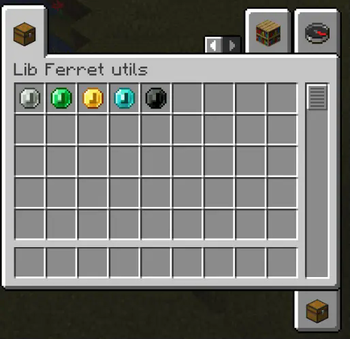
Library Ferret is a library mod designed to centralize shared code for JTorLeon Studios' mods. While it doesn't add visible content on its own, it is crucial for the functionality of other mods from our studio. Originally, this mod included items and blocks, but in the next version, only the "coins" item functionality will be retained.
Even if you're not using other JTorLeon Studios mods, Library Ferret could still be useful for integrating custom features or expanding your own projects, like the coins.
Mods requiring Library Ferret


Enjoy this mod? Don’t miss future updates! Click the Follow button on the project page to get notified when new content is released. 💚🚀
Partners :
href=""
target="_blank"
rel="noopener noreferrer"><img
src=""
width="1168" height="155"/>
Call to Action :
Have questions? Need help? Join us on Discord or visit our GitHub to get involved with the community and contribute!
Available Versions
How to Install Library Ferret on Your Server
Order Server
Order a Minecraft Java server with at least 3 GB RAM (4 GB recommended).
Set fabric Loader
In the panel under "Egg", select the fabric loader and matching Minecraft version (26.2).
Install Mod
Open the mod browser in the dashboard and search for "Library Ferret". Click "Install" – done! Alternatively, upload the .jar via SFTP to the /mods folder.
Compatibility
Mod Loaders
Minecraft Versions
26.2, 1.21.11, 1.21.10 (+26 more)
Server-side
✓ RequiredRecommended RAM
4 GB(min. 3 GB)Frequently Asked Questions
Library Ferret server crashes on startup – what to do?
Most common cause: wrong fabric version or insufficient RAM. Check the server log (latest.log) for "OutOfMemoryError" or "Mixin" errors. With Mado Hosting: ensure at least 3 GB RAM is allocated and the loader matches the mod version (26.2). You can switch loaders with one click in the panel.
Is Library Ferret compatible with fabric and forge and neoforge?
Library Ferret officially supports fabric, forge, neoforge for Minecraft 26.2, 1.21.11, 1.21.10. Note: Forge and Fabric mods are NOT cross-compatible – pick one loader and stick with it. The Mado dashboard automatically detects incompatible loader combinations.
Server lagging with Library Ferret – how to optimize performance?
Recommended RAM: 4 GB (per 8 players). Use /spark profiler to check if Library Ferret consumes the most tick time. Common fixes: reduce server view-distance to 8-10, install "performant" or "starlight" as supplementary mods on Forge. With Mado Hosting, your server runs on NVMe SSDs with dedicated CPU cores for minimal latency.
Similar Mods


![CobbleDollars [Cobblemon Addon]](https://cdn.modrinth.com/data/s7N7AsqL/684040a264fc1d7f9b856ec5d2da39767398c7ad.png)

Rent Modded Server
Install Library Ferret with just one click on your server.