
Panic Figura (Add-on Figura)
Panic Figura use for edit render distance figura
Screenshots
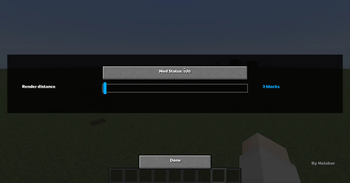
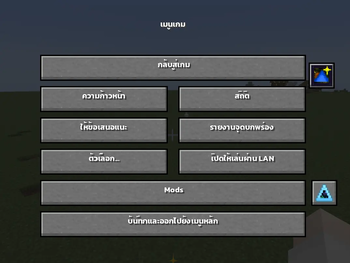
About this Mod
Panic Figura
Panic Figura , This mod allows you to freely adjust the mesh render distance in Figura , giving you better control over how models are displayed in-game
By reducing the render distance of distant meshes, the mod helps eliminate unnecessary processing—especially when using high-detail or multiple models. This results in noticeable FPS improvements and smoother overall performance
Perfect for ⁉️
- Players using multiple Figura models
- Users experiencing FPS drops from complex avatars
- Anyone looking to optimize performance
Features ✨
- Adjustable mesh render distance
- Reduces GPU/CPU load from distant models
- Improves overall FPS and performance
- Simple and easy to use
TH
Panic Figura เอาไว้ใช้สําหรับการปรับระยะการมองเห็นของ Figura ถ้าเกิดว่าอยู่นอกระยะจะไม่ Render Figura คนนอกระยะ
เหมาะสำหรับ ⁉️
- เชิฟใหญ่ที่มีผู้เล่นที่ใส่ Figura เยอะ
- คนที่อยากปรับ Performance ให้เหมาะกับเครื่องตัวเอง
ฟีเจอร์ ✨
ปรับระยะการแสดงผล Mesh ได้แบบละเอียด
ลดภาระ GPU/CPU จากโมเดลที่อยู่ไกล
เพิ่มประสิทธิภาพ (FPS) โดยรวมของเกม
ใช้งานง่าย ไม่ซับซ้อน
Original Mods / Request Mod ⭐
Available Versions
How to Install Panic Figura (Add-on Figura) on Your Client
Install the Mod Loader Locally
Install forge for your local Minecraft version.
Download the Matching File
Choose the Panic Figura (Add-on Figura) file for forge and Minecraft 1.20.1.
Install Mod
Place the .jar file in your local .minecraft/mods folder and restart Minecraft. No server-side installation is required.
Compatibility
Mod Loaders
Minecraft Versions
1.20.1
Server-side
✗ UnsupportedRecommended RAM
4 GB(min. 3 GB)Frequently Asked Questions
Does Panic Figura (Add-on Figura) need to be installed on the Minecraft server?
No. Modrinth marks Panic Figura (Add-on Figura) as unsupported on the server side. Install it only in your local Minecraft mods folder. Your server can remain unchanged unless the mod page lists an additional dependency.
Which version and loader does Panic Figura (Add-on Figura) require?
Use a file for forge and your exact Minecraft version. Supported versions include 1.20.1. Files for different loaders are not interchangeable.
Panic Figura (Add-on Figura) is not working – what should I check?
First check the Minecraft version, loader version and required dependencies. Put the .jar file in your local .minecraft/mods folder and remove older duplicates. Because this mod is client-side, adding server RAM will not fix it.
Similar Mods






Minecraft Server for Your Group
Panic Figura (Add-on Figura) stays on your client. Host a compatible world for your group.