
Player Radar
Get notified when players are near.
Screenshots
About this Mod



About
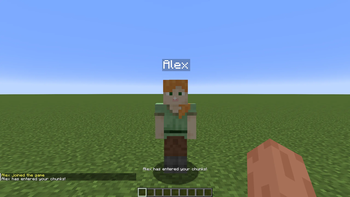
Get notified when a player is within your loaded chunks. Fully client-side.
You can choose between a chat message, a message above the hotbar, and/or a sound indicator.
It is highly recommended you install MidnightLib, as the config will NOT WORK without MidnightLib installed.
Commands
To prevent some players from being picked up in the radar, or to only make specific players get picked up, use /radarlist. The usage is:
/radarlist add <player>- Add a player to the list by their username./radarlist remove <player>- Remove a player from the list by their username./radarlist mode- Returns the current radar mode./radarlist mode (blacklist|whitelist)- Sets the current radar mode./radarlist uuid add <uuid>- Add a player to the list by their UUID./radarlist uuid remove <uuid>- Remove a player from the list by their UUID./radarlist toggle- Toggles the radar on or off.
Using blacklist mode will prevent any user in the list from being detected.
Using whitelist mode will only allow users in the list to be detected.
The whitelist and blacklist are two separate lists; they do not share the same data.
WARNING
Some servers may consider this a cheat or a hack. I do not encourage hacking. Please check with your server owner or a moderator before using this mod.
Made by the request of u/RateRight8781
Available Versions
How to Install Player Radar on Your Client
Install the Mod Loader Locally
Install fabric for your local Minecraft version.
Download the Matching File
Choose the Player Radar file for fabric and Minecraft 26.3.
Install Mod
Place the .jar file in your local .minecraft/mods folder and restart Minecraft. No server-side installation is required.
Compatibility
Mod Loaders
Minecraft Versions
26.3, 26.2, 26.1.2 (+21 more)
Server-side
✗ UnsupportedRecommended RAM
4 GB(min. 3 GB)Frequently Asked Questions
Does Player Radar need to be installed on the Minecraft server?
No. Modrinth marks Player Radar as unsupported on the server side. Install it only in your local Minecraft mods folder. Your server can remain unchanged unless the mod page lists an additional dependency.
Which version and loader does Player Radar require?
Use a file for fabric and your exact Minecraft version. Supported versions include 26.3, 26.2, 26.1.2. Files for different loaders are not interchangeable.
Player Radar is not working – what should I check?
First check the Minecraft version, loader version and required dependencies. Put the .jar file in your local .minecraft/mods folder and remove older duplicates. Because this mod is client-side, adding server RAM will not fix it.
Similar Mods






Minecraft Server for Your Group
Player Radar stays on your client. Host a compatible world for your group.