
Sakura Updater
Sakura Updater — a lightweight auto-sync mod with one-click updates, mirror/push sync, and a visual update UI. Sakura Updater — 是一个轻量级的自动同步mod,具有一键更新,镜像/推送同步和视觉更新UI
Screenshots
About this Mod

SakuraUpdater
(中文版请向下滚动 | Scroll down for Chinese version)
Introduction
SakuraUpdater is a NeoForge Minecraft mod that enables automatic synchronization of mod files between a server and clients, allowing players to receive server updates automatically, similar to other games.
Features
- 🔄 Automatic server update checks
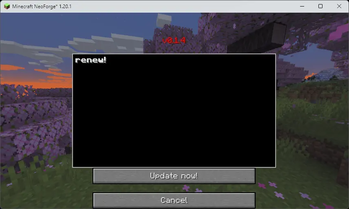
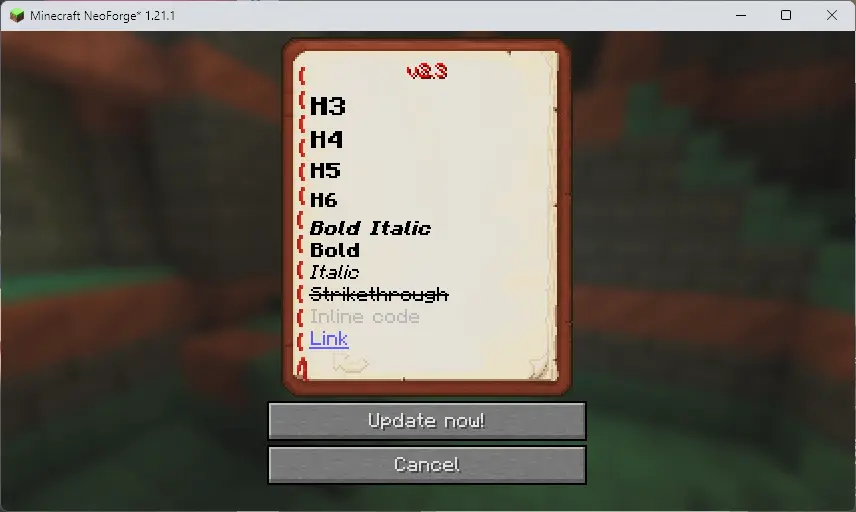
- 🕒 Display update logs in the update UI
- 📁 Multiple sync modes supported (mirror, push, ignore)
- 🎮 Graphical update UI
- ⚙️ Configurable client and server settings
- 🚀 The server can run independently
Installation
Server-side installation
- Place
sakuraupdater-[version].jarinto the server'smodsfolder. - Start the server. Configuration files will be generated on first run.
- Edit the server configuration file at
config/sakuraupdater-server.toml.
Client-side installation
- Place
sakuraupdater-[version].jarinto the client'smodsfolder. - Start the game. Configuration files will be generated on first run.
- Edit the client configuration file at
config/sakuraupdater-client.toml.
Server-side independent operation
- Place
sakuraupdater-[version].jarinto a separate folder. - Run the server independently with
java -jar sakuraupdater-[version].jar. - Edit the standalone server configuration file at
sakuraupdater-common.toml.
Runtime dependencies
The same JAR supports NeoForge and java -jar standalone operation. Dependencies are no longer bundled. Standalone startup obtains SQLite JDBC 3.46.0.0, Gson 2.10, NightConfig core/toml 3.8.1, and SLF4J api/simple 2.0.9. NeoForge servers only obtain SQLite when opening the database; ordinary clients do not download these libraries.
First startup needs internet access: downloads try Aliyun Central (https://maven.aliyun.com/repository/central/) first, then Maven Central (https://repo.maven.apache.org/maven2/). Files are cached in lib/ relative to the process working directory. Every file is checked against a pinned SHA-256 before use; valid caches work offline and are not downloaded again.
To override the download source, set SAKURAUPDATER_MAVEN_REPO to an HTTP(S) Maven repository root before starting Java. For example, in PowerShell:
$env:SAKURAUPDATER_MAVEN_REPO = "https://maven.aliyun.com/repository/central/"
java -jar sakuraupdater-[version].jar
A nonblank value replaces both default sources; if it fails, no public-source fallback is attempted. Unset or blank values retain the default Aliyun → Maven Central order. A trailing slash is optional. The URL must not include credentials, query parameters, or a fragment. This applies to standalone and NeoForge processes; restart the process after changing the variable. SHA-256 checks still apply to custom sources.
Without internet, complete valid caches allow normal startup with no network requests. Missing or corrupt required files trigger a download attempt; if every configured source fails, startup stops at that dependency. Each source is attempted once, with a 10-second connection timeout and a 60-second read timeout (these are not an overall startup deadline). Standalone startup exits with code 1; a NeoForge server reports a mod initialization error and cannot finish startup. Existing database files are not deleted. Ordinary clients do not require these downloads. An accessible LAN Maven repository can also supply missing files without public internet access.
For offline setup, copy the required versioned JAR files into lib/ from a previously successful installation. Keep the exact filenames (for example, sqlite-jdbc-3.46.0.0.jar); standalone mode needs all six files. Existing valid lib/ files from older releases can be reused. Lock files may remain and should not be removed while the application is running.
If acquisition fails, the log names the library, attempted URLs, and causes. Check network access and write permissions for lib/, or prepopulate verified files, then restart. Corrupt files are replaced only after a complete, verified download. A missing dependency or database initialization failure stops server startup. JARs are loaded directly; SQLite extracts its platform native library automatically, so its JVM temporary directory must be writable.
Configuration
Server configuration (sakuraupdater-server.toml)
# File server port
port = 25564

# Sync directory configuration, format: ["target_dir:mode:source_dir:extra_source_dir:..."]
# Mode explanations:
# - mirror: mirror mode, fully synchronize source directory to the target directory
# - push: push mode, push server files to clients
# - pull: pull mode, pull files from clients to the server
# - ignore: ignore mode, ignore files matching the regex. Since the path is included, ".*filename$" is recommended.
SYNC_DIR = [
    "mods:mirror",                           # synchronize the mods folder
    "config:push:clientconfig:config",       # push config and clientconfig to the client
    "resourcepacks:mirror",                  # synchronize resourcepacks folder
    "mods:ignore:.*abc\.jar$"                # ignore files in mods ending with 'abc.jar'
]
Client configuration (sakuraupdater-client.toml)
# Server host address
host = "localhost"

# Server port (should match the sakuraupdater-server.toml configuration, especially if using frp or other proxies)
port = 25564

# Current client version (managed automatically; do not edit manually)
now_version = ""
Usage
1. Server administrator operations
When using the independent server, remove the /sakuraupdater command prefix and use the commit and data commands directly
Create a release/commit
/sakuraupdater commit <version> <description-or-path-to-description-file>
Example:/sakuraupdater commit v1.0.1 Fixed item duplication bug\nAdded new enchantments
Or using a text file (commonly used markdown supported):/sakuraupdater commit v1.0.1 description.md
Manage data versions
# List all versions
/sakuraupdater data list

# Show details for a specific version
/sakuraupdater data show v1.0.1

# Edit version description (only the description: the file list and the timestamp are left untouched)
/sakuraupdater data edit v1.0.1 "Updated version description"

# Rebuild a version's file list from the current sync directories
/sakuraupdater data repair v1.0.1

# Delete a version
/sakuraupdater data delete v1.0.1

# Clear all version data
/sakuraupdater data clear
data repair <version>is for versions whose file list is empty — for example versions damaged by an older build'sdata editbug, or versions that were never committed properly. It keeps the description and timestamp, so the order of your update log does not change. Note that it records the current contents of your sync directories, not a historical snapshot of that release.
2. Client player operations
Automatic update check
When a player joins the game, the client will automatically check whether the server has a newer version and will open the update UI if an update is available.
SakuraUpdater (中文)
简介
SakuraUpdater 是一个 Minecraft NeoForge 模组,用于自动更新服务器的 mod 文件,让玩家能够像其他游戏一样自动获取服务器更新。
功能特性
- 🔄 自动检查服务器更新
- 🕒 在更新界面显示更新日志
- 📁 支持多种文件同步模式(mirror、push、ignore)
- 🎮 图形化更新界面
- ⚙️ 可配置的客户端和服务器设置
- 🚀 服务端可独立运行
安装步骤
服务器端安装
- 将
sakuraupdater-[version].jar放入服务器的mods文件夹。 - 启动服务器,首次运行会生成配置文件。
- 编辑
config/sakuraupdater-server.toml配置文件。
客户端安装
- 将
sakuraupdater-[version].jar放入客户端的mods文件夹。 - 启动游戏,首次运行会生成配置文件。
- 编辑
config/sakuraupdater-client.toml配置文件。
服务端独立运行
- 将
sakuraupdater-[version].jar放入单独文件夹。 - 直接
java -jar sakuraupdater-[version].jar即可运行服务端。 - 编辑
sakuraupdater-common.toml独立服务端配置文件。
运行时依赖
同一个 JAR 支持 NeoForge 模组和 java -jar 独立运行,依赖不再随包发布。独立模式启动时获取 SQLite JDBC 3.46.0.0、Gson 2.10、NightConfig core/toml 3.8.1、SLF4J api/simple 2.0.9。NeoForge 服务端仅在连接数据库时获取 SQLite;普通客户端不会下载这些依赖。
首次启动需要联网:优先使用阿里云 Central 镜像(https://maven.aliyun.com/repository/central/),失败后尝试 Maven Central(https://repo.maven.apache.org/maven2/)。文件缓存到进程工作目录下的 lib/,使用前检查固定 SHA-256;缓存有效时不再联网,支持离线启动。
如需指定下载源,在启动 Java 前设置环境变量 SAKURAUPDATER_MAVEN_REPO,值为 HTTP(S) Maven 仓库根地址。PowerShell 示例:
$env:SAKURAUPDATER_MAVEN_REPO = "https://maven.aliyun.com/repository/central/"
java -jar sakuraupdater-[version].jar
非空值会完全替换两个默认源,自定义源失败时不会再访问公共源;未设置或只有空白时,仍按“阿里云 → Maven Central”尝试。末尾 / 可省略,地址不能带用户名、密码、查询参数或片段。独立模式与 NeoForge 模式均适用,修改后需要重启对应进程。自定义源下载的文件仍需通过固定 SHA-256 校验。
没网时,如果所需缓存完整且校验通过,程序正常启动,不发起下载。缺少依赖或缓存损坏时,会尝试下载;所有配置的源都失败后,在该依赖处终止启动。每个源仅尝试一次,连接超时 10 秒、读取超时 60 秒(并非整个启动过程的总时限)。独立模式退出码为 1;NeoForge 服务端会报告模组初始化错误,无法完成启动。已有数据库文件不会被删除,普通客户端也不会因为这些依赖无法下载而受影响。没有公网但能访问局域网 Maven 仓库时,也可以通过自定义源补齐依赖。
离线部署时,从已成功运行的安装目录复制对应版本的 JAR 到 lib/,保持原文件名(例如 sqlite-jdbc-3.46.0.0.jar);独立模式需要全部 6 个文件。旧版本释放的有效 lib/ 文件可直接复用。目录中的锁文件可以保留,不要在程序运行时删除。
获取失败时,日志会列出依赖名称、尝试的地址和失败原因。检查网络及 lib/ 写入权限,或手动预置校验正确的文件后重启。损坏缓存仅在新文件完整下载并校验通过后替换;依赖获取或数据库初始化失败会终止服务端启动。JAR 直接加载,SQLite 原生库由驱动自动解压,JVM 临时目录需要可写。
配置说明
服务器配置 (sakuraupdater-server.toml)
# 文件服务器端口
port = 25564

# 同步目录配置,格式: ["目标目录:模式:源目录:额外的源目录:..."]
# 模式说明:
# - mirror: 镜像模式,完全同步源目录到目标目录
# - push: 推送模式,将服务器文件推送到客户端
# - pull: 拉取模式,从客户端拉取文件到服务器
# - ignore: 忽略模式,使用正则匹配忽略文件。匹配时前面带路径,推荐用 ".*文件名$" 格式。
SYNC_DIR = [
    "mods:mirror",                           # 同步 mods 文件夹
    "config:push:clientconfig:config",       # 将 config 和 clientconfig 推送到客户端
    "resourcepacks:mirror",                  # 同步资源包文件夹
    "mods:ignore:.*abc\.jar$"                # 忽略以 abc.jar 结尾的文件
]
客户端配置 (sakuraupdater-client.toml)
# 服务器主机地址
host = "localhost"

# 服务器端口(需与sakuraupdater-server.toml配置一致,如使用frp等代理后的端口)
port = 25564

# 当前客户端版本(自动管理,请勿手动修改)
now_version = ""
使用方法
1. 服务器管理员操作
在使用独立服务端时,需去除 /sakuraupdater 命令前缀,直接使用 commit、data 命令
创建更新版本
/sakuraupdater commit <版本号> <描述信息/描述文件路径>
例如:/sakuraupdater commit v1.0.1 修复了物品复制bug\n添加了新的附魔
或使用文本文件(常见的md格式支持):/sakuraupdater commit v1.0.1 description.md
管理数据版本
# 查看所有版本
/sakuraupdater data list

# 查看特定版本详情
/sakuraupdater data show v1.0.1

# 编辑版本描述(只改描述:文件清单与时间戳都不会被动)
/sakuraupdater data edit v1.0.1 "更新了版本描述"

# 重建某个版本的文件清单(按当前同步目录重新扫描)
/sakuraupdater data repair v1.0.1

# 删除版本
/sakuraupdater data delete v1.0.1

# 清空所有版本数据
/sakuraupdater data clear
data repair <版本>用于文件清单为空的版本——例如被旧版本data edit的 bug 清空过的版本,或当时没 commit 好的版本。它会保留描述与时间戳,所以不会打乱更新日志的顺序。注意:它记录的是当前同步目录里的内容,不是那一版当时的历史快照。
2. 客户端玩家操作
自动检查更新
当玩家进入游戏时,如果检测到服务器有新版本,会自动弹出更新界面。
Available Versions
How to Install Sakura Updater on Your Server
Order Server
Order a Minecraft Java server with at least 3 GB RAM (4 GB recommended).
Set forge Loader
In the panel under "Egg", select the forge loader and matching Minecraft version (1.21.11).
Install Mod
Open the mod browser in the dashboard and search for "Sakura Updater". Click "Install" – done! Alternatively, upload the .jar via SFTP to the /mods folder.
Compatibility
Mod Loaders
Minecraft Versions
1.21.11, 1.21.10, 1.21.9 (+14 more)
Server-side
✓ RequiredRecommended RAM
4 GB(min. 3 GB)Frequently Asked Questions
Sakura Updater server crashes on startup – what to do?
Most common cause: wrong forge version or insufficient RAM. Check the server log (latest.log) for "OutOfMemoryError" or "Mixin" errors. With Mado Hosting: ensure at least 3 GB RAM is allocated and the loader matches the mod version (1.21.11). You can switch loaders with one click in the panel.
Is Sakura Updater compatible with forge and neoforge?
Sakura Updater officially supports forge, neoforge for Minecraft 1.21.11, 1.21.10, 1.21.9. The Mado dashboard automatically detects incompatible loader combinations.
Server lagging with Sakura Updater – how to optimize performance?
Recommended RAM: 4 GB (per 8 players). Use /spark profiler to check if Sakura Updater consumes the most tick time. Common fixes: reduce server view-distance to 8-10, install "performant" or "starlight" as supplementary mods on Forge. With Mado Hosting, your server runs on NVMe SSDs with dedicated CPU cores for minimal latency.
Similar Mods






Rent Modded Server
Install Sakura Updater with just one click on your server.