Efficiency Checker Mod
Before installing, check that this mod release supports your dedicated server and game version. A ficsit.app listing alone does not establish compatibility.
Installation and verification
- Read the original description, check SML version and dependencies and back up your save.
- Stop the server and choose the mod in your dashboard’s Satisfactory mods section. Verify source and version.
- Install required client mods in compatible versions. Start the server and inspect logs, connection and mod-dependent content.
Removal and updates may affect saves. Keep a backup of the working combination. Memory needs cannot reliably be inferred from one mod’s name.
Published releases
- 2.5.20 · Game version >=520140 · SML check project
Published targets: LinuxServer, Windows, WindowsServer
- 2.5.19 · Game version >=517554 · SML check project
Published targets: LinuxServer, Windows, WindowsServer
- 2.5.18 · Game version >=502094 · SML check project
Published targets: LinuxServer, Windows, WindowsServer
- 2.5.17 · Game version >=495413 · SML check project
Published targets: LinuxServer, Windows, WindowsServer
- 2.5.16 · Game version >=495413 · SML check project
Published targets: LinuxServer, Windows, WindowsServer
Original mod author description
See if your production is under-flowing!
Code has been refactored for better internal maintenance. Please let me know if something isn't working like it used to
ATTENTION: this mod is not compatible with Refined Power and other mods with custom machines that does not implement Attachments (like Splitters/Mergers), "Factories" (the ones that use recipes to consume and produce something), standard "Generators" or standard "Extractors". Any checker placed on belts or pipes connecting to those buildings will ignore their existence. A solution may come to some of those, but each case must be approached one by one, and that takes time
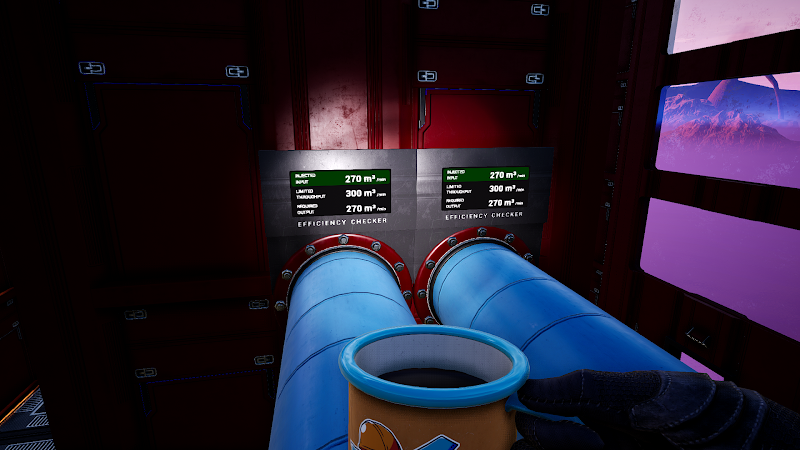
This mod allows you to verify if your production can work at 100% efficiency or if it is on risk of under-flowing, either because:
- You don't have the correct set of conveyors capable to deliver the minimum amount of required items;
- You are not producing enough items to deliver.
It is Multiplayer compatible. Many thanks to TwoTwoEleven (Micro Manage) for the orientations on how to get it working 😀

This mod is completely free. But if you wish to donate a value as a “thank you”, feel free to click on the button below.

Find me at Satisfactory Modding Discord server (@MarcioHuser)
What it includes:
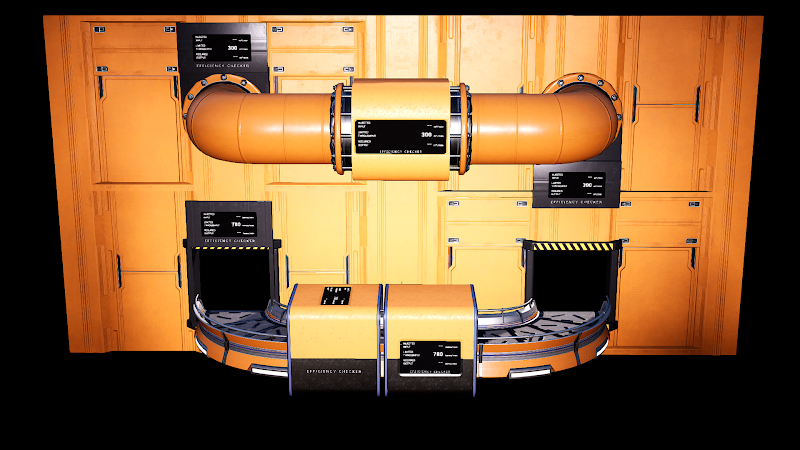
- Two building for SOLIDS which you can snap on existing belts (or have a belt passing through it). One with panels on each side; the other with panel on top of it. They can be
stacked on top of each other. Both will show you:
- The maximum amount of items/minute the producers can inject into the belts (miners, constructors, foundries, etc. Modded producers should work as well). You can manually change this number, if you find it necessary;
- The maximum amount of items/minute your belts can transport. This takes into account not only the belt it is connected to, but also connected belts/lifts preceding or following the current one;
- The required amount of items/minute your consumers need to receive to be able to work at 100%. You can manually change this number, if you find it necessary
- A wall variant for solids which you can snap to Foundation Wall Poles. It works the same as the stackable buildings, showing the information for whichever belt/lift is connected or passing through the Wall Conveyor Pole
- A building for LIQUIDS which can snap on existing pipes. Different from the solid ones, the pipe MUST connect to it, if you don't place it directly on a pipe. It can be stacked with other Liquids Checker or any of the Solid Checkers
- A wall variant for liquids which you can snap to Walls, just like a pipe wall adapter. It also includes its own adapter and snaps the same as a regular pipe wall adapter would. It works the same as the previous buildings, showing the information for whichever pipe connected with it
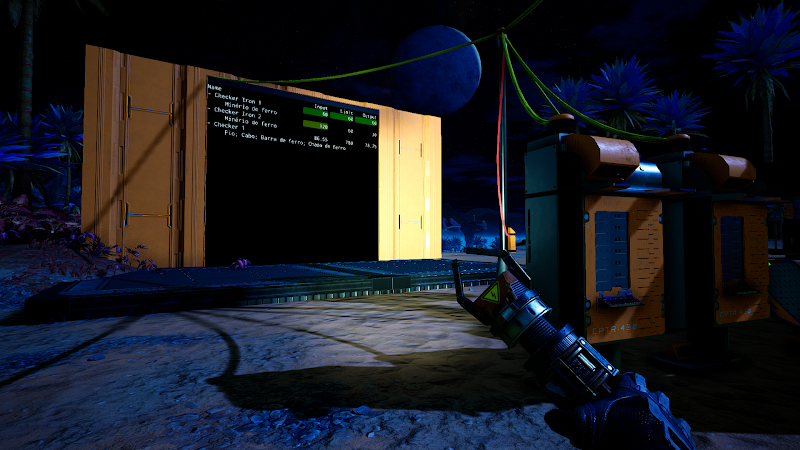
- A hand tool that can give you the same stats, realtime. Just point to a pipe, belt or lift, and click: the tool display will show the computed stats for the given belt/pipe. And yes, it IS expensive. You didn't though having an easy life would be cheap, right?
- Color coding:
- Blue: the field has a custom set, defined manually;
- Green: the inject input and/or the throughput limit is the same value of the required output (if the required output is greater than zero). All three fields will be presented with green color if the required output equals the injected output and they era less or equal than the throughput limit
- Yellow: The inject input is greater than the belt throughput limit;
- Red: the inject input and/or the throughput limit is less than the required output
- Black: injected input and/or throughput limit is greater than the required output. Indicates you still have room to increase the consumption of items
How do I get it:
It will become available to be unlocked at the hub once you have unlocked the Logistics Mk.3 milestone. The Hand Tool will be available at Tier 5How can I build it:
Ground/floor checkers, for solid items
Method 1:
Just snap it into an existing belt. It snaps along any belt, much like how you can do with a splitter or a merger.Method 2:
Place the building down and snap the belts to it. It acts like a conveyor pole, so you can snap from either direction, with any orientation. You can snap above other EfficiencyChecker Buildings, too, but only if they are not inclinedMethod 3:
You don't even need to snap any belt to it. It will detect the one that is already passing through it. So,place it down, and just run the belt through itWall checkers, for solid items
Snap it to a Wall Conveyor Pole, no mather if it already has belts/lifts connected or notGround/floor checkers, for liquid items
Method 1:
Snap it to an existing pipe. It will split the pipe in two parts, as a junction would do. If you remove it with the pipes intact, they will also be rejoinedMethod 2:
Place it on the ground os on top of another checker, and connect pipes to it. It will not detect the liquids if you just pass the pipe through it, it must be connectedWall checkers, for liquids items
Snap it to any valid Wall. It will place a pipe wall attachment where you must connect the pipesHow can I use it:
- No matter the method you chose to place it down, it will automatically detect if any belt, lift, factory, pipe, junction or pump has been placed or dismantled, and will auto update after a given timeout without any new building/conveyor being placed/removed;
- By default it timeouts after 10s. You can also disable the auto-update, by editing the EfficiencyChecker.cfg, at the configs folder, if you need or want to save some processing cycles. If auto-update is disabled, all checkers can only be refreshed when you interact with it
- You can manually type values for input and/or output, if you want to manually define your limits for the system. Useful for complex, load balanced belt systems
FicsIt-Networks integration
The following methods are available for all the Efficiency Checker variants- updateBuilding(): mark the checker to recalculate at the next "tick" (right now it will only happen if you are near enough to the Checker)
- injectItems(): return a list of known items that can possible pass through the conveyors
- injectedInput: the amount of inject items the checker knows about
- setCustomInjectedInput(float): defines the custom amount of injected items. If zero, it will reset to the computed one
- isCustomInjectedInput(): true if a custom input is defined; false otherwise
- resetCustomInjectedInput(): resets the custom input to the computed one
- limitedThroughput: the maximum amount of items per minute the conveyors system can handle
- requiredOutput: the amount of required items the checker knows about
- setCustomRequiredOutput(float): defines the custom amount of required items. If zero, it will reset to the computed one
- isCustomRequiredOutput(): true if a custom output is defined; false otherwise
- resetCustomRequiredOutput(): resets the custom output to the computed one
A sample script can be downloaded here
Get FicsIt-Networks
Videos:
- 🚧 Efficiency Checker - Satisfactory Mod Spotlight, by Random Gamer
- Efficiency Checker Mod Monday Satisfactory Mod Spotlight, by TotalXclipse
Changelog
Version 2.5.18
- Fixed some networking issues for multiplayer (contribuition from https://github.com/frostmx)
Version 2.5.17
- Hand tool FOV fix
Version 2.5.16
- Game headers update
Version 2.5.15
- Added new EfficiencyChecker wall variant: WallBellow
- Updated textures for wall variants
Version 2.5.14
- Fixed a crash when dismantling wall checkers
- Fixed textures on wall checkers
Version 2.5.12
- Satisfactory 1.2 and SML 3.12.0
Version 2.5.11
- Satisfactory 1.1 and SML 3.11.1
Version 2.5.10
- Added support to account for Alien Power Matrix consumption rate by Alien Power Augmenters
Version 2.5.9
- Added support to account for Singularity Cell consumption rate by Portals
- Fixed the amount and type of waste computed from Nuclear Generators
Version 2.5.8
- Game headers update
Version 2.5.7
- Fixed an issue where the Mod would not consider Storage Teleporters or Underground Belts that where placed through blueprints
- Recompiled to keep compatible with MarcioCommonLibs
Version 2.5.6
- Fixed hand tool showing solid transfer speeds as m³/min, instead of items/min
- Train platforms transfer rate are now considered to compute the Throughput Limit
Version 2.5.5
- Added support for Drone Stations
- Recompiled to keep compatible with MarcioCommonLibs
- Recompiled due to new game patch
Version 2.5.4
- Updated the equipment's icon
Version 2.5.3
- Fixed crash while using wall pipe checker after randomly dismantling a pipe
- Fixed the pipe checkers not adding up the injected inputs
- Fixed valves and other limit throughputs not being properly calculated by the inline and wall pipe checkers
- Item icon modified to better identify the checker
Version 2.5.2
- Recompiled due to new game patch
Version 2.5.1
- Fixed wrong values being shown when checking a conveyor after a splitter (regular or smart/programmable)
Version 2.5.0
- Satisfactory 1.0 and SML 3.8.0
Version 2.4.8
- Mod updated due to changes in MarcioCommonLibs
Version 2.4.7
- Mod updated due to changes in MarcioCommonLibs
Version 2.4.6
- Restored compatibility with FicsIt-Networks
- The Checker Buildings can also be used as a power pole with 2 connections, each
- The custom inject input and required output were not being shown at the Checkers
Version 2.4.5
- The checkers and hand tool incorretly add up as required output all the items from a recipe for those requiring two or more items
Version 2.4.4
- The checkers and hand tool were not considering fraction values, giving wrong results
Version 2.4.3
- Refactored code for better internal maintenance. Please let me know if something isn't working like it used to
- Completed the support for smart/programmable modules from Modular Load Balancers
- Added support for Throughput Counter and Limiter
Version 2.4.2
- Added basic compatibility for Modular Load Balancers
- Smart/Programmable modules will be worked on next. So far, those will be consideraded as regular outputs, without considering the filters
- Added basic compatibility for Modular Load Balancers
Version 2.4.1
- Restoring compatibility with Storage Teleporter mod
Version 2.4.0
- Update 8.2
Version 2.3.1
- Game headers update
Version 2.3.0
- Update 7
Version 2.2.0
- Added support for multi-output machines added by other mods (order of the items being outputted are presumed and can't be guaranteed)
- Added support for Underground Belts
- Fixed correct liquid/gas inject input and required output when pipes are connected to a machine that consumes and produces the same liquid/gas
Version 2.1.12
- Update code to prevent crash with certain concurrent mods while loading a save game
Version 2.1.11
- Game headers update
Version 2.1.10
- Fix
- Fixed miners and water extractors not reporting as valid producers
- Fix
Version 2.1.8
- Removed some old, unused code, that was still being called and could cause a crash, when using the Hand Tool
Version 2.1.7
- Recompiled for latest Update 6 Exp
Version 2.1.6
- Fixed correct SML dependency
Version 2.1.5
- Recompiled for Update 6
Version 2.1.4
- Fixed categorization of the Hand Tool to be at the "Hands" category, at the Equipment Workshop
Version 2.1.3
- Recompiled for SML 3.3.0
Version 2.1.2
- Update to fix compatibility with CL174766
Version 2.1.1
- Update to fix compatibility with CL174506
Version 2.1.0
- Update 5
Version 2.0.11
- Fix
- Timeout routine refactored. The previous code did not work as intended
- Fix
Version 2.0.10
- Fix
- Included some additional timeout/loop checks to prevent game from hanging while collecting production across train stations
- Fix
Version 2.0.9
- Fix
- Fixed Hand Tool scaling for FOV different than 90
- Fix
Version 2.0.8
- Fix
- Fixed a bug which would make the Pionner look as a giant in multiplayer, when the Hand Tool was equipped
- Fix
Version 2.0.7
- Fix
- Reduced log usage to spam less messages
- QoL
- Tweaking of the "yellow" color at the Hand Tool and the Checker Buildings, for better readability
- Fix
Version 2.0.6
- Fix
- Fixed compatibility for SML 3.1.0
- QoL
- Include options to define if a checker must ignore unpowered and/or paused machines.
To cycle through modes with the hand tool, click with the right mouse button
- Include options to define if a checker must ignore unpowered and/or paused machines.
- Fix
Version 2.0.5
- Fix
- Fixed crash caused when aiming to a checker with the build gun at Dismantle mode
- Fix
Version 2.0.4
- Fix
- Restored compatibility with Miner MK4 mod
- Restored compatibility with Storage Teleport mod
- Fix
Version 2.0.3
- Fix
- Fixed crash caused by patch 151024
- Fix
Version 2.0.2
- Fix
- Fixed some numbers being rounded up incorrectly (given the maximum of 4 decimals precision)
- Fix
Version 2.0.1
- Fix
- Fixed pipes not merging back after dismantling an inline pipe-checker
- Fix
Version 2.0.0
- Features
- Reworked to be compatible with SML 3.0.0 and Update 4
- Included a timeout to prevent the checker to run "forever" when it find a really complex setup
- Features
Version 1.1.7
- Fix
- Fixed Multiplayer crash when a client uses the Hand Tool
- Fix
Version 1.1.6
- Fix
- Fixed T-Pose while the Hand Tool is equipped, in multiplayer
- Proper flow rate are taken into account when there's a valve at a pipe sequence
- Fix
Version 1.1.5
- Fix
- Fixed crash when a fluid checker does not have pipes connected on both ends
- Fix
Version 1.1.4
- QoL
- Added support for FICSMAS Gift Tree
- QoL
Version 1.1.3
- Fix
- Fixed compatibility with Build 138299
- Fix
Version 1.1.2
- Optimization
- Code refactoring to optimize connected pipes/belts crawling to prevent Stack Overflow errors for very long/heavy splitting setups. Regardless, if it can't find a
tight enough crawling path, the game will no longer crash (hopefully), but the checkers will not report any number, showing instead an "Error" status
- Code refactoring to optimize connected pipes/belts crawling to prevent Stack Overflow errors for very long/heavy splitting setups. Regardless, if it can't find a
- Fix
- Fixed the correct throughput limit for pipe networks that include MK2 pipes
- Fixed stack overflow errors that would crash the game (hopefully)
- Fixed crash that happens when used with current EXP version (but the mod will not show computed numbers, displaying a warning instead)
- Optimization
Version 1.1.1
- Fix
- Fixed some invalid meshes that could crash the game for some users
- Fix
Version 1.1.0
- Recompiled to be compatible with Experimental Branch. This version will crash if used with Early Access. Revert to 1.0.5 if that is your case
Version 1.0.5
- QoL
- Mergers placed AFTER the checker (or after the belt you point at with the hand tool) will now be considered for accounting.
The amount of items that become injected from the other inputs will be discounted from the total Required Output - Hold "Left Ctrl" while using the Hand Toll to fixate the number it reads. The read on the screen will remain the same until you do another read, which
will reset to its default behaviour if you don't hold "Left Ctrl" while using it. It can be combined with "Left Shift" to read and fixate
the net value
- Mergers placed AFTER the checker (or after the belt you point at with the hand tool) will now be considered for accounting.
- QoL
Version 1.0.4
- QoL
- Hold "Left Shift" while using the Hand Tool to get the net value of inject items (how many items per minute you have to spare to consume at your factory)
- QoL
Version 1.0.3
- Fix
- More refactoring regarding the random crash at game startup. It should be fine, now
- Fix
Version 1.0.2
- Fix
- Code refactoring to prevent random crashes at game startup, depending of the combination of other mods you had installed
- Fix
Version 1.0.1
- Fix
- New refactoring to prevent random crashes if you have Storage Teleporter and/or FicsIt-Networks
- Fix
Version 1.0.0
- New content
- Efficiency Checker Hand Tool!!!!!
- Added drop-down selection box to define if a specific Checker can auto update or not
- Fix
- Refactored part of the code to try to prevent crashing when using Storage Teleporter mod. If crashes still occur, you can disable Storage Teleporter support (it will
be ignored by the checkers, as if they don't exist and the belt system will stop at it). Edit [game folder]\Configs\EfficiencyChecker.cfg and change the
"ignoreStorageTeleporter" to true
- Refactored part of the code to try to prevent crashing when using Storage Teleporter mod. If crashes still occur, you can disable Storage Teleporter support (it will
- New content
Version 0.5.0
- New content
- Added compatibility for Storage Teleporter
- New content
Version 0.4.1
- Optimization
- Reduction in triangles count and changed some LOD details, to try improve overall rendering performance
- Fix
- Fixed the algorithm for Train Freighter Platforms
- Optimization
Version 0.4.0
- New Content
- Added support for Train Freighter Platforms (liquid and solid). The Checkers will check all the items that can be transported to/from the station it is connected,
interlinking all of them as a single, huge, merger/splitter. No consideration will be done regarding the distance the trains have to travel from station to station:
it is up to you to keep the flow steady. Attention: it will not work with double-ended trains that go back-and-forth between stations
- Added support for Train Freighter Platforms (liquid and solid). The Checkers will check all the items that can be transported to/from the station it is connected,
- Fix
- Fixed crash that could happen when removing a Pipe Checker that didn't have both connections being used
- New Content
Version 0.3.5
- Fix
- Fixed a bug that would make the pipe network fluids to turn into "unknown type", if a checker is placed inline to a pipe and all the fluids come only from containers
(could also happen if a pipe checker is removed and the pipes were merged together)
- Fixed a bug that would make the pipe network fluids to turn into "unknown type", if a checker is placed inline to a pipe and all the fluids come only from containers
- Fix
Version 0.3.4
- Fix
- Fixed a bug that would make wall pipe checkers to only consider one side of the system for input computing. If it chooses the wrong side, it will not
collect any producing machine, only consumers, and will give "zero" for the Inject Input and Limited Throughput stats
- Fixed a bug that would make wall pipe checkers to only consider one side of the system for input computing. If it chooses the wrong side, it will not
- Fix
Version 0.3.3
- Fix
- Fixed Truck Stations handling, where the belt system comming in for the fuel input was considered as part of the belt system used for the input/output ones
- Fixed a bug caused by Micro Manage when moving the pipe checker, which caused the pipe attachment points to not move with it
- Fix
Version 0.3.2
- Fix
- Fixed a bug where the checkers would not display a value for "Injected Input" nor "Throughput Limit", if the source of items
are only the Truck Station and/or the Train Cargo Platform; or if the all the origin/terminal builds are not machines or conveyors
(storage bins, splitters, mergers, docking stationg and freighter platforms)
- Fixed a bug where the checkers would not display a value for "Injected Input" nor "Throughput Limit", if the source of items
- Fix
Version 0.3.1
- New Content
- Added a new panel BELOW the Efficiency Checker (Top), for those who need to read the values from below
- Fix
- Fixed a bug where the calculations would not give the discounted inject input when there's a splitter placed before the checker
(it was no longer discounting the values diverted through the other exits)
- Fixed a bug where the calculations would not give the discounted inject input when there's a splitter placed before the checker
- New Content
Version 0.3.0
- New Content
- Multiplayer support
- New Content
Version 0.2.0
- New Content
- You can now rotate Checkers that stacks on top of each other
- You can also rotate Pipe Checkers when placing alongside a pipe (increments of 22.5°). Press Left Control or "R" to reset the rotation (the arrow indicates which side is "up")
- Added FicsIt-Networks integration
- Fix
- Fixed a bug that kept the Injected Input fields on the panels with the last color they had, not changing to black when no special condition is met
- New Content
Version 0.1.3
- Fixes
- Fixed crashes that happen when you have a belt loop in the system the checker is placed
- Fixes
Version 0.1.2
- Fixes
- Fixed crashes that happen when a fluid checker is placed and will update
- Fixes
Version 0.1.1
- Fixes
- Fixed the calculations for when there are mixed items serving the same machine (Assemblers, Manufacturers and other modded ones with multiple inputs),
sorted by using smart/programmable splitters for each input
- Fixed the calculations for when there are mixed items serving the same machine (Assemblers, Manufacturers and other modded ones with multiple inputs),
- Fixes
Version 0.1.0
- New Content
- Checker variants for LIQUIDS
- Refactored to be Multiplayer compatible (still testing. Your feedback will be welcome)
- Now you can manually set how many items are/will be injected and/or consumed. Useful if you have complex systems and already now how they would split,
and only wants to check if the consumers will not be under-flowed (and if the belts can handle it, too) - Added compatibility for MK4 Miners (from Miner Mk4 mod)
- Now the popup window will show all the items that can pass by the checker, for mixed belts that relly on smart/programmable splitters
- New Content
Version 0.0.10
- Re-upload
Version 0.0.9
- Fixes
- Fixed the calculation of the effective production for overclocked/underclocked machines
- Fixes
Version 0.0.8
- New content
- New mesh for ground building, more in-inline with the overall FicsIt look
- Fixes
- Fixed the correct production speed for the MK4 buildings from MK++ Mod
- New content
Version 0.0.7
- New content
- Added compatibility for MK++ buildings (the effective consumption/production is multiplied accordingly to the building type)
- Added compatibility for Farming Mod greenhouses (the effective consumption/production is multiplied accordingly to the Greenhouse type)
- New texture for the wall variant
- Optimization
- Changes on the overclock value of a connected building are detected in real-time, now
- New content
Version 0.0.6
- New content
- Wall mounted variant. Just snap it to a conveyor wall hole, and it works the same as the regular ones
- The "fat" variant is gone. It was replaced by the narrow one, but keeping the display on the side
- Mew meshes, to reduce triangles and improve render performance
- New content
Version 0.0.5
- Optimization
- More adjustments on the auto-updating algorithm, to improve detection of which buildings need to be updated
- Optimization
Version 0.0.4
- New content
- If the Checker is placed AFTER splitters, it will discount the amount delivered elsewhere for the "Inject Items" information
- Optimization
- Some memory management adjustments
- Changed the auto-updating to trigger only when the player is near the Checker (around 40 m or closer). This will lower the occasional stutters that occur after some trackable buildings are placed in the world
- New content
Version 0.0.3
- Refactored the startup initialization code to no longer HANG the loading process
Version 0.0.2
- Fixed auto-updating not working as promised