
Adaptivecaps
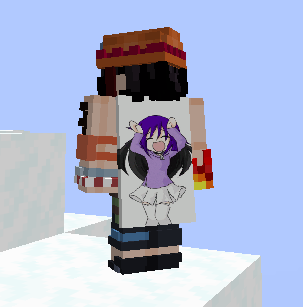
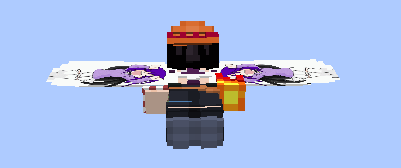
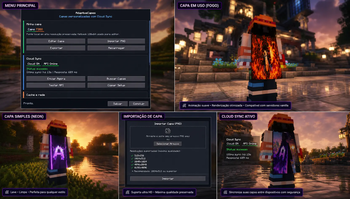
Use any image as your Minecraft cape with vanilla-style cape animations and an integrated editor.
Screenshots
Über diese Mod
AdaptiveCaps
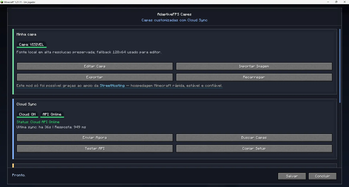
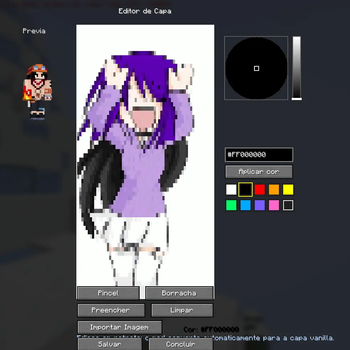
Click Import Cape and select any image from your device. The editor will automatically convert it into a Minecraft-compatible cape, ready for preview and customization.
AdaptiveCaps is a cape customization mod for Minecraft Fabric that allows players to create, personalize, and display custom capes through a simple, modern, and optimized experience.
Built with performance and compatibility in mind, AdaptiveCaps features its own rendering system, allowing players to use custom capes without relying on external mods or third-party services.
✨ Features
- 🎨 Integrated in-game cape editor
- 🖌️ Painting tools with a full color palette
- 🖼️ Image import for automatic cape creation
- 📂 Support for PNG, JPG, JPEG, and GIF files
- 🎞️ Animated GIF cape support
- 🧩 Automatic conversion to Minecraft cape format
- 👀 Real-time cape preview before saving
- 🪶 Elytra compatibility
- ⚡ Optimized rendering for high performance
- 🔄 Automatic synchronization between players using the mod
- 🎮 Simple and intuitive user interface
- 🧹 Fast cape editing and updating system
🎞️ Animated Capes
AdaptiveCaps fully supports animated capes using GIF files. Animations are automatically processed and displayed to other players who have the mod installed, allowing you to create unique and dynamic capes within Minecraft.
🚀 Purpose
AdaptiveCaps was created to provide a complete cape customization experience, allowing any player to build their own visual identity in Minecraft quickly and easily.
Whether you prefer drawing pixel by pixel or importing your own artwork, AdaptiveCaps gives you the freedom to create a truly unique cape.
📦 Compatibility
- Fabric Loader/neoforge
- Minecraft 1.21+
- Compatible with most optimization mods
❤️ Acknowledgements
This project continues to evolve thanks to the support of the community and the players who help by testing new versions and providing valuable feedback.
Create. Customize. Stand Out.
Your cape, your way.
The AdaptiveCaps Team
Verfügbare Versionen
Adaptivecaps auf deinem Client installieren
Mod-Loader lokal installieren
Installiere fabric für deine lokale Minecraft-Version.
Passende Datei herunterladen
Wähle die Adaptivecaps-Datei für fabric und Minecraft 26.2.
Mod installieren
Lege die .jar-Datei in deinem lokalen .minecraft/mods-Ordner ab und starte Minecraft neu. Eine Installation auf dem Server ist nicht nötig.
Kompatibilität
Mod-Loader
Minecraft-Versionen
26.2, 26.1, 1.21.11 (+3 weitere)
Server-seitig
✗ Nicht unterstütztEmpfohlener RAM
4 GB(min. 3 GB)Häufige Fragen
Muss Adaptivecaps auf dem Minecraft Server installiert werden?
Nein. Modrinth kennzeichnet Adaptivecaps serverseitig als nicht unterstützt. Installiere die Mod nur im lokalen Minecraft-Mods-Ordner. Dein Server kann unverändert bleiben, sofern die Mod-Seite keine zusätzliche Abhängigkeit nennt.
Welche Version und welchen Loader braucht Adaptivecaps?
Nutze eine Datei für fabric, neoforge und exakt deine Minecraft-Version. Unterstützte Versionen sind unter anderem 26.2, 26.1, 1.21.11. Loader-Dateien sind nicht untereinander austauschbar.
Adaptivecaps funktioniert nicht – was kann ich prüfen?
Prüfe zuerst Minecraft-Version, Loader-Version und erforderliche Abhängigkeiten. Lege die .jar-Datei im lokalen .minecraft/mods-Ordner ab und entferne ältere Duplikate. Da die Mod clientseitig ist, löst mehr Server-RAM dieses Problem nicht.
Ähnliche Mods

![[ETF] Entity Texture Features](https://cdn.modrinth.com/data/BVzZfTc1/af683d206d50b05258d865b0d6e4aa2f2cee12f2_96.webp)
![[EMF] Entity Model Features](https://cdn.modrinth.com/data/4I1XuqiY/6e5bbd0d06b1741bfdab6c0cfab6de8fdaf0064c_96.webp)



Minecraft Server für deine Gruppe
Adaptivecaps bleibt auf deinem Client. Hoste dazu eine kompatible Welt für deine Mitspieler.