
Adaptivecaps
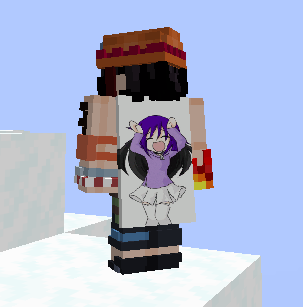
Use any image as your Minecraft cape with vanilla-style cape animations and an integrated editor.
Screenshots
About this Mod
AdaptiveCaps
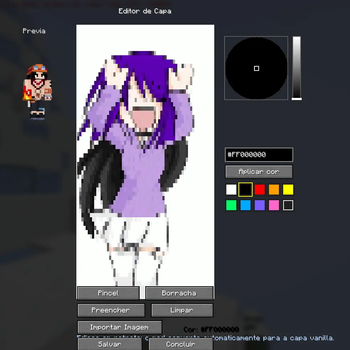
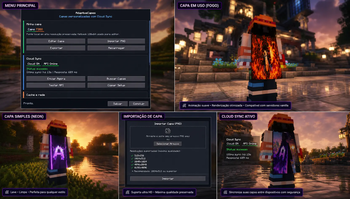
Click Import Cape and select any image from your device. The editor will automatically convert it into a Minecraft-compatible cape, ready for preview and customization.
AdaptiveCaps is a cape customization mod for Minecraft Fabric that allows players to create, personalize, and display custom capes through a simple, modern, and optimized experience.
Built with performance and compatibility in mind, AdaptiveCaps features its own rendering system, allowing players to use custom capes without relying on external mods or third-party services.
✨ Features
- 🎨 Integrated in-game cape editor
- 🖌️ Painting tools with a full color palette
- 🖼️ Image import for automatic cape creation
- 📂 Support for PNG, JPG, JPEG, and GIF files
- 🎞️ Animated GIF cape support
- 🧩 Automatic conversion to Minecraft cape format
- 👀 Real-time cape preview before saving
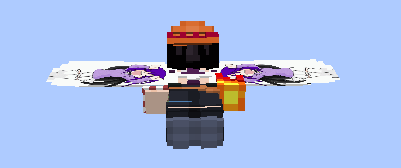
- 🪶 Elytra compatibility
- ⚡ Optimized rendering for high performance
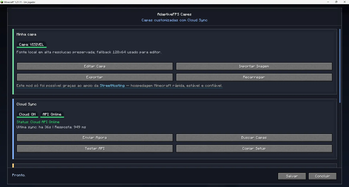
- 🔄 Automatic synchronization between players using the mod
- 🎮 Simple and intuitive user interface
- 🧹 Fast cape editing and updating system
🎞️ Animated Capes
AdaptiveCaps fully supports animated capes using GIF files. Animations are automatically processed and displayed to other players who have the mod installed, allowing you to create unique and dynamic capes within Minecraft.
🚀 Purpose
AdaptiveCaps was created to provide a complete cape customization experience, allowing any player to build their own visual identity in Minecraft quickly and easily.
Whether you prefer drawing pixel by pixel or importing your own artwork, AdaptiveCaps gives you the freedom to create a truly unique cape.
📦 Compatibility
- Fabric Loader/neoforge
- Minecraft 1.21+
- Compatible with most optimization mods
❤️ Acknowledgements
This project continues to evolve thanks to the support of the community and the players who help by testing new versions and providing valuable feedback.
Create. Customize. Stand Out.
Your cape, your way.
The AdaptiveCaps Team
Available Versions
How to Install Adaptivecaps on Your Client
Install the Mod Loader Locally
Install fabric for your local Minecraft version.
Download the Matching File
Choose the Adaptivecaps file for fabric and Minecraft 26.2.
Install Mod
Place the .jar file in your local .minecraft/mods folder and restart Minecraft. No server-side installation is required.
Compatibility
Mod Loaders
Minecraft Versions
26.2, 26.1, 1.21.11 (+3 more)
Server-side
✗ UnsupportedRecommended RAM
4 GB(min. 3 GB)Frequently Asked Questions
Does Adaptivecaps need to be installed on the Minecraft server?
No. Modrinth marks Adaptivecaps as unsupported on the server side. Install it only in your local Minecraft mods folder. Your server can remain unchanged unless the mod page lists an additional dependency.
Which version and loader does Adaptivecaps require?
Use a file for fabric, neoforge and your exact Minecraft version. Supported versions include 26.2, 26.1, 1.21.11. Files for different loaders are not interchangeable.
Adaptivecaps is not working – what should I check?
First check the Minecraft version, loader version and required dependencies. Put the .jar file in your local .minecraft/mods folder and remove older duplicates. Because this mod is client-side, adding server RAM will not fix it.
Similar Mods

![[ETF] Entity Texture Features](https://cdn.modrinth.com/data/BVzZfTc1/af683d206d50b05258d865b0d6e4aa2f2cee12f2_96.webp)
![[EMF] Entity Model Features](https://cdn.modrinth.com/data/4I1XuqiY/6e5bbd0d06b1741bfdab6c0cfab6de8fdaf0064c_96.webp)



Minecraft Server for Your Group
Adaptivecaps stays on your client. Host a compatible world for your group.