AE2 EMI Crafting Integration
Adds support for crafting with EMI on Applied Energistics 2 terminals
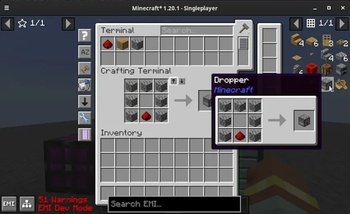
Screenshots
Über diese Mod
AE2 EMI Crafting Integration
It does what it says in the tin and nothing more.
As of [v:1.3.0] this mod is a full backport of the official AppEng EMI plugin.
Items inside an AppEng terminal are shown on EMI, and they can used for crafting.
All EMI functionality you'd expect from a vanilla crafting table also should work, including but not limited to:
- Shift-Clicking recipes
- Viewing which items are available on the recipe tree
- Bringing items from all available inventories, including your hotbar
- Support for tags, prioritizing the item you have the most of on the AE2 system
- [v:1.2.1] Support for Fluid Crafting
- [v:1.2.1] Support for Dragging Items from EMI
- [v:1.2.1] Support for Auto-Filling Crafting Patterns
- [v:1.2.1] Support for Auto-Filling Processing Patterns (including fluids)
- [v:1.3.0] Syncing AE2 and EMI search
- [v:1.3.0] Requesting existing crafting patterns with Ctrl + Click
- [v:1.3.0] Full Applied Energistics 2 Recipes Support
Cross-Mod Integration
[v:1.3.0] Extra Mod Integrations
The ExMI AE2 plugin gets automatically disabled if found which removes the duplicate recipes from applied energistics.
This mod has integrations for both AE2 and AE2WTLib.
Support Matrix
| Minecraft Version | AppEng2 | AE2WTLib |
|---|---|---|
| 1.20.1 (Fabric) | ✅ | ✅ |
Previous Work
This is a non-comprehensive list of mods which inspired or helped with the implementation of this mod.
leo60228's emplied - The original idea of the mod was to port emplied to the latest
version, but after a second glance this wasn't what I wanted to do. Helped understand the layout for EMI plugins and how to set up the plugin entrypoint.
Chikage0o0's emicompat - Helped figure out that you need to send a packet to AE2
for it to craft with items from the system, and the prioritization logic.
Tips
For syncing your AE2 search with EMI you can use the runtime JEI integration that EMI has.
Just add JEI (NOT REI) into your mods folder and select Sync with JEINo longer needed as of 1.3.0
on the terminal settings.
Verfügbare Versionen
AE2 EMI Crafting Integration auf deinem Client installieren
Mod-Loader lokal installieren
Installiere fabric für deine lokale Minecraft-Version.
Passende Datei herunterladen
Wähle die AE2 EMI Crafting Integration-Datei für fabric und Minecraft 1.20.1.
Mod installieren
Lege die .jar-Datei in deinem lokalen .minecraft/mods-Ordner ab und starte Minecraft neu. Eine Installation auf dem Server ist nicht nötig.
Kompatibilität
Mod-Loader
Minecraft-Versionen
1.20.1
Server-seitig
✗ Nicht unterstütztEmpfohlener RAM
4 GB(min. 3 GB)Häufige Fragen
Muss AE2 EMI Crafting Integration auf dem Minecraft Server installiert werden?
Nein. Modrinth kennzeichnet AE2 EMI Crafting Integration serverseitig als nicht unterstützt. Installiere die Mod nur im lokalen Minecraft-Mods-Ordner. Dein Server kann unverändert bleiben, sofern die Mod-Seite keine zusätzliche Abhängigkeit nennt.
Welche Version und welchen Loader braucht AE2 EMI Crafting Integration?
Nutze eine Datei für fabric, quilt und exakt deine Minecraft-Version. Unterstützte Versionen sind unter anderem 1.20.1. Loader-Dateien sind nicht untereinander austauschbar.
AE2 EMI Crafting Integration funktioniert nicht – was kann ich prüfen?
Prüfe zuerst Minecraft-Version, Loader-Version und erforderliche Abhängigkeiten. Lege die .jar-Datei im lokalen .minecraft/mods-Ordner ab und entferne ältere Duplikate. Da die Mod clientseitig ist, löst mehr Server-RAM dieses Problem nicht.
Ähnliche Mods


Minecraft Server für deine Gruppe
AE2 EMI Crafting Integration bleibt auf deinem Client. Hoste dazu eine kompatible Welt für deine Mitspieler.