AE2 EMI Crafting Integration
Adds support for crafting with EMI on Applied Energistics 2 terminals
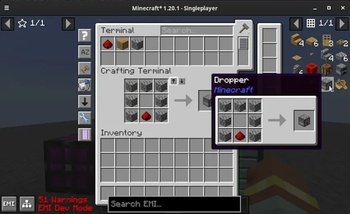
Screenshots
About this Mod
AE2 EMI Crafting Integration
It does what it says in the tin and nothing more.
As of [v:1.3.0] this mod is a full backport of the official AppEng EMI plugin.
Items inside an AppEng terminal are shown on EMI, and they can used for crafting.
All EMI functionality you'd expect from a vanilla crafting table also should work, including but not limited to:
- Shift-Clicking recipes
- Viewing which items are available on the recipe tree
- Bringing items from all available inventories, including your hotbar
- Support for tags, prioritizing the item you have the most of on the AE2 system
- [v:1.2.1] Support for Fluid Crafting
- [v:1.2.1] Support for Dragging Items from EMI
- [v:1.2.1] Support for Auto-Filling Crafting Patterns
- [v:1.2.1] Support for Auto-Filling Processing Patterns (including fluids)
- [v:1.3.0] Syncing AE2 and EMI search
- [v:1.3.0] Requesting existing crafting patterns with Ctrl + Click
- [v:1.3.0] Full Applied Energistics 2 Recipes Support
Cross-Mod Integration
[v:1.3.0] Extra Mod Integrations
The ExMI AE2 plugin gets automatically disabled if found which removes the duplicate recipes from applied energistics.
This mod has integrations for both AE2 and AE2WTLib.
Support Matrix
| Minecraft Version | AppEng2 | AE2WTLib |
|---|---|---|
| 1.20.1 (Fabric) | ✅ | ✅ |
Previous Work
This is a non-comprehensive list of mods which inspired or helped with the implementation of this mod.
leo60228's emplied - The original idea of the mod was to port emplied to the latest
version, but after a second glance this wasn't what I wanted to do. Helped understand the layout for EMI plugins and how to set up the plugin entrypoint.
Chikage0o0's emicompat - Helped figure out that you need to send a packet to AE2
for it to craft with items from the system, and the prioritization logic.
Tips
For syncing your AE2 search with EMI you can use the runtime JEI integration that EMI has.
Just add JEI (NOT REI) into your mods folder and select Sync with JEINo longer needed as of 1.3.0
on the terminal settings.
Available Versions
How to Install AE2 EMI Crafting Integration on Your Client
Install the Mod Loader Locally
Install fabric for your local Minecraft version.
Download the Matching File
Choose the AE2 EMI Crafting Integration file for fabric and Minecraft 1.20.1.
Install Mod
Place the .jar file in your local .minecraft/mods folder and restart Minecraft. No server-side installation is required.
Compatibility
Mod Loaders
Minecraft Versions
1.20.1
Server-side
✗ UnsupportedRecommended RAM
4 GB(min. 3 GB)Frequently Asked Questions
Does AE2 EMI Crafting Integration need to be installed on the Minecraft server?
No. Modrinth marks AE2 EMI Crafting Integration as unsupported on the server side. Install it only in your local Minecraft mods folder. Your server can remain unchanged unless the mod page lists an additional dependency.
Which version and loader does AE2 EMI Crafting Integration require?
Use a file for fabric, quilt and your exact Minecraft version. Supported versions include 1.20.1. Files for different loaders are not interchangeable.
AE2 EMI Crafting Integration is not working – what should I check?
First check the Minecraft version, loader version and required dependencies. Put the .jar file in your local .minecraft/mods folder and remove older duplicates. Because this mod is client-side, adding server RAM will not fix it.
Similar Mods


Minecraft Server for Your Group
AE2 EMI Crafting Integration stays on your client. Host a compatible world for your group.