
Modrinth · Fabric, Forge, NeoForge, Quilt
Animated Doors auf deinem Minecraft Server
Animated Doors läuft auf Minecraft Servern mit Fabric oder Forge oder NeoForge oder Quilt. Bestell deinen Server, stell den Loader im Panel ein und installiere die Mod mit einem Klick im Mod-Browser.
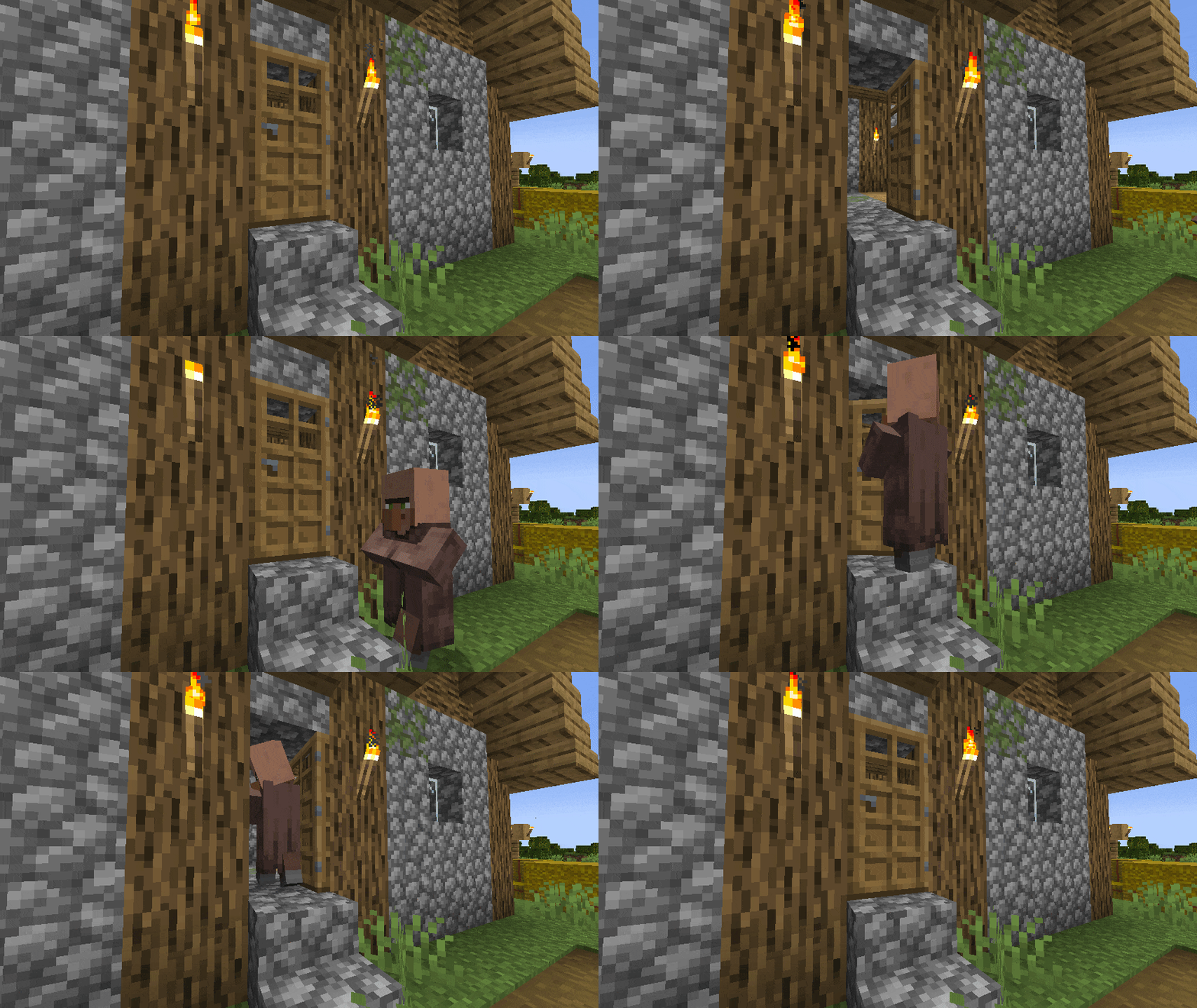
Animate & connect doors, trapdoors & fence gates opening/closing. Make your world more alive! Fully customizable.
- Downloads
- 1.2M
- Autor
- Miraculixx
- Loader
- Fabric, Forge, NeoForge, Quilt
- Minecraft
- 1.19 – 26.3
- Aktualisiert
- –
Screenshots
So sieht Animated Doors aus
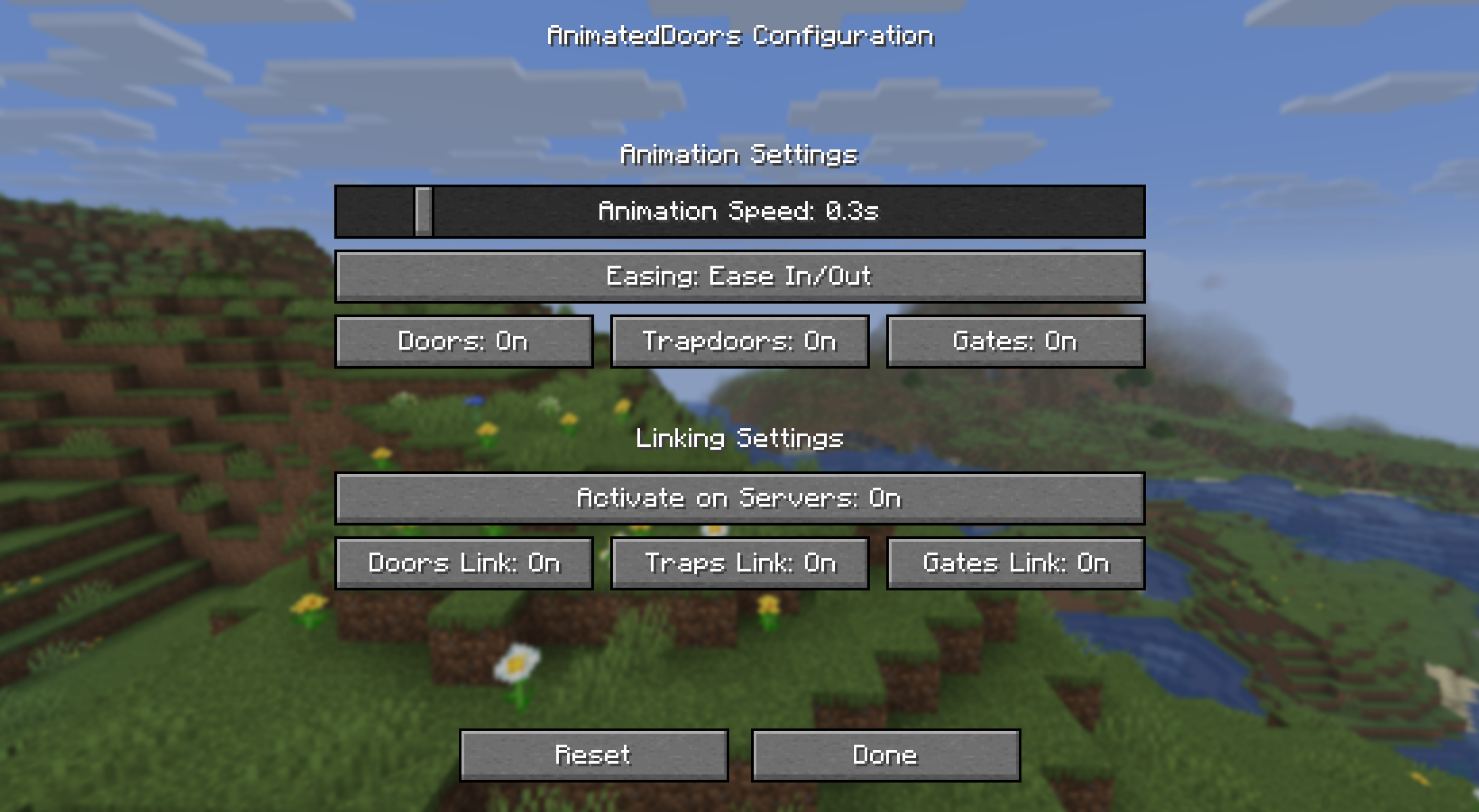
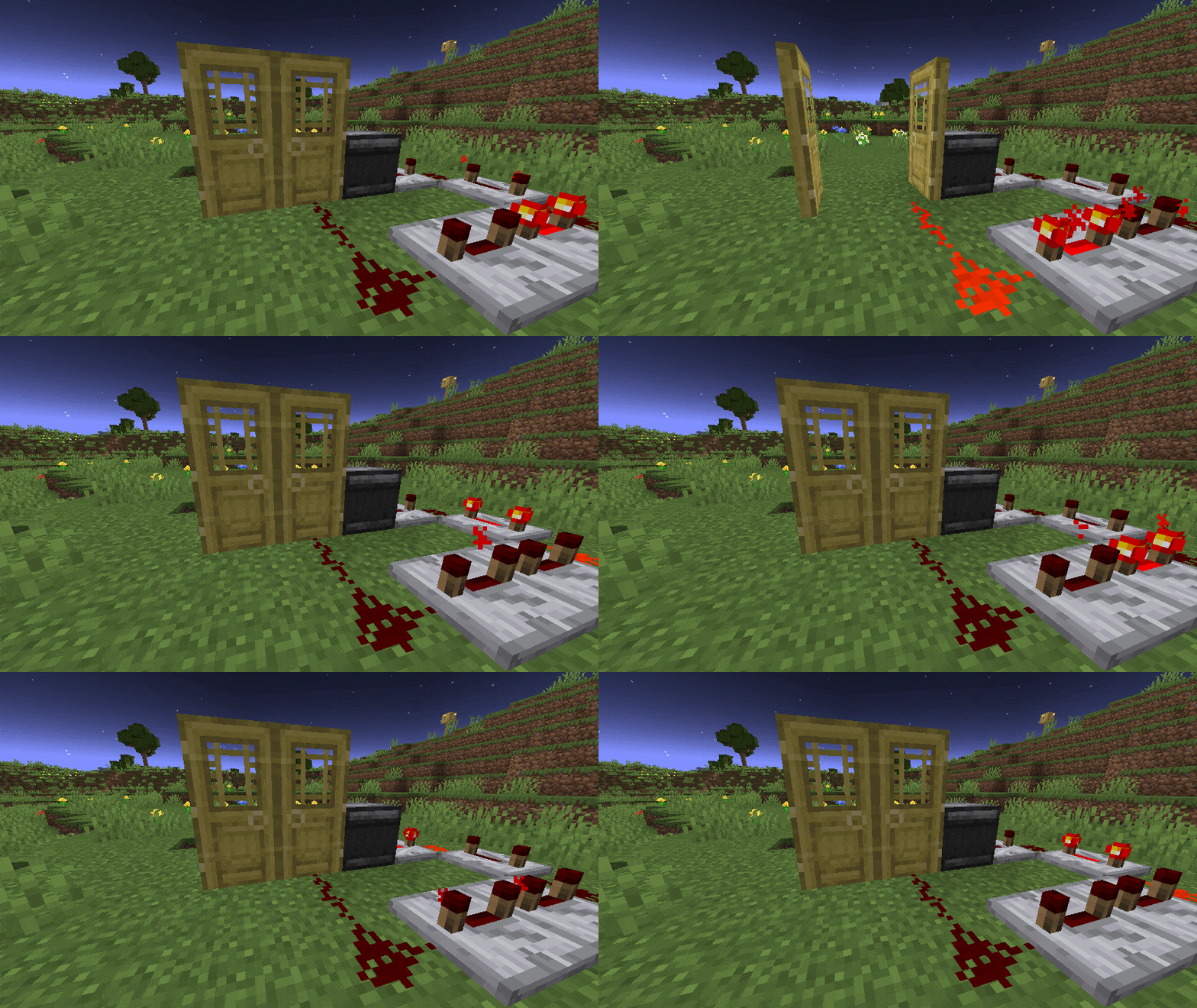
Bilder: Animated Doors auf Modrinth, vom Projektteam veröffentlicht.
Einrichtung
Animated Doors auf dem Server installieren
Server und Spieler brauchen denselben Loader und dieselbe Minecraft-Version. Sichere die Welt, bevor du Mods hinzufügst oder aktualisierst.
- 01
Konfigurieren
4 GB RAM sind vorausgewählt. Laufzeit und Add-ons wählst du selbst, bezahlt wird per Kreditkarte oder PayPal.
- 02
Loader einstellen
Stell im Panel die Serversoftware auf Fabric oder Forge oder NeoForge oder Quilt und wähl die passende Minecraft-Version, zum Beispiel 26w14a.
- 03
Mod installieren
Such im Mod-Browser nach „Animated Doors“ und installiere die Version für deinen Loader. Alternativ lädst du die .jar per SFTP in den Ordner mods. Erforderliche Abhängigkeiten stehen auf der Projektseite.
- 04
Verbinden
Animated Doors ist auf dem Client optional. Spieler verbinden sich über die Serveradresse aus dem Panel.
- Auf dem Server
- Erforderlich
- Auf dem Client
- Optional
- Loader
- Fabric, Forge, NeoForge, Quilt
- Minecraft
- 26w14a, 26.3, 26.2 +22 weitere
- Lizenz
- MIT License
Das Panel
Mods installieren, Fehler finden.
Echte Screenshots aus dem Mado Panel. Beides ist bei jedem Minecraft Server enthalten.
Mod-Browser
Modrinth und CurseForge direkt im Panel.
Der Browser filtert nach deiner Minecraft-Version. Mods installierst du mit einem Klick, ohne .jar-Dateien hochzuladen.

KI-Crash-Analyse
Wenn ein Mod crasht, liest die Analyse das Log.
Mods scheitern oft an einer falschen Loader-Version, Java-Version oder fehlenden Abhängigkeit. Die Analyse nennt eine wahrscheinliche Ursache und einen Lösungsvorschlag.

Versionen
Veröffentlichte Versionen
Nimm die Datei, die zu Loader und Minecraft-Version deines Servers passt. Server und Spieler brauchen dieselbe Version.
Animated Doors · Modrinth- AnimatedDoors - 2.0.216. September 2026Minecraft 26.3 · Fabric, NeoForge, Quilt
- AnimatedDoors - 2.0.222. Juli 2026Minecraft 26.2 · Fabric, NeoForge, Quilt
- AnimatedDoors - 2.0.13. Juni 2026Minecraft 26.1, 26.1.1, 26.1.1-rc-1, 26.1.2, 26.1.2-rc-1, 26w14a · Fabric, NeoForge, Quilt
- Animated Doors - 1.21.4 Edition25. Januar 2025Minecraft 1.21.4 · datapack
- Animated Doors - 1.20.5/6 Edition15. Juli 2024Minecraft 1.20.5, 1.20.6 · Fabric, Forge, Quilt
Originalbeschreibung des Projektautors
✨ Animated & Connected Doors*
*Actually doors, trapdoors and fence gates! But that would be too long of a name, right?
Add a fancy opening and closing animation to your doors, trapdoors & fence gates.
Two connecting doors/trapdoors/gates will open together if only one side is opened (and closed).
All animations & connections are fully client-sided.
To make connections work with redstone or similar, install this mod on your server too!
Compatible with Sodium/Iris (Shaders may show invalid shadows on doors), custom models & other mods.
View the Galery for more previews
⚙️ Configuration
The settings menu is accessible via the Mod Menu (Fabric - requires ModMenu).
| Setting | Description | Default |
|---|---|---|
| Animation Speed | Adjust the speed of the opening and closing animation. | 0.3 |
| Easing | Change how the animation is smoothed. Linear removes smoothing | Ease In/Out |
| Block Toggle | Enable/disable animation for doors, trapdoors or fence gates | All enabled |
| Server Linking | Enable/disable client-side linking on servers. This can help avoiding anti-cheat false positives | Enabled |
| Linking Toggle | Enable/disable linking for doors, trapdoors or fence gates | All enabled |
Tip: Making animations very slow can look epic on edits or story videos!
This pack also overrides vanilla door/trapdoor/gate models to make the UV consistent and avoiding jumping pixels.
Resource packs/mods that add custom models may reintroduce those UV inconsistencies, you can ask them to fix that too! (examples)
DataPack Version
There are also DataPack versions available for vanilla environments (all <2.0.0).
Those are lite versions and only support vanilla doors and require this ResourcePack to work!
Note: The DataPack uses entities to fake the animation to players, this is not intended for large scale use!
DataPack Troubleshooting
This datapack was originally started by Scommander and discontinued
I picked it up and optimized a few things and also ported it into the newer versions to support all doors again.
If you want to use this pack in your adventure map, please credit it by adding the modrinth link and name somewhere visible!
Q: My doors are invisible!
A: On first installation, all previous placed doors needs to update once before they are visible. Just look at them once.
Q: There are floating iron ingots now! / My doors are not animated!
A: If you see floating iron ingots at doors or your doors simply are not animated you need to activate the resource pack.
Q: How do i uninstall Animated Doors?
A: To uninstall Animated Doors you need to enter /function anim-doors:uninstall in every region where doors exist or simply remove the datapack and enter /kill @e[tag=_betdor_marker] everytime you find a region that was not loaded yet.
Q: How do i add custom/modded doors?
A: While you could edit the datapack to add custom doors, it's not advised and very tedious. Please use the mod version instead
👀 In search of the cake™

Animated Doors Server crasht beim Start – was tun?
Häufige Ursachen: Loader- oder Minecraft-Version passen nicht zur Mod-Datei, eine Abhängigkeit fehlt oder der RAM reicht nicht. Such im Log (latest.log) nach „OutOfMemoryError“, „Mixin“ oder fehlenden Mods. Bei Mado wertet die KI-Crash-Analyse das Log aus und schlägt eine Ursache vor. Loader und Version änderst du im Panel.
Mit welchem Loader läuft Animated Doors?
Laut Modrinth unterstützt Animated Doors Fabric, Forge, NeoForge, Quilt für Minecraft 26w14a, 26.3, 26.2. Forge- und Fabric-Dateien sind nicht untereinander austauschbar: Wähl einen Loader für Server und Clients.
Wie viel RAM braucht ein Server mit Animated Doors?
Als Orientierung 3–4 GB für einen Server mit dieser Mod. Das ist eine Schätzung, keine gemessene Mindestanforderung. Weitere Mods, viele Spieler und große Sichtweiten brauchen mehr. Ob eine Mod die Tick-Zeit belastet, siehst du mit dem spark-Profiler.
Ähnliche Mods
Beliebte Mods aus derselben Kategorie
 Nur Client

Iris Shaders
von coderbot
A modern shader pack loader for Minecraft intended to be compatible with existing OptiFine shader packs
 Nur Client

[ETF] Entity Texture Features
von Traben
Emissive, Random & Custom texture support for entities in resourcepacks just like Optifine but for Fabric
 Nur Client

[EMF] Entity Model Features
von Traben
EMF is an, OptiFine format, Custom Entity Model replacement mod available for Fabric and Forge.
 Nur Client

Not Enough Animations
von tr7zw
Bringing first-person animations to the third-person
Bereit für deinen Server mit Animated Doors?
4 GB RAM ab 8,00 € im Monat. 35 % auf den 1. Monat mit MADO35.