
Bad Horse Fix
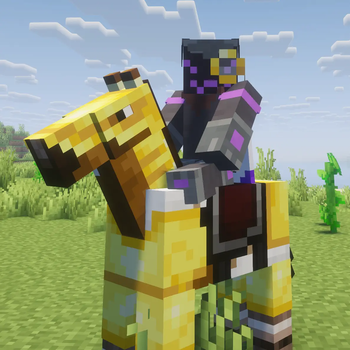
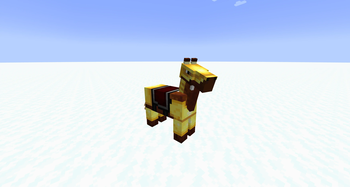
Fixes horse markings appearing above horse armor when using Iris or Oculus.
Screenshots
Über diese Mod

Bad Horse Fix


NOTE: As of Minecraft 1.21.2 this bug appears to be fixed! The latest version of the mod (4.0.0) should be compatible with EVERY version of Iris/Oculus that includes the bug.
About
This mod fixes horse markings appearing above horse armor when using Iris or Oculus shaders mods.
Basically, this mod checks everything being rendered to see if it contains "horse", "armor", or "markings" and if it finds anything, it forces it to be rearranged. There doesn't seem to be any noticeable performance hit.
The mod now (as of 4.0.0) looks for just vanilla horse armor and sends it to the end of the Iris rendering batch, so that it's rendered last, above markings. This also means less conflicts, and better performance (though performance never seemed to be an issue)
Bugs
If you run into any glitches, bugs, or problems of any kind, please report them on the GitHub Issues page for this mod. If issues go unreported, they also go unfixed!
Modpacks
You can include this mod in modpacks that are hosted on Modrinth, CurseForge, or that respect this mod's license (LGPL-3.0).
Verfügbare Versionen
Bad Horse Fix auf deinem Client installieren
Mod-Loader lokal installieren
Installiere fabric für deine lokale Minecraft-Version.
Passende Datei herunterladen
Wähle die Bad Horse Fix-Datei für fabric und Minecraft 1.21.1.
Mod installieren
Lege die .jar-Datei in deinem lokalen .minecraft/mods-Ordner ab und starte Minecraft neu. Eine Installation auf dem Server ist nicht nötig.
Kompatibilität
Mod-Loader
Minecraft-Versionen
1.21.1, 1.21, 1.20.6 (+17 weitere)
Server-seitig
✗ Nicht unterstütztEmpfohlener RAM
4 GB(min. 3 GB)Häufige Fragen
Muss Bad Horse Fix auf dem Minecraft Server installiert werden?
Nein. Modrinth kennzeichnet Bad Horse Fix serverseitig als nicht unterstützt. Installiere die Mod nur im lokalen Minecraft-Mods-Ordner. Dein Server kann unverändert bleiben, sofern die Mod-Seite keine zusätzliche Abhängigkeit nennt.
Welche Version und welchen Loader braucht Bad Horse Fix?
Nutze eine Datei für fabric, forge, neoforge, quilt und exakt deine Minecraft-Version. Unterstützte Versionen sind unter anderem 1.21.1, 1.21, 1.20.6. Loader-Dateien sind nicht untereinander austauschbar.
Bad Horse Fix funktioniert nicht – was kann ich prüfen?
Prüfe zuerst Minecraft-Version, Loader-Version und erforderliche Abhängigkeiten. Lege die .jar-Datei im lokalen .minecraft/mods-Ordner ab und entferne ältere Duplikate. Da die Mod clientseitig ist, löst mehr Server-RAM dieses Problem nicht.
Ähnliche Mods

![[ETF] Entity Texture Features](https://cdn.modrinth.com/data/BVzZfTc1/af683d206d50b05258d865b0d6e4aa2f2cee12f2_96.webp)
![[EMF] Entity Model Features](https://cdn.modrinth.com/data/4I1XuqiY/6e5bbd0d06b1741bfdab6c0cfab6de8fdaf0064c_96.webp)



Minecraft Server für deine Gruppe
Bad Horse Fix bleibt auf deinem Client. Hoste dazu eine kompatible Welt für deine Mitspieler.
Details
- Lizenz
- GNU Lesser General Public License v3.0 only
- Server-seitig
- Nicht unterstützt