
Banner Flags
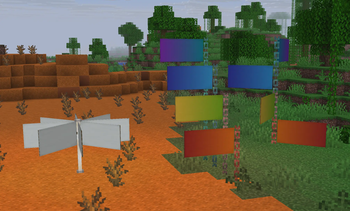
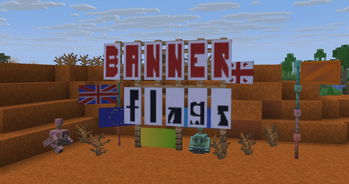
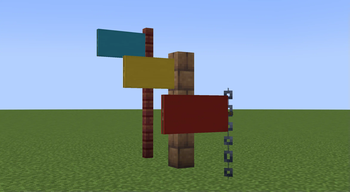
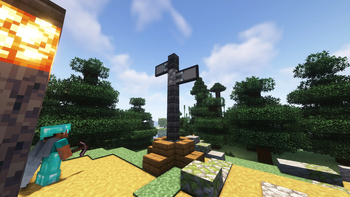
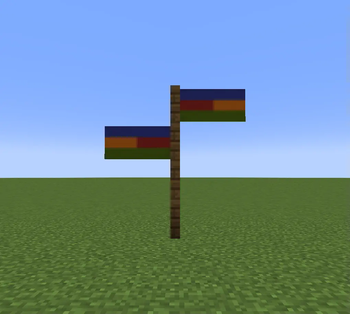
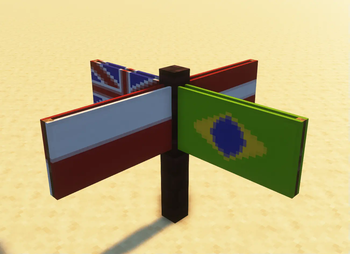
Place banners horizontally as flags on fences, walls and other pole-like blocks!
Screenshots
Über diese Mod
❗I RECOMMEND USING THE DATAPACK VERSION FOR THE BEST EXPERIENCE
My other decorative datapacks:
🛏️ Banner Bedsheets: https://modrinth.com/datapack/banner-bedsheets
💤 Gardener's Dream: https://modrinth.com/datapack/gardeners-dream
🔨 Air Gap Fix: https://modrinth.com/datapack/air-gap-fix
Banner Flags 🏳️
Ever since banners were added I've wanted to place them horizontally like flags. Now I have made it possible using this data pack!
🚩FEATURES:
- Place flag in 8 directions!
- Uses the exact banner design you placed
- Break the block it is placed on to remove it and get your banner back
- Place multiple on the same block!
- Works in multiplayer & survival friendly!
- Can make flags bigger, rotate, flip them and even make them wave in the wind!
- Detailed feature explanations in advancements page.
⛳SUPPORTED BLOCKS:
- fences
- walls
- glass panes
- iron & copper bars
- iron & copper chains
- lightning rods
- bamboo stem
- end rod
🤔HOW TO USE:
Crouch + click a banner on one of the supported blocks to place your banner as a flag! Break the block it is placed on to remove it.
Crouch near the flag pole while holding a diamond to make your flag bigger! You get your diamond back when breaking the flag.
Crouch near the flag pole while holding a stick to flip the flag! Hold the stick in your offhand to rotate the flag.
Crouch near the flag pole while holding a feather to make the flag wave!
❗FOR ADMINS
If you have land protection on your server use this command:
'/function bannerflags:delay_on'
This will add a small delay when placing banners so players can't place them in protected areas.
Performance is optimized & tested, it wont cause you any issues.
❌UNINSTALLATION:
If you don't end up liking the pack here are the ways you can remove the flags:
- manually breaking each block that a flag has been placed on so you get the banners back.
or - writing /function bannerflags:removeall (you wont get your banners back though)
❕SUMMARY:
This datapack greatly expands the ways you can use banners in Minecraft, such as for decoration, storytelling & direction pointers.
If you have any questions, issues or suggestions you can DM me on Discord @Gurkis
Verfügbare Versionen
Banner Flags auf dem Server installieren
Server bestellen
Bestelle einen Minecraft Java Server mit mindestens 3 GB RAM (4 GB empfohlen).
datapack Loader setzen
Wähle im Panel unter "Egg" den datapack-Loader und die passende Minecraft-Version (26.3).
Mod installieren
Öffne den Mod-Browser im Dashboard und suche nach "Banner Flags". Klicke "Installieren" – fertig! Alternativ: Lade die .jar via SFTP in den /mods Ordner.
Kompatibilität
Mod-Loader
Minecraft-Versionen
26.3, 26.2, 26.1.2 (+56 weitere)
Server-seitig
✓ ErforderlichEmpfohlener RAM
4 GB(min. 3 GB)Häufige Fragen
Banner Flags Server crasht beim Start – was tun?
Häufigste Ursache: falsche datapack-Version oder zu wenig RAM. Prüfe im Server-Log (latest.log), ob ein "OutOfMemoryError" oder "Mixin"-Fehler auftritt. Bei Mado Hosting: Stelle sicher, dass mindestens 3 GB RAM zugewiesen sind und der Loader zur Mod-Version passt (26.3). Über das Panel kannst du den Loader mit einem Klick wechseln.
Ist Banner Flags mit datapack und fabric und forge und neoforge und quilt kompatibel?
Banner Flags unterstützt offiziell datapack, fabric, forge, neoforge, quilt für Minecraft 26.3, 26.2, 26.1.2. Achtung: Forge- und Fabric-Mods sind NICHT untereinander kompatibel – wähle einen Loader und bleibe dabei. Im Mado Dashboard werden inkompatible Loader-Kombinationen automatisch erkannt.
Server laggt mit Banner Flags – wie optimiere ich die Performance?
Empfohlener RAM: 4 GB (+1 GB pro 8 Spieler). Prüfe mit /spark profiler, ob Banner Flags den meisten Tick-Time verbraucht. Häufige Fixes: Server-View-Distance auf 8-10 reduzieren, bei Forge "performant" oder "starlight" als Zusatz-Mod installieren. Bei Mado Hosting läuft dein Server auf NVMe-SSDs mit dedizierten CPU-Kernen für minimale Latenz.
Ähnliche Mods

![[ETF] Entity Texture Features](https://cdn.modrinth.com/data/BVzZfTc1/af683d206d50b05258d865b0d6e4aa2f2cee12f2_96.webp)
![[EMF] Entity Model Features](https://cdn.modrinth.com/data/4I1XuqiY/6e5bbd0d06b1741bfdab6c0cfab6de8fdaf0064c_96.webp)



Modded Server mieten
Installiere Banner Flags mit nur einem Klick auf deinem Server.