
Banner Flags
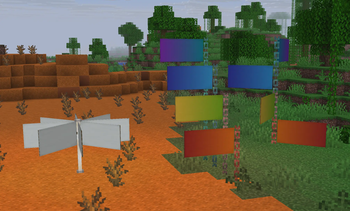
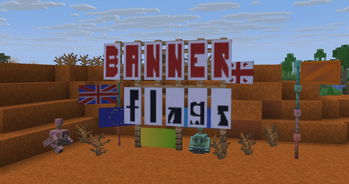
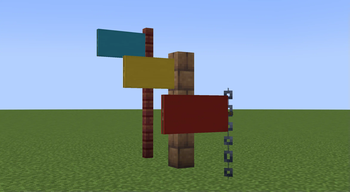
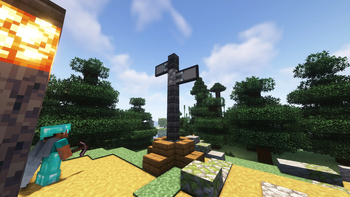
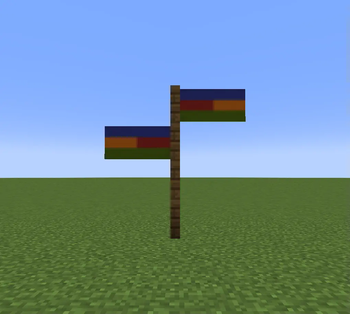
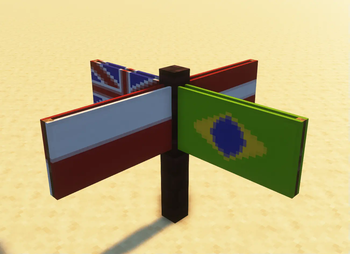
Place banners horizontally as flags on fences, walls and other pole-like blocks!
Screenshots
About this Mod
❗I RECOMMEND USING THE DATAPACK VERSION FOR THE BEST EXPERIENCE
My other decorative datapacks:
🛏️ Banner Bedsheets: https://modrinth.com/datapack/banner-bedsheets
💤 Gardener's Dream: https://modrinth.com/datapack/gardeners-dream
🔨 Air Gap Fix: https://modrinth.com/datapack/air-gap-fix
Banner Flags 🏳️
Ever since banners were added I've wanted to place them horizontally like flags. Now I have made it possible using this data pack!
🚩FEATURES:
- Place flag in 8 directions!
- Uses the exact banner design you placed
- Break the block it is placed on to remove it and get your banner back
- Place multiple on the same block!
- Works in multiplayer & survival friendly!
- Can make flags bigger, rotate, flip them and even make them wave in the wind!
- Detailed feature explanations in advancements page.
⛳SUPPORTED BLOCKS:
- fences
- walls
- glass panes
- iron & copper bars
- iron & copper chains
- lightning rods
- bamboo stem
- end rod
🤔HOW TO USE:
Crouch + click a banner on one of the supported blocks to place your banner as a flag! Break the block it is placed on to remove it.
Crouch near the flag pole while holding a diamond to make your flag bigger! You get your diamond back when breaking the flag.
Crouch near the flag pole while holding a stick to flip the flag! Hold the stick in your offhand to rotate the flag.
Crouch near the flag pole while holding a feather to make the flag wave!
❗FOR ADMINS
If you have land protection on your server use this command:
'/function bannerflags:delay_on'
This will add a small delay when placing banners so players can't place them in protected areas.
Performance is optimized & tested, it wont cause you any issues.
❌UNINSTALLATION:
If you don't end up liking the pack here are the ways you can remove the flags:
- manually breaking each block that a flag has been placed on so you get the banners back.
or - writing /function bannerflags:removeall (you wont get your banners back though)
❕SUMMARY:
This datapack greatly expands the ways you can use banners in Minecraft, such as for decoration, storytelling & direction pointers.
If you have any questions, issues or suggestions you can DM me on Discord @Gurkis
Available Versions
How to Install Banner Flags on Your Server
Order Server
Order a Minecraft Java server with at least 3 GB RAM (4 GB recommended).
Set datapack Loader
In the panel under "Egg", select the datapack loader and matching Minecraft version (26.3).
Install Mod
Open the mod browser in the dashboard and search for "Banner Flags". Click "Install" – done! Alternatively, upload the .jar via SFTP to the /mods folder.
Compatibility
Mod Loaders
Minecraft Versions
26.3, 26.2, 26.1.2 (+56 more)
Server-side
✓ RequiredRecommended RAM
4 GB(min. 3 GB)Frequently Asked Questions
Banner Flags server crashes on startup – what to do?
Most common cause: wrong datapack version or insufficient RAM. Check the server log (latest.log) for "OutOfMemoryError" or "Mixin" errors. With Mado Hosting: ensure at least 3 GB RAM is allocated and the loader matches the mod version (26.3). You can switch loaders with one click in the panel.
Is Banner Flags compatible with datapack and fabric and forge and neoforge and quilt?
Banner Flags officially supports datapack, fabric, forge, neoforge, quilt for Minecraft 26.3, 26.2, 26.1.2. Note: Forge and Fabric mods are NOT cross-compatible – pick one loader and stick with it. The Mado dashboard automatically detects incompatible loader combinations.
Server lagging with Banner Flags – how to optimize performance?
Recommended RAM: 4 GB (per 8 players). Use /spark profiler to check if Banner Flags consumes the most tick time. Common fixes: reduce server view-distance to 8-10, install "performant" or "starlight" as supplementary mods on Forge. With Mado Hosting, your server runs on NVMe SSDs with dedicated CPU cores for minimal latency.
Similar Mods

![[ETF] Entity Texture Features](https://cdn.modrinth.com/data/BVzZfTc1/af683d206d50b05258d865b0d6e4aa2f2cee12f2_96.webp)
![[EMF] Entity Model Features](https://cdn.modrinth.com/data/4I1XuqiY/6e5bbd0d06b1741bfdab6c0cfab6de8fdaf0064c_96.webp)



Rent Modded Server
Install Banner Flags with just one click on your server.