
Beautify!
Adds lots of vanilla-styled ways to spice up your builds.
Screenshots
![Example Image1 [V.1.4.0]](https://cdn.modrinth.com/data/9BPuv4vL/images/e888c0590c9d840a94b50938a7c3e202b3d737cf_350.webp)
![Example Image2 [V.1.4.0]](https://cdn.modrinth.com/data/9BPuv4vL/images/f8dbdad558a8a481cdbbb2fca1a24d6f4a7174ba_350.webp)

Über diese Mod


What is Beautify?
Beautify is a client and serverside deco-mod that adds lots of vanilla-styled ways to spice up your builds with custom models.
My goal with this mod is to increase the detail in builds without killing the need for imagination and creativity.
Additionally, most blocks include new features. For example, potted plants (such as 1 tall flowers) can be duplicated using bone meal.
Versions [Forge]: 1.18.2 | 1.19 | 1.19.1 | 1.19.2 | 1.20.1
!
Feature summary:
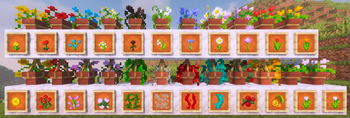
- Hanging Pots with custom flower models and a wide variety of supported plants
- Book Stacks with different models that can power an enchantment table
- Blinds to add details to your windows or create new types of entrances
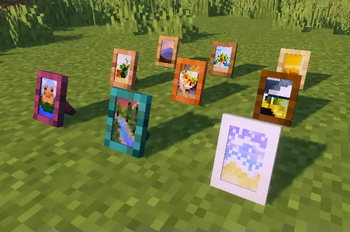
- Picture Frames with all 16x16 Vanilla Painting motives and more
- Rope that Hanging Pots and other Blocks can be attached to and Players can climb
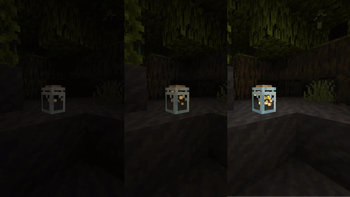
- New forms of light sources: Bamboo Lantern, Candelabras/ Chandeliers, Glowessence Jar, Light Bulbs
- Lattices for putting plants on walls and ceilings
- more coming soon
For more info on the blocks and their uses, please visit the wiki!
I'm thankful for any suggestions, feedback etc. and will be working on this in the future!
Verfügbare Versionen
Beautify! auf dem Server installieren
Server bestellen
Bestelle einen Minecraft Java Server mit mindestens 3 GB RAM (4 GB empfohlen).
forge Loader setzen
Wähle im Panel unter "Egg" den forge-Loader und die passende Minecraft-Version (1.21.1).
Mod installieren
Öffne den Mod-Browser im Dashboard und suche nach "Beautify!". Klicke "Installieren" – fertig! Alternativ: Lade die .jar via SFTP in den /mods Ordner.
Kompatibilität
Mod-Loader
Minecraft-Versionen
1.21.1, 1.21, 1.20.2 (+5 weitere)
Server-seitig
✓ ErforderlichEmpfohlener RAM
4 GB(min. 3 GB)Häufige Fragen
Beautify! Server crasht beim Start – was tun?
Häufigste Ursache: falsche forge-Version oder zu wenig RAM. Prüfe im Server-Log (latest.log), ob ein "OutOfMemoryError" oder "Mixin"-Fehler auftritt. Bei Mado Hosting: Stelle sicher, dass mindestens 3 GB RAM zugewiesen sind und der Loader zur Mod-Version passt (1.21.1). Über das Panel kannst du den Loader mit einem Klick wechseln.
Ist Beautify! mit forge und neoforge kompatibel?
Beautify! unterstützt offiziell forge, neoforge für Minecraft 1.21.1, 1.21, 1.20.2. Im Mado Dashboard werden inkompatible Loader-Kombinationen automatisch erkannt.
Server laggt mit Beautify! – wie optimiere ich die Performance?
Empfohlener RAM: 4 GB (+1 GB pro 8 Spieler). Prüfe mit /spark profiler, ob Beautify! den meisten Tick-Time verbraucht. Häufige Fixes: Server-View-Distance auf 8-10 reduzieren, bei Forge "performant" oder "starlight" als Zusatz-Mod installieren. Bei Mado Hosting läuft dein Server auf NVMe-SSDs mit dedizierten CPU-Kernen für minimale Latenz.
Ähnliche Mods

![[ETF] Entity Texture Features](https://cdn.modrinth.com/data/BVzZfTc1/af683d206d50b05258d865b0d6e4aa2f2cee12f2_96.webp)
![[EMF] Entity Model Features](https://cdn.modrinth.com/data/4I1XuqiY/6e5bbd0d06b1741bfdab6c0cfab6de8fdaf0064c_96.webp)



Modded Server mieten
Installiere Beautify! mit nur einem Klick auf deinem Server.