
Better Clouds
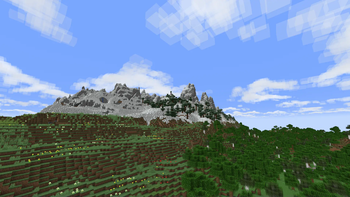
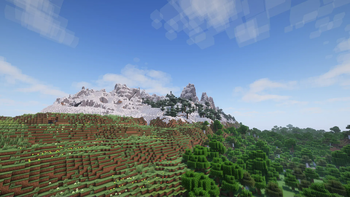
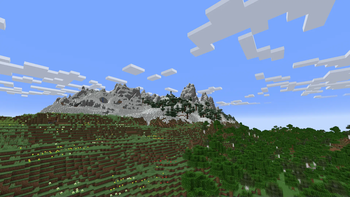
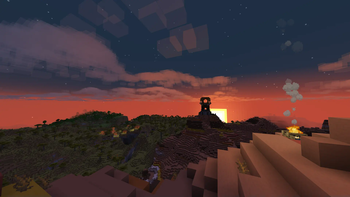
Beautiful clouds in touch with the vanilla style
Screenshots
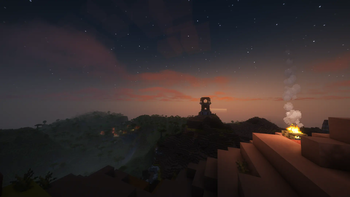
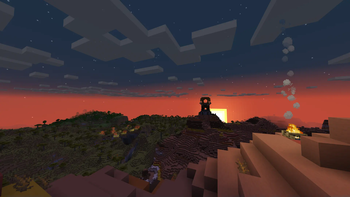
Über diese Mod

"Beautiful clouds in touch with the vanilla style"




Please, feel free to report any issues
hi everyone, i'm the new maintainer now. the mod is no longer discontinued. cheers
-orangishcat
Better Clouds adds volumetric clouds to Minecraft, in a simple, blocky style that matches the rest of the game.
Often, shaders and resource packs add hyper-realistic clouds to the game, which look good but don't match with
Minecraft's style. This mod aims to fix that, adding volumetric, multi-layered clouds that don't clash with the style of
Minecraft.
Features
- Adds simple volumetric clouds that doesn't clash with the style of the rest of the game.
- Cloud appearance is highly customizable; practically every option can be changed. Go wild!
- Built-in shader presets to make the clouds look good. Supports Complementary, BSL, Chocapic, Kappa, Rethinking Voxels,
and Solas. - Cloud generation is customizable via resource packs.
- Built-in compatibility with visual mods, such as Iris, Serene Seasons, and more!
- Performs just as well or potentially even better than vanilla cloud rendering.
- Available for Fabric and NeoForge.
Download
Download Better Clouds on Modrinth
Contributions
Thanks to everyone who has contributed to the project!
See the full list here.
Wiki
The wiki documents every setting, explains how to create presets, and includes a list of compatible shaders.
Read it here.
License
This software is licensed under MPL 2.0.
The assets, except for the logo, are under CC BY-SA.
Restrictions on Name and Logo use
I do not grant permission for the use of the name "Better Clouds" or its logo for publication of derivative works.
Derivative works must have a clearly distinct name and logo to avoid confusion with the official "Better Clouds".
Examples
- "Better Clouds Forge", is too similar and can be confused as an official publication for Forge.
- "Better Clouds Reforged", this is fine, as "Reforged" is a common term for unofficial ports to Forge.
- "Better Clouds (Unofficial)", if this is where your imagination ends, this is also fine.
Verfügbare Versionen
Better Clouds auf deinem Client installieren
Mod-Loader lokal installieren
Installiere fabric für deine lokale Minecraft-Version.
Passende Datei herunterladen
Wähle die Better Clouds-Datei für fabric und Minecraft 26.3.
Mod installieren
Lege die .jar-Datei in deinem lokalen .minecraft/mods-Ordner ab und starte Minecraft neu. Eine Installation auf dem Server ist nicht nötig.
Kompatibilität
Mod-Loader
Minecraft-Versionen
26.3, 26.2, 26.1.2 (+26 weitere)
Server-seitig
✗ Nicht unterstütztEmpfohlener RAM
4 GB(min. 3 GB)Häufige Fragen
Muss Better Clouds auf dem Minecraft Server installiert werden?
Nein. Modrinth kennzeichnet Better Clouds serverseitig als nicht unterstützt. Installiere die Mod nur im lokalen Minecraft-Mods-Ordner. Dein Server kann unverändert bleiben, sofern die Mod-Seite keine zusätzliche Abhängigkeit nennt.
Welche Version und welchen Loader braucht Better Clouds?
Nutze eine Datei für fabric, forge, neoforge und exakt deine Minecraft-Version. Unterstützte Versionen sind unter anderem 26.3, 26.2, 26.1.2. Loader-Dateien sind nicht untereinander austauschbar.
Better Clouds funktioniert nicht – was kann ich prüfen?
Prüfe zuerst Minecraft-Version, Loader-Version und erforderliche Abhängigkeiten. Lege die .jar-Datei im lokalen .minecraft/mods-Ordner ab und entferne ältere Duplikate. Da die Mod clientseitig ist, löst mehr Server-RAM dieses Problem nicht.
Ähnliche Mods

![[ETF] Entity Texture Features](https://cdn.modrinth.com/data/BVzZfTc1/af683d206d50b05258d865b0d6e4aa2f2cee12f2_96.webp)
![[EMF] Entity Model Features](https://cdn.modrinth.com/data/4I1XuqiY/6e5bbd0d06b1741bfdab6c0cfab6de8fdaf0064c_96.webp)



Minecraft Server für deine Gruppe
Better Clouds bleibt auf deinem Client. Hoste dazu eine kompatible Welt für deine Mitspieler.