
Better Clouds
Beautiful clouds in touch with the vanilla style
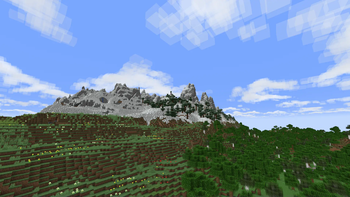
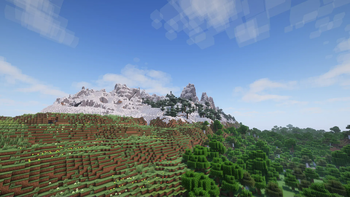
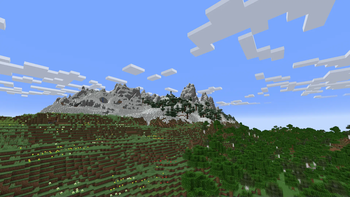
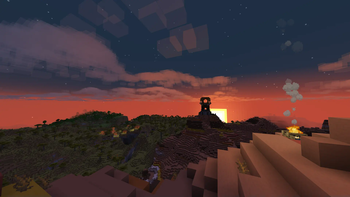
Screenshots
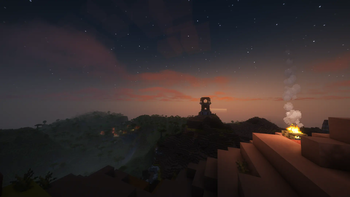
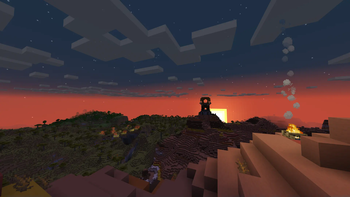
About this Mod

"Beautiful clouds in touch with the vanilla style"




Please, feel free to report any issues
hi everyone, i'm the new maintainer now. the mod is no longer discontinued. cheers
-orangishcat
Better Clouds adds volumetric clouds to Minecraft, in a simple, blocky style that matches the rest of the game.
Often, shaders and resource packs add hyper-realistic clouds to the game, which look good but don't match with
Minecraft's style. This mod aims to fix that, adding volumetric, multi-layered clouds that don't clash with the style of
Minecraft.
Features
- Adds simple volumetric clouds that doesn't clash with the style of the rest of the game.
- Cloud appearance is highly customizable; practically every option can be changed. Go wild!
- Built-in shader presets to make the clouds look good. Supports Complementary, BSL, Chocapic, Kappa, Rethinking Voxels,
and Solas. - Cloud generation is customizable via resource packs.
- Built-in compatibility with visual mods, such as Iris, Serene Seasons, and more!
- Performs just as well or potentially even better than vanilla cloud rendering.
- Available for Fabric and NeoForge.
Download
Download Better Clouds on Modrinth
Contributions
Thanks to everyone who has contributed to the project!
See the full list here.
Wiki
The wiki documents every setting, explains how to create presets, and includes a list of compatible shaders.
Read it here.
License
This software is licensed under MPL 2.0.
The assets, except for the logo, are under CC BY-SA.
Restrictions on Name and Logo use
I do not grant permission for the use of the name "Better Clouds" or its logo for publication of derivative works.
Derivative works must have a clearly distinct name and logo to avoid confusion with the official "Better Clouds".
Examples
- "Better Clouds Forge", is too similar and can be confused as an official publication for Forge.
- "Better Clouds Reforged", this is fine, as "Reforged" is a common term for unofficial ports to Forge.
- "Better Clouds (Unofficial)", if this is where your imagination ends, this is also fine.
Available Versions
How to Install Better Clouds on Your Client
Install the Mod Loader Locally
Install fabric for your local Minecraft version.
Download the Matching File
Choose the Better Clouds file for fabric and Minecraft 26.3.
Install Mod
Place the .jar file in your local .minecraft/mods folder and restart Minecraft. No server-side installation is required.
Compatibility
Mod Loaders
Minecraft Versions
26.3, 26.2, 26.1.2 (+26 more)
Server-side
✗ UnsupportedRecommended RAM
4 GB(min. 3 GB)Frequently Asked Questions
Does Better Clouds need to be installed on the Minecraft server?
No. Modrinth marks Better Clouds as unsupported on the server side. Install it only in your local Minecraft mods folder. Your server can remain unchanged unless the mod page lists an additional dependency.
Which version and loader does Better Clouds require?
Use a file for fabric, forge, neoforge and your exact Minecraft version. Supported versions include 26.3, 26.2, 26.1.2. Files for different loaders are not interchangeable.
Better Clouds is not working – what should I check?
First check the Minecraft version, loader version and required dependencies. Put the .jar file in your local .minecraft/mods folder and remove older duplicates. Because this mod is client-side, adding server RAM will not fix it.
Similar Mods

![[ETF] Entity Texture Features](https://cdn.modrinth.com/data/BVzZfTc1/af683d206d50b05258d865b0d6e4aa2f2cee12f2_96.webp)
![[EMF] Entity Model Features](https://cdn.modrinth.com/data/4I1XuqiY/6e5bbd0d06b1741bfdab6c0cfab6de8fdaf0064c_96.webp)



Minecraft Server for Your Group
Better Clouds stays on your client. Host a compatible world for your group.