
Caelum
Realistic stars and Keplerian orbital mechanics of the Sun, Earth, Moon and the planets. Now with eclipses and stuff
Screenshots

Über diese Mod
Caelum

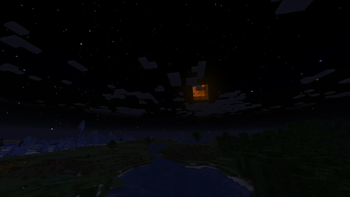
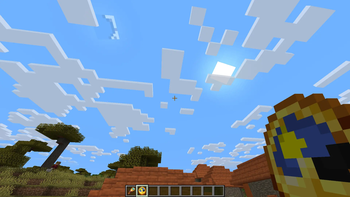
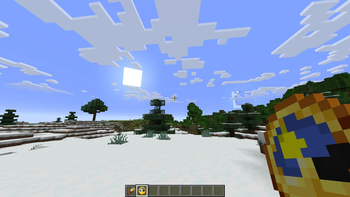
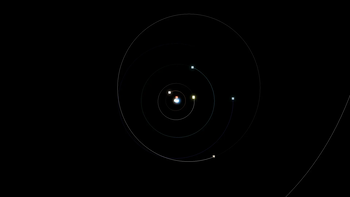
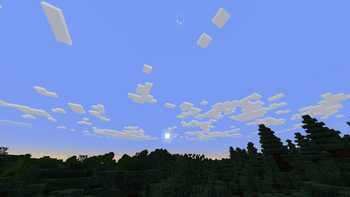
Caelum is a Minecraft mod, that aims to make the Minecraft sky more realistic by calculating the positions of the major solar system objects (namely the Earth and Moon) based on their Keplerian** orbital elements for the given date.
Features
- choose whether to use the Vanilla or custom stars (or whether to render stars at all)
- add or even replace the custom stars using resource packs
- add and edit celestial objects like moons and planets
- enable/disable star color (does not apply to Vanilla stars)
- change star size (does not apply to Vanilla stars)
- change the speed of passage of time (i.e. how long the day and night are)
- have a different length of the day depending on your latitude (the Z coordinate) - resulting in polar days and nights near polar regions.
- experience solar and lunar eclipses and planet transits
The positions of the planets correspond to their positions IRL within some tolerance, thus resulting in solar/lunar eclipses on the same* dates as they would IRL.
Compatibility
Keep in mind that the shader support is partial at best. While the positions of the Sun and the Moon and their shadows should be right for a large portion of shaders, stuff like custom stars or planets are almost certainly not going to work, as the shaders do their own sky rendering.
The 3.0.0.0+ versions of the mod are client-side with optional server-side support - ideally, you want the mod both on the client side and the server side, so stuff like mob spawning is affected, though it is also possible to join with the mod servers without the mod. If the mod is present on the server side, all clients must have the mod.
*Vanilla Minecraft Sun and Moon are several times larger than they are IRL, resulting in more eclipses. Their size can be made more realistic in the config.
** Keplerian orbits apply to the 3.0.0.0+ versions of the mod, the previous versions use simpler circular orbit approximation for the Moon.
Verfügbare Versionen
Caelum auf deinem Client installieren
Mod-Loader lokal installieren
Installiere forge für deine lokale Minecraft-Version.
Passende Datei herunterladen
Wähle die Caelum-Datei für forge und Minecraft 1.21.1.
Mod installieren
Lege die .jar-Datei in deinem lokalen .minecraft/mods-Ordner ab und starte Minecraft neu. Eine Installation auf dem Server ist nicht nötig.
Kompatibilität
Mod-Loader
Minecraft-Versionen
1.21.1, 1.20.1
Server-seitig
✗ Nicht unterstütztEmpfohlener RAM
4 GB(min. 3 GB)Häufige Fragen
Muss Caelum auf dem Minecraft Server installiert werden?
Nein. Modrinth kennzeichnet Caelum serverseitig als nicht unterstützt. Installiere die Mod nur im lokalen Minecraft-Mods-Ordner. Dein Server kann unverändert bleiben, sofern die Mod-Seite keine zusätzliche Abhängigkeit nennt.
Welche Version und welchen Loader braucht Caelum?
Nutze eine Datei für forge, neoforge und exakt deine Minecraft-Version. Unterstützte Versionen sind unter anderem 1.21.1, 1.20.1. Loader-Dateien sind nicht untereinander austauschbar.
Caelum funktioniert nicht – was kann ich prüfen?
Prüfe zuerst Minecraft-Version, Loader-Version und erforderliche Abhängigkeiten. Lege die .jar-Datei im lokalen .minecraft/mods-Ordner ab und entferne ältere Duplikate. Da die Mod clientseitig ist, löst mehr Server-RAM dieses Problem nicht.
Ähnliche Mods

![[ETF] Entity Texture Features](https://cdn.modrinth.com/data/BVzZfTc1/af683d206d50b05258d865b0d6e4aa2f2cee12f2_96.webp)
![[EMF] Entity Model Features](https://cdn.modrinth.com/data/4I1XuqiY/6e5bbd0d06b1741bfdab6c0cfab6de8fdaf0064c_96.webp)



Minecraft Server für deine Gruppe
Caelum bleibt auf deinem Client. Hoste dazu eine kompatible Welt für deine Mitspieler.